# Bienvenidos a Tupay API

Aquí encontrarás información valiosa en cuanto al proceso de integración de la API de Tupay.

## Proceso de Onboarding

### 1. Sign Up. <a href="#sign-up" id="sign-up"></a>

Llena el [**Signup form**](https://merchants.tupayonline.com/signup) para registrarte en Tupay.\
Entraremos en contacto contigo, y aprobaremos tu petición de registro.

### 2. Creación de Cuenta. <a href="#account-creation" id="account-creation"></a>

En cuanto aceptemos tu petición para empezar a procesar con nosotros, recibirás un email para configurar tu cuenta en nuestro [Panel Tupay STG](https://merchants-stg.tupayonline.com/login). Procede a configurar y activar tu cuenta en STG.

### 3. Ambientes. <a href="#environments" id="environments"></a>

Nuestro ambiente STG es un ambiente seguro para que puedas probar tu integración y cualquier funcionalidad que desees testear libre de riesgo.\
Una vez ingresado al Panel Tupay STG podrás ver tus credenciales para la API de STG en **Settings** > **API Access**, procede a leer nuestra documentación y comenzar la integración!

### 4. Integración.

Integrate a Tupay y asegúrate de que todo funcione adecuadamente :rocket:

<table data-view="cards"><thead><tr><th align="center"></th><th data-hidden data-type="content-ref"></th><th data-hidden></th><th data-hidden data-card-cover data-type="files"></th><th data-hidden data-card-target data-type="content-ref"></th></tr></thead><tbody><tr><td align="center">Depositos</td><td><a href="/documentacion-de-la-api/tu-multipay/aspectos-tecnicos">Aspectos Técnicos</a></td><td></td><td><a href="https://content.gitbook.com/content/GjMKy3VezYlJlCCcjySW/blobs/34gOYqZIM3UgrvJzGSkR/Group%208.png">Group 8.png</a></td><td><a href="/documentacion-de-la-api/tu-multipay">Tu Multipay</a></td></tr><tr><td align="center">Retiros</td><td></td><td></td><td><a href="https://content.gitbook.com/content/GjMKy3VezYlJlCCcjySW/blobs/Evm1bL6fyM0az7fnVyHg/Integrate%202%20(1).png">Integrate 2 (1).png</a></td><td><a href="/documentacion-de-la-api/tu-payout">Tu Payout</a></td></tr><tr><td align="center">Conciliación</td><td></td><td></td><td><a href="https://content.gitbook.com/content/GjMKy3VezYlJlCCcjySW/blobs/9tCheUkLrjVvovtC6YaE/Integrate%203%20(2).png">Integrate 3 (2).png</a></td><td><a href="/documentacion-de-la-api/conciliacion">Conciliación</a></td></tr></tbody></table>

### 5. Go Live. <a href="#go-live" id="go-live"></a>

* Una vez terminada la integración, querrás comenzar a procesar.
* Para ello, necesitarás una cuenta en el ambiente de **Producción**.
* Podrás solicitar acceso a producción desde el **Home** del **Panel de Tupay STG**, clickeando en el botón "*Request go live!*" sobre la esquina superior derecha.
* Nos llegará la petición, haremos una revisión de tus pruebas y si todo luce bien, recibirás un email para activar tu cuenta en Producción :smile:.                                                 \
  &#x20;                                           &#x20;

<figure><img src="https://content.gitbook.com/content/GjMKy3VezYlJlCCcjySW/blobs/q7mPdr0PegQAgRkjp542/Frame%205%20(2).png" alt=""><figcaption><p>Panel de Tupay STG</p></figcaption></figure>

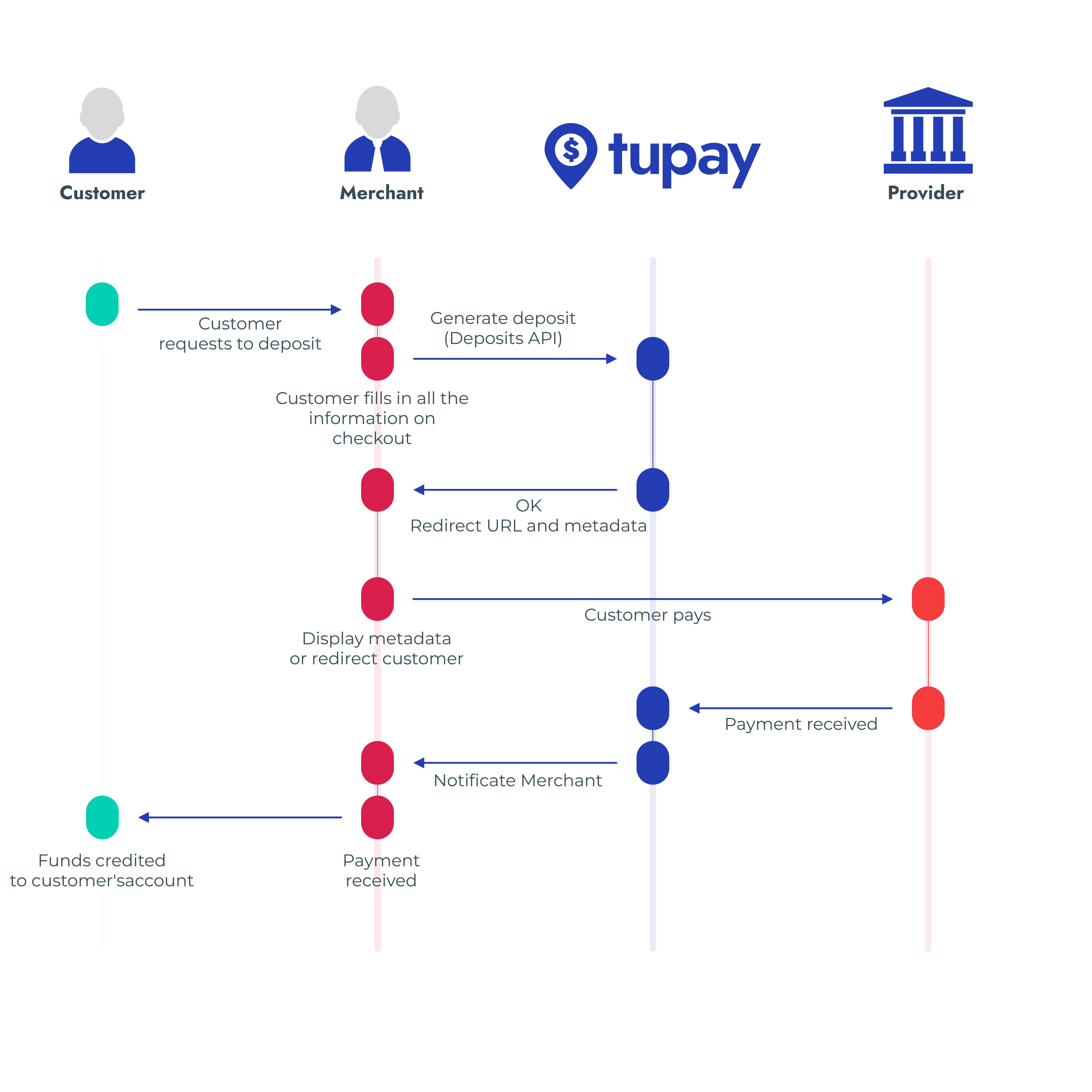
## Flujo

<figure><img src="https://content.gitbook.com/content/GjMKy3VezYlJlCCcjySW/blobs/tWWwaMRIrdgK1SSj25KJ/infografi%CC%81a%20API%20-%20One%20Shot%20Experience%201%201.png" alt=""><figcaption></figcaption></figure>

### User journey

Envía todos los campos requeridos :ballot\_box\_with\_check: via API para crear una experiencia libre de fricciones y prevenir pasos adicionales a los usuarios :tada:.


# Tu Multipay

Nuestra última API Mutipay se centra en la simplicidad, la usabilidad y la personalización y se utiliza para permitir a sus clientes depositar con sus métodos de pago locales de preferencia.

Trabajamos como un puente entre usted y los métodos de pago locales de sus clientes, como bancos, billeteras electrónicas, tarjetas de crédito, entre otros.

Con una sola integración, tienes acceso a los métodos de pago más populares en los mercados emergentes.

Para hacerlo posible, hemos desarrollado nuestra API v3 de Depósitos que le permite crear pagos directamente desde su propio cajero o desde uno de los nuestros en caso de que desee que nos encarguemos de los campos necesarios para cada país y método de pago.


# Aspectos Técnicos

Aprende sobre nuestros aspectos técnicos y seguridad de nuestra API.

## Consideraciones Técnicas

* Todas las llamadas a nuestra API deben ser hechas sobre [HTTPS. ](http://en.wikipedia.org/wiki/HTTP_Secure)Llamadas hechas sobre HTTP Plain van a fallar.
* Llamadas a la API sin autenticación también fallarán.
* Solo podrán hacer pegadas a nuestras APIs desde las IPs que haya previamente whitelisteado desde el Panel Tupay (o Panel Tupay STG).

## Ambientes

Toda la integración debe ser hecha dentro de nuestro ambiente de STG, dónde pueden realizar pruebas sin riesgo de ningún tipo.

Cuando se registren con nosotros, les generaremos una cuenta en el ambiente de STG dónde podrán hacer lo siguiente:

* Ver las transacciones creadas
* Aprobar y cancelar transacciones
* Acceder a las credencials de la API de STG
* Whitelistear sus IPs, y más.

### Dominios de los Endpoints

Cada ambiente tiene su propio dominio. La ruta a los endpoints no cambian.

| Ambiente   | Dominio                                          |
| ---------- | ------------------------------------------------ |
| STG        | `https://api-stg.tupayonline.com/`               |
| Producción | Se lo proveeremos una vez que pase a Producción. |

{% hint style="info" %}
**Notas**

* Deben usar el Endpoint de STG durante la integración.
* Los ambientes de STG y Producción no están comunicados de ninguna manera.
* Ninguna transacción realizada en el ambiente STG se verá reflejada en Producción y viceversa.
* Las Credenciales de la API y las configuraciones entre ambientes tambien son diferentes.
  {% endhint %}


# Autorización y cálculo de Signature

## <mark style="color:blue;">Credenciales de la API</mark>

Nuestra API de Depósitos usa las Credenciales para autenticar todas las llamadas. Podrán encontrar sus credenciales en el **Panel Tupay**, desde **Settings -> API Access**.

* Las Credenciales de los ambientes de STG y Producción son diferentes.

Básicamente, hay dos juegos de credenciales:

* Un juego de Credenciales para llamadas del tipo POST, que contiene una API Key y una API Signature.
* Un juego de Credenciales read-only, que contiene una API Key.

La Autenticación para la API es hecha vía [HTTP Basic Auth](http://en.wikipedia.org/wiki/Basic_access_authentication). Se debe enviar la API Key en todos las llamadas como autenticación básica del valor username. No se requiere proveer una contraseña.

La API Key debe ser enviada en todas las llamadas a la API usando el campo X-Login en los encabezados del request.

## <mark style="color:blue;">Encabezados</mark>

<table><thead><tr><th width="204">Encabezado</th><th width="100">Formato</th><th width="122">Obligatorio</th><th>Descripción</th></tr></thead><tbody><tr><td>Authorization</td><td>String</td><td>Si</td><td><code>"TUPAY"</code> más un hash HMAC256 para verificar la integridad de las llamadas.</td></tr><tr><td>X-Login</td><td>String</td><td>Si</td><td>Su <code>API Key</code></td></tr><tr><td>X-Date</td><td>String</td><td>Si</td><td>Fecha según el estándar ISO 8601 en el siguiente formato: <code>yyyy-MM-dd'T'HH:mm:ssZ</code>. E.g.: <code>2020-06-21T12:33:20Z</code></td></tr><tr><td>Content-Type</td><td>String</td><td>Si</td><td><code>application/json</code></td></tr><tr><td>X-Idempotency-Key</td><td>String</td><td>Si</td><td>Valor único generado por el cliente que usa el servidor para reconocer reintentos subsecuentes de la misma llamada.</td></tr></tbody></table>

## <mark style="color:blue;">Cálculo de Signature</mark>

Todas las llamadas a nuestra API de Depósitos debe contener el campo Authorization en el encabezado para asegurar la integridad de la llamada y autenticar las credenciales del Comercio, ya que usaran su propia secret key (también llamada API Signature).

Tiene que ser creada usando codificación **HMAC-SHA-256 (RFC 2104)** y el contenido debe incluir los siguientes detalles:

> [X-Date](#notas) + [X-Login](#notas) + `JSONPayload`

{% hint style="success" %}
Usa tu API Signature para generar el valor `Authorization`.
{% endhint %}

El campo `Authorization` en el encabezado de la llamada debe contener el string "TUPAY " más el hash generado, en el siguiente formato:

> Authorization: "TUPAY " + HMAC256(X-Date + X-Login + JSONPayload)

Ejemplo:

> Authorization: TUPAY 223a9dd4784726f1536c926da7dc69155a57612c5c3c1e1b429c367a5eee67cf

<details>

<summary>Notas</summary>

* Él [`X-Login`](#notas) es su API Key, puede ser encontrada en el Tupay Panel, yendo a Settings -> API Access -> Deposit credentials -> API Key.
* El [`X-Date`](#notas) es la fecha en ISO8601 Datetime con huso horario. El formato esperado es:  ISO8601 Datetime con huso horario: <mark style="color:blue;">`yyyy-MM-dd'T'HH:mm:ssZ`</mark>. Ejemplo: [<mark style="color:blue;">`2020-06-21T12:33:20Z`</mark>](#user-content-fn-1)[^1].&#x20;
* El <mark style="color:blue;">`JSONPayload`</mark> debe ser convertido a UTF-8 antes del hashing para prevenir el error Invalid Signature cuando se envían caracteres con distinta codificación.

</details>

{% tabs %}
{% tab title="Llamadas Idempotencia" %}
Nuestra API soporta [Idempotencia](https://es.wikipedia.org/wiki/Idempotencia) para reintentar llamadas de forma segura, evitando realizar la misma operación de forma duplicada por error. Esto resulta útil cuando una llamada a la API es corrompida en tránsito y la respuesta no es recibida. Por ejemplo, si una llamada al Endpoint de Creación de Depósitos no tiene respuesta debido a un error en la conexión de red, puedes reintentar la llamada con la misma Idempotency key para garantizar que no se genere más de un depósito.

Para poder crear una llamada Idempotente se precisa enviar el encabezado `X-Idempotency-Key: <key>`  con un String generado aleatoriamente.

La Idempotencia funciona guardando el código de estatus y el cuerpo de la primer llamada hecha para cierta Idempotency key, sin importar si falló o tuvo éxito. Llamadas subsecuentes con una misma Idempotency key devolverán el mismo resultado, inclusive errores de HTTP `500`.

Una idempotency key es un valor único generado por un cliente el cual el servidor usa para reconocer llamadas con reintentos subsecuentes de la misma. Cómo se crean las claves únicas depende de usted, pero nosotros sugerimos usar V4 UUIDs, o cualquier otro string aleatorio con entropía suficiente para evitar colisiones.

Todas las llamadas `POST` aceptan idempotency keys. Enviar idempotency keys en llamadas `GET` y `DELETE` no tiene efecto alguno y deberían ser evitadas, ya que estas llamadas son idempotentes por definición.

### Content-Type

Nuestra API de Depósitos está diseñada para recibir y responder la información en formato JSON.

Este encabezado no cambiará a lo largo de las llamadas, y siempre será: `application/json`
{% endtab %}

{% tab title="IP Whitelisting" %}
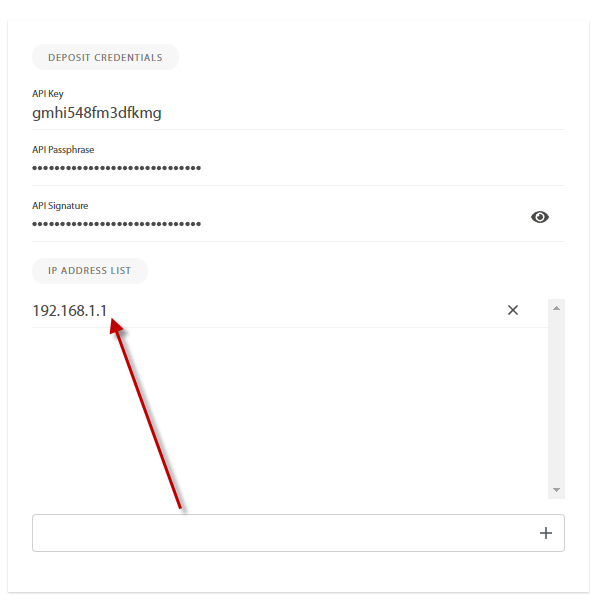
Por motivos de seguridad, necesitarán hacer whitelist de sus IPs desde las cuales van a estar haciendo las llamada a nuestras APIs.\
Para hacer este proceso lo más eficiente y rápido posible, deben entrar al Tupay Panel e ir a **Settings -> API Access** y agregar la lista de IPs de las cuales podrían usar bajo la sección **Deposit IP Address**.

<figure><img src="https://2298703647-files.gitbook.io/~/files/v0/b/gitbook-x-prod.appspot.com/o/spaces%2FGjMKy3VezYlJlCCcjySW%2Fuploads%2F70vxR4qwPLqqVg69ULAd%2Fimage.png?alt=media&amp;token=5d07042c-75d7-4095-ba34-dc6291c9c8b1" alt="" width="298"><figcaption></figcaption></figure>
{% endtab %}
{% endtabs %}

<details>

<summary>Buenas Practicas</summary>

* Asegúrese siempre de verificar las Signatures control string enviados en las notificaciones para validar la veracidad.
* Toda la información que recibimos es convertida a UTF-8. Asegúrese de convertirla también a UTF-8 para garantizar que ambas partes tengan los mismos detalles.
* Siempre valide que un depósito no se libere más de una vez según el `deposit_id` (Las notificaciones se pueden enviar varias veces).\
  Asegúrese de que un depósito no es liberado más de una vez basándonos en el `deposit_id`, ya que la notificación puede ser enviada más de una vez.

</details>

## <mark style="color:blue;">Ejemplos</mark>

Revisa cómo calcular la Signature en los diferentes lenguajes.

{% tabs %}
{% tab title="PHP" %}

```php
<?php
class TupayExample {
	const TUPAY_AUTHORIZATION_SCHEME = "TUPAY ";
	const HMAC_SHA256 = 'sha256';
	
	public static function build_deposit_key_signature($api_signature, $x_date, $deposits_api_key, $json_payload) {
		// Concatenate the content of the header X-Date, your deposits API Key (X-Login) and 
		// the whole JSON payload of the body of the request
		
		$string = $x_date . $deposits_api_key . $json_payload;
		
		// Generate the HASH by using yur own deposits API Signature and 
		// concatenate "D24 " in front of the hash
		return  self::TUPAY_AUTHORIZATION_SCHEME . hash_hmac(self::HMAC_SHA256, $string, $api_signature);
	}
}
```

{% endtab %}

{% tab title="Java" %}

```java
import java.io.ByteArrayOutputStream;
import java.io.IOException;
import java.nio.charset.StandardCharsets;
import java.security.InvalidKeyException;
import java.security.NoSuchAlgorithmException;
import java.util.Formatter;
import javax.crypto.Mac;
import javax.crypto.spec.SecretKeySpec;

public static final String TUPAY_AUTHORIZATION_SCHEME = "TUPAY ";

private static final String HMAC_SHA256 = "HmacSHA256";

public static String buildDepositKeySignature(String apiSignature, String xDate, String depositKey, String JSONPayload)
      throws NoSuchAlgorithmException, InvalidKeyException, IOException {
   byte[] hmacSha256 = null;
   Mac mac = Mac.getInstance(HMAC_SHA256);
   SecretKeySpec secretKeySpec = new SecretKeySpec(apiSignature.getBytes(StandardCharsets.UTF_8), HMAC_SHA256);
   mac.init(secretKeySpec);
   hmacSha256 = mac.doFinal(buildByteArray(xDate, apiKey, JSONPayload));
   return TUPAY_AUTHORIZATION_SCHEME + toHexString(hmacSha256);
}

private static byte[] buildByteArray(String xDate, String apiKey, String JSONPayload) throws IOException {
   ByteArrayOutputStream bos = new ByteArrayOutputStream();
   bos.write(xDate.getBytes(StandardCharsets.UTF_8));
   bos.write(apiKey.getBytes(StandardCharsets.UTF_8));
   if (JSONPayload != null) {
      bos.write(payload.getBytes(StandardCharsets.UTF_8));
   }
   return bos.toByteArray();
}

private static String toHexString(byte[] bytes) {
   Formatter formatter = new Formatter();
   for (byte b : bytes) {
      formatter.format("%02x", b);
   }
   return formatter.toString();
}


```

{% endtab %}

{% tab title="C#" %}

```csharp
using System;
using System.Text;
using System.IO;
using System.Security.Cryptography;

namespace Application 
{

    class Directa24Example 
    {
    
        public readonly static string TUPAY_AUTHORIZATION_SCHEME = "TUPAY ";
        
        private readonly static string HMAC_SHA256 = "HmacSHA256";
        
        public static String buildDepositKeySignature(String apiSignature, String xDate, String depositKey, String jsonPayload)
        {
            byte[] hmacSha256 = null;
            var apiSignatureEncod = Encoding.UTF8.GetBytes(apiSignature);
            var hash = new HMACSHA256(apiSignatureEncod);
            hmacSha256 = hash.ComputeHash(buildByteArray(xDate, depositKey, jsonPayload));  
            return TUPAY_AUTHORIZATION_SCHEME + toHexString(hmacSha256).ToLower();
        }
        
        private static byte[] buildByteArray(String xDate, String apiKey, String jsonPayload)
        {
            try
            {
                MemoryStream stream = new MemoryStream();
                var xDateEncod = Encoding.UTF8.GetBytes(xDate);
                var apiKeyEncod = Encoding.UTF8.GetBytes(apiKey);
                stream.Write(xDateEncod, 0, xDateEncod.Length);
                stream.Write(apiKeyEncod, 0, apiKeyEncod.Length);
                if (!string.IsNullOrWhiteSpace(jsonPayload))
                {
                    var jsonPayloadEncod = Encoding.UTF8.GetBytes(jsonPayload);
                    stream.Write(jsonPayloadEncod, 0, jsonPayloadEncod.Length);
                }
                return stream.ToArray();
            }
            catch (Exception ex)
            {
                throw ex;
            }
        }
        
        private static string toHexString(byte[] bytes)
        {
            return BitConverter.ToString(bytes).Replace("-", string.Empty);
        }
    }
}


```

{% endtab %}
{% endtabs %}

[^1]:


# Endpoint Creación

## Endpoint Creación

<mark style="color:green;">`POST`</mark> `https://api-stg.tupayonline.com/v3/deposits`

#### Headers

| Name                                      | Type   | Description                                                                             |
| ----------------------------------------- | ------ | --------------------------------------------------------------------------------------- |
| Content-Type                              | string | `application/json`                                                                      |
| X-Date<mark style="color:red;">\*</mark>  | string | <p>Fecha según el estándar ISO8601 formato: <br><code>yyyy-MM-dd'T'HH:mm:ssZ</code></p> |
| X-Login<mark style="color:red;">\*</mark> | string | X-Login API Key del Comercio                                                            |
| Authorization                             | string | Hash de control de autorización                                                         |
| X-Idempotency-Key                         | string | Idempotency key única                                                                   |

#### Request Body

| Name                                                 | Type    | Description                                                                                                                                                                                                                                                        |
| ---------------------------------------------------- | ------- | ------------------------------------------------------------------------------------------------------------------------------------------------------------------------------------------------------------------------------------------------------------------ |
| country<mark style="color:red;">\*</mark>            | string  | <p><strong>(PE)</strong></p><p>País del depósito </p>                                                                                                                                                                                                              |
| currency<mark style="color:red;">\*</mark>           | string  | <p><strong>(PEN / USD)</strong></p><p>Tipo de Moneda</p>                                                                                                                                                                                                           |
| amount<mark style="color:red;">\*</mark>             | number  | Monto de depósito                                                                                                                                                                                                                                                  |
| request\_payer\_data\_on\_validation\_failure        | boolean | <p>(default:false)</p><p>Marca utilizada para especificar si desea ignorar error por <code>phone</code>, <code>zip\_code</code> y/o <code>state</code> inválidos.</p>                                                                                              |
| client\_ip                                           | string  | Dirección IPv4/v6 válida del cliente                                                                                                                                                                                                                               |
| device\_id                                           | string  | <p>(max length: 100)</p><p>Identificador  único del  cliente</p>                                                                                                                                                                                                   |
| back\_url                                            | string  | HTTPS URL válida usada para redireccionar al usuario.                                                                                                                                                                                                              |
| success\_url<mark style="color:red;">\*</mark>       | string  | HTTPS URL usada para redireccionar al cliente en caso de completarse el depósito                                                                                                                                                                                   |
| error\_url                                           | string  | HTTPS URL válida usada para redireccionar al cliente en caso de que ocurra un error a la hora de generar el pago                                                                                                                                                   |
| payment\_method<mark style="color:red;">\*</mark>    | string  | Debe ser enviado  con el valor XA/XAQR[ <mark style="color:orange;">**(Método de Pago)**</mark>](#metodos-de-pago)                                                                                                                                                 |
| notification\_url<mark style="color:red;">\*</mark>  | string  | HTTPS URL válida usada para enviar notificaciones sobre los cambios de estado del depósito                                                                                                                                                                         |
| test                                                 | boolean | Etiqueta para indicar que es un depósito de prueba. Si es enviado como `true`, no afectará el balance del comercio.                                                                                                                                                |
| mobile                                               | boolean | <p>(default: false)</p><p>La marca mobile es un booleano y tiene que ser enviado con el valor <code>true</code> si el cliente genera el deposito desde un dispositivo móvil. Si no es enviado el valor por default es <code>false</code>.</p>                      |
| payer{}<mark style="color:red;">\*</mark>            | object  | Objeto que contiene los detalles del pagador.                                                                                                                                                                                                                      |
| prayer.first\_name<mark style="color:red;">\*</mark> | string  | <p>(max length: 50)</p><p>Nombre del cliente.</p>                                                                                                                                                                                                                  |
| prayer.last\_name<mark style="color:red;">\*</mark>  | string  | <p>(max length: 50)</p><p>Apellido del cliente.</p>                                                                                                                                                                                                                |
| prayer.phone                                         | string  | <p>string (max length: 32)</p><p>Número de teléfono válido del cliente.</p>                                                                                                                                                                                        |
| prayer.document<mark style="color:red;">\*</mark>    | string  | <p> (max length: 30)</p><p>Asegúrese de que sea correcto y que el usuario no pueda cambiarlo cada vez que desea generar un nuevo depósito.</p>                                                                                                                     |
| prayer.email<mark style="color:red;">\*</mark>       | string  | <p> (max length: 255)</p><p>Dirección de email válida del cliente.</p>                                                                                                                                                                                             |
| prayer.document\_type                                | string  | <p> (max length: 10)</p><p>Tipo de documento del cliente. Opcional, en caso de enviar debe ser un valor válido.<a href="#validacion-de-tipo-de-documento-de-identidad"> <mark style="color:blue;"><strong>(Tipo de documento de identidad)</strong></mark></a></p> |
| prayer.address{}                                     | object  | Objeto conteniendo detalles de la dirección.                                                                                                                                                                                                                       |
| prayer.address.zip\_code                             | string  | <p>(max length: 16)</p><p>Código postal del cliente.</p>                                                                                                                                                                                                           |
| prayer.address.city                                  | string  | <p>(max length: 128)</p><p>Ciudad del cliente.</p>                                                                                                                                                                                                                 |
| prayer.address.street                                | string  | <p>(max length: 255)</p><p>Calle del cliente.</p>                                                                                                                                                                                                                  |
| fee\_on\_payer                                       | boolean | <p>(default: false)</p><p>Elija si la tarifa del depósito será pagada por el cliente o debitada de su saldo</p>                                                                                                                                                    |
| invoice\_id<mark style="color:red;">\*</mark>        | string  | <p>(max length: 128) </p><p>(random:  ^\[A-Za-z0-9-\_]\*$ )</p><p>ID de depósito único por parte del merchant.</p>                                                                                                                                                 |
| expiration                                           | number  | Tiempo de expiracion de la transaccion                                                                                                                                                                                                                             |
| description                                          | string  | Descripcion del deposit                                                                                                                                                                                                                                            |

{% tabs %}
{% tab title="201 Solicitud de depósito creada exitosamente" %}
{% code overflow="wrap" fullWidth="false" %}

```json
{
    "checkout_type": "ONE_SHOT",
    "redirect_url": "https://payment-stg.tupayonline.com/v1/checkout/eyJhbGciOiJIUzM4NCJ9.eyJqdGkiOiI1NjkzMDY5MSIsImlhdCI6MTcwNzg3ODk1MCwiZXhwIjoxNzA5MTc0OTUwLCJsYW5ndWFnZSI6ImVzIn0.gR5a1bIzgiZ8kUGK5MCFaLmuf_yPzr0tMZs4RCgfEsn6_qYXT7IIWmfAcz3uR3_V/PE/XA/3041/47591",
    "iframe": true,
    "deposit_id": 301178390,
    "merchant_invoice_id": "19574-7770615745349746664",
    "payment_info": {
        "type": "MULTIGATEWAY",
        "payment_method": "XA",
        "payment_method_name": "Tupay",
        "amount": 10.00,
        "currency": "PEN",
        "expiration_date": "2026-05-27 10:49:10",
        "created_at": "2024-02-14 02:49:10",
        "metadata": {
            "reference": 56930691,
            "beneficiary_name": "TUPAY",
            "payment_method_code": "XA"
        },
        "multigateway_metadata": [
            {
                "beneficiaryName": "Tupay",
                "agreement": "A-659374",
                "reference": "56930691",
                "paymentMethodCode": "BC",
                "payerName": "Nombre Apellido",
                "paymentMethodName": "Tupay",
                "paymentMethodType": "BANK_TRANSFER"
            },
            {
                "beneficiaryName": "Tupay",
                "agreement": "A-659374",
                "reference": "56930691",
                "paymentMethodCode": "BP",
                "payerName": "Nombre Apellido",
                "paymentMethodName": "Tupay",
                "paymentMethodType": "BANK_TRANSFER"
            },
            {
                "qrCode": "data:image/png;base64,iVBORw0KGgoAAAANSUhEUgAAAV4AAAFeAQAAAADlUEq3AAAFXUlEQVR42u1bQa6jSgx0xIIlR+Am4WJIROJi5CZ9hCxZIDyuqm6SjPSlv5iNZ14W6OWliITbbZerK+b//3XYD/jfAr/M7PaaR7wbzYaH+dN",
                "subType": "VOUCHER",
                "reference": "56930691",
                "paymentMethodCode": "NQR",
                "paymentMethodName": "TEST",
                "paymentMethodType": "QR_CODE"
            },
            {
                "paymentMethodType": "CREDIT_CARD",
                "redirectUrl": "https://pay-stg.tupayonline.com/validate/bbf7WD95WlaTOrgYqxB2OdBpstWQyq1y",
                "paymentMethodCode": "VI"
            },
            {
                "paymentMethodType": "CREDIT_CARD",
                "redirectUrl": "https://pay-stg.tupayonline.com/validate/Ng58VMecAM3BF5R3K8vJ5jQVH9HRoZKu",
                "paymentMethodCode": "MC"
            }
        ]
    }
}
```

{% endcode %}
{% endtab %}

{% tab title="401: Unauthorized Invalid signature" %}

```json
{
    "code": 102,
    "description": "Invalid signature",
    "type": "INVALID_SIGNATURE"
}
```

{% endtab %}

{% tab title="400: Bad Request La solictud de deposito fallo" %}

```javascript
{
    "code": 201,
    "description": "Field validation error. Check details",
    "details": [
        "payer.document: Invalid document type and/or document"
    ],
    "type": "BEAN_VALIDATION_ERROR"
}
```

{% endtab %}
{% endtabs %}

{% hint style="success" %}
Los parámetros del body que se encuentren con marcas \*  son campos obligatorios.
{% endhint %}

## <mark style="color:blue;">Consideraciones de la Respuesta</mark>

{% tabs %}
{% tab title="checkout\_type" %}

| ONE\_SHOT                                                                                                                                                                                        | HOSTED                                                                                                                                                                                                             |
| ------------------------------------------------------------------------------------------------------------------------------------------------------------------------------------------------ | ------------------------------------------------------------------------------------------------------------------------------------------------------------------------------------------------------------------ |
| La creación del depósito fue completada con éxito a partir de su petición, y el usuario verá directamente la información para completar el pago.                                                 | La información enviada no es suficiente para crear el depósito, y los datos faltantes deben ser pedidos al usuario. Redirija al usuario a nuestro Hosted Checkout para que solicitemos la información en cuestión. |
| Debajo encontrarás los campos requeridos con un Checkbox ![](https://content.gitbook.com/content/GjMKy3VezYlJlCCcjySW/blobs/B6N9Nkd3HQN51WkC7Ec5/Screen%20Shot%202022-11-17%20at%2016.26.49.png) | <p>Si faltan datos para crear el pago, el flujo <code>HOSTED</code> se hará presente <span data-gb-custom-inline data-tag="emoji" data-code="1f44d">👍</span><br></p>                                              |

{% endtab %}

{% tab title="Iframe" %}
Nuestra etiqueta redirect\_url maneja iframe por lo tanto no es necesario direccionar a otra pestaña ya que se puede manejar en la misma vista.

```html
<!DOCTYPE html>
<html>
<head>
    <title>Iframe test</title>
</head>
<body>
    <iframe src=" https://payin.checkoutogate.com/validate/eyJhbGciOiJI
    UzM4NCJ9.eyJqdGkiOiI4NzY1ODgwODYiLCJpYXQiOjE3MDIzMDExODUsImV
    4cCI6MTcwNDg5MzE4NXfjh0.xUOFVMwKFXDFGHfROxTnG9znuI2MI4G6tRVjbso4y1
    PsREiEYL8WSCJ1HEEbi4fsr0Qsde435sdH" 
            width="1200" 
            height="800" 
            frameborder="0" 
            hspace="0"
            width: 100%>
    </iframe>
</body>
</html>
```

{% endtab %}
{% endtabs %}

## <mark style="color:blue;">Request de Ejemplo</mark>

{% code overflow="wrap" %}

```json
{
	"country": "PE",
	"currency": "PEN",
	"amount": "100",
	"payment_method": "XA",
	"payer": 
	{
		"email": "client@tupaypagos.com",
		"document": "74586930",
		"document_type": "DNI",
		"last_name": "Gaming last name",
		"first_name": "Gaming",
		"phone":"987654321"

	 },
	"expiration": 10,
	"invoice_id": "ID-12394594",
	 "success_url": "https://tupay.2024/admin/page/tupay/pending",
	 "back_url": "https://tupay.2024/admin/page/tupay/pending",
	 "error_url": "https://tupay.2024/admin/page/tupay/fail",
	 "notification_url": "https://47e2a34561/fy/tupay"
}
```

{% endcode %}

{% tabs %}
{% tab title="Java" %}

```java
OkHttpClient client = new OkHttpClient().newBuilder()
  .build();
MediaType mediaType = MediaType.parse("application/json");
RequestBody body = RequestBody.create(mediaType, "{\n\t\"country\": \"PE\",\n\t\"currency\": \"PEN\",\n\t\"amount\": \"100\",\n\t\"payment_method\": \"XA\",\n\t\"invoice_id\": \"65b87bb498fd3002a270a7b3\",\n\t\"payer\": \n\t{\n\t\t\"email\": \"client@tupaypagos.com\",\n\t\t\"document\": \"74586930\",\n\t\t\"document_type\": \"DNI\",\n\t\t\"last_name\": \"Gaming last name\",\n\t\t\"first_name\": \"Gaming\",\n\t\t\"address\":{\n\t\t\t\"street\":\"Calle 13\",\n\t\t\t\"city\":\"Peru\",\n\t\t\t\"zip_code\":\"12345\"\n\t\t\t}\n\t },\n\t \"success_url\": \"https://tupay.2024/admin/page/tupay/pending\",\n\t \"back_url\": \"https://tupay.2024/admin/page/tupay/pending\",\n\t \"error_url\": \"https://tupay.2024/admin/page/tupay/fail\",\n\t \"notification_url\": \"https://47e2a34561/fy/tupay\",\n\t \"client_ip\":\"1.147.73.157\",\n\t \"expiration\": 100,\n\t \"fee_on_payer\":\"false\",\n\t \"device_id\":\"\",\n\t \"test\":\"true\",\n\t \"mobile\":\"false\",\n\t \"request_payer_data_on_validation_failure\":\"false\"\n}");
Request request = new Request.Builder()
  .url("https://api-stg.tupayonline.com/v3/deposits")
  .method("POST", body)
  .addHeader("X-Login", "zkSSILAezeTUyIkPxQvS")
  .addHeader("X-Date", "2024-02-19T15:12:54Z")
  .addHeader("Authorization", "D24 210645f9b657ae1d342e4e8e5e8ca3c57e8ce3d067fd512f01d1e826488a593b")
  .addHeader("Content-Type", "application/json")
  .addHeader("Cookie", "GCLB=CJ3O2uri78nfAQ")
  .build();
Response response = client.newCall(request).execute();
```

{% endtab %}

{% tab title="Javascript" %}

```javascript
const myHeaders = new Headers();
myHeaders.append("X-Login", "zkSSILAezeTUyIkPxQvS");
myHeaders.append("X-Date", "2024-02-19T15:12:54Z");
myHeaders.append("Authorization", "D24 210645f9b657ae1d342e4e8e5e8ca3c57e8ce3d067fd512f01d1e826488a593b");
myHeaders.append("Content-Type", "application/json");
myHeaders.append("Cookie", "GCLB=CJ3O2uri78nfAQ");

const raw = JSON.stringify({
  "country": "PE",
  "currency": "PEN",
  "amount": "100",
  "payment_method": "XA",
  "invoice_id": "65b87bb498fd3002a270a7b3",
  "payer": {
    "email": "client@tupaypagos.com",
    "document": "74586930",
    "document_type": "DNI",
    "last_name": "Gaming last name",
    "first_name": "Gaming",
    "address": {
      "street": "Calle 13",
      "city": "Peru",
      "zip_code": "12345"
    }
  },
  "success_url": "https://tupay.2024/admin/page/tupay/pending",
  "back_url": "https://tupay.2024/admin/page/tupay/pending",
  "error_url": "https://tupay.2024/admin/page/tupay/fail",
  "notification_url": "https://47e2a34561/fy/tupay",
  "client_ip": "1.147.73.157",
  "expiration": 100,
  "fee_on_payer": "false",
  "device_id": "",
  "test": "true",
  "mobile": "false",
  "request_payer_data_on_validation_failure": "false"
});

const requestOptions = {
  method: "POST",
  headers: myHeaders,
  body: raw,
  redirect: "follow"
};

fetch("https://api-stg.tupayonline.com/v3/deposits", requestOptions)
  .then((response) => response.text())
  .then((result) => console.log(result))
  .catch((error) => console.error(error));
```

{% endtab %}

{% tab title="C#" %}

```csharp
var options = new RestClientOptions("https://api-stg.tupayonline.com")
{
  MaxTimeout = -1,
};
var client = new RestClient(options);
var request = new RestRequest("/v3/deposits", Method.Post);
request.AddHeader("X-Login", "zkSSILAezeTUyIkPxQvS");
request.AddHeader("X-Date", "2024-02-19T15:12:54Z");
request.AddHeader("Authorization", "D24 210645f9b657ae1d342e4e8e5e8ca3c57e8ce3d067fd512f01d1e826488a593b");
request.AddHeader("Content-Type", "application/json");
request.AddHeader("Cookie", "GCLB=CJ3O2uri78nfAQ");
var body = @"{" + "\n" +
@"	""country"": ""PE""," + "\n" +
@"	""currency"": ""PEN""," + "\n" +
@"	""amount"": ""100""," + "\n" +
@"	""payment_method"": ""XA""," + "\n" +
@"	""invoice_id"": ""65b87bb498fd3002a270a7b3""," + "\n" +
@"	""payer"": " + "\n" +
@"	{" + "\n" +
@"		""email"": ""client@tupaypagos.com""," + "\n" +
@"		""document"": ""74586930""," + "\n" +
@"		""document_type"": ""DNI""," + "\n" +
@"		""last_name"": ""Gaming last name""," + "\n" +
@"		""first_name"": ""Gaming""," + "\n" +
@"		""address"":{" + "\n" +
@"			""street"":""Calle 13""," + "\n" +
@"			""city"":""Peru""," + "\n" +
@"			""zip_code"":""12345""" + "\n" +
@"			}" + "\n" +
@"	 }," + "\n" +
@"	 ""success_url"": ""https://tupay.2024/admin/page/tupay/pending""," + "\n" +
@"	 ""back_url"": ""https://tupay.2024/admin/page/tupay/pending""," + "\n" +
@"	 ""error_url"": ""https://tupay.2024/admin/page/tupay/fail""," + "\n" +
@"	 ""notification_url"": ""https://47e2a34561/fy/tupay""," + "\n" +
@"	 ""client_ip"":""1.147.73.157""," + "\n" +
@"	 ""expiration"": 100," + "\n" +
@"	 ""fee_on_payer"":""false""," + "\n" +
@"	 ""device_id"":""""," + "\n" +
@"	 ""test"":""true""," + "\n" +
@"	 ""mobile"":""false""," + "\n" +
@"	 ""request_payer_data_on_validation_failure"":""false""" + "\n" +
@"}";
request.AddStringBody(body, DataFormat.Json);
RestResponse response = await client.ExecuteAsync(request);
Console.WriteLine(response.Content);
```

{% endtab %}

{% tab title="PHP" %}

```php
<?php

$curl = curl_init();

curl_setopt_array($curl, array(
  CURLOPT_URL => 'https://api-stg.tupayonline.com/v3/deposits',
  CURLOPT_RETURNTRANSFER => true,
  CURLOPT_ENCODING => '',
  CURLOPT_MAXREDIRS => 10,
  CURLOPT_TIMEOUT => 0,
  CURLOPT_FOLLOWLOCATION => true,
  CURLOPT_HTTP_VERSION => CURL_HTTP_VERSION_1_1,
  CURLOPT_CUSTOMREQUEST => 'POST',
  CURLOPT_POSTFIELDS =>'{
	"country": "PE",
	"currency": "PEN",
	"amount": "100",
	"payment_method": "XA",
	"invoice_id": "65b87bb498fd3002a270a7b3",
	"payer": 
	{
		"email": "client@tupaypagos.com",
		"document": "74586930",
		"document_type": "DNI",
		"last_name": "Gaming last name",
		"first_name": "Gaming",
		"address":{
			"street":"Calle 13",
			"city":"Peru",
			"zip_code":"12345"
			}
	 },
	 "success_url": "https://tupay.2024/admin/page/tupay/pending",
	 "back_url": "https://tupay.2024/admin/page/tupay/pending",
	 "error_url": "https://tupay.2024/admin/page/tupay/fail",
	 "notification_url": "https://47e2a34561/fy/tupay",
	 "client_ip":"1.147.73.157",
	 "expiration": 100,
	 "fee_on_payer":"false",
	 "device_id":"",
	 "test":"true",
	 "mobile":"false",
	 "request_payer_data_on_validation_failure":"false"
}',
  CURLOPT_HTTPHEADER => array(
    'X-Login: zkSSILAezeTUyIkPxQvS',
    'X-Date: 2024-02-19T15:12:54Z',
    'Authorization: D24 210645f9b657ae1d342e4e8e5e8ca3c57e8ce3d067fd512f01d1e826488a593b',
    'Content-Type: application/json',
    'Cookie: GCLB=CJ3O2uri78nfAQ'
  ),
));

$response = curl_exec($curl);

curl_close($curl);
echo $response;
```

{% endtab %}
{% endtabs %}

## <mark style="color:orange;">Métodos de Pago</mark>

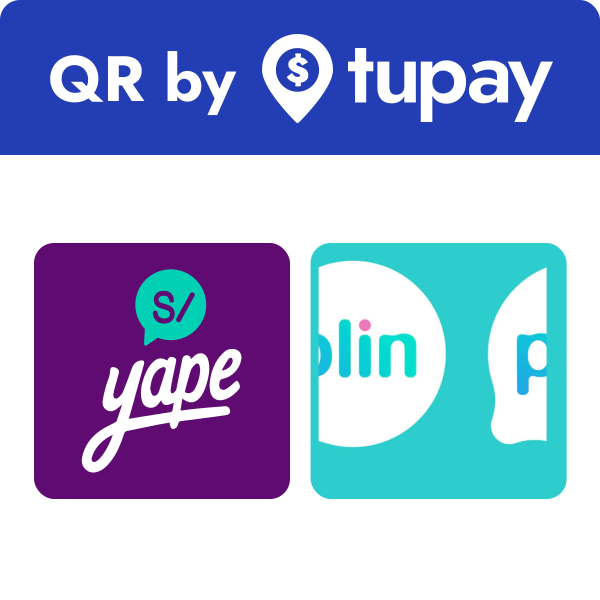
Dentro de la API de Tupay, será posible encontrar distintos métodos de pago, representados por distintos códigos de <mark style="color:orange;">**payment\_method**</mark>, estos son utilizados para filtrar exactamente que métodos de pago quieren mostrarle al cliente final . <mark style="color:orange;">**"payment\_method":"XAQR" / "payment\_method":"XA"**</mark>

<table><thead><tr><th width="99">Logo</th><th width="101">Valor</th><th>Descripción</th></tr></thead><tbody><tr><td><img src="https://2298703647-files.gitbook.io/~/files/v0/b/gitbook-x-prod.appspot.com/o/spaces%2FGjMKy3VezYlJlCCcjySW%2Fuploads%2FfNzOudYlo0ybvOeekL6j%2Fimage.png?alt=media&amp;token=f6999ded-c10f-482d-9522-ba95583e5ed5" alt="" data-size="original"></td><td>XA</td><td>El método de pago "XA" representa todos los metodos de pago de Tupay,al utilizar este codigo, el cliente sera ofrecido con todas las opciones que ofrecemos para realizar el pago final</td></tr><tr><td><img src="https://2298703647-files.gitbook.io/~/files/v0/b/gitbook-x-prod.appspot.com/o/spaces%2FGjMKy3VezYlJlCCcjySW%2Fuploads%2F6RQSqj0ZsEZfen9lRt0Y%2Fimage.png?alt=media&amp;token=1afdf0dd-96c4-4379-ae3c-670f1b3d764a" alt="" data-size="original"></td><td>XAQR</td><td>Al utilizar este codigo, el cliente final sera presentado con todas las opciones que ofrecen un QR para escanear y realizar el pago final.</td></tr><tr><td><img src="https://docs.d24.com/~gitbook/image?url=https%3A%2F%2F773174111-files.gitbook.io%2F%7E%2Ffiles%2Fv0%2Fb%2Fgitbook-x-prod.appspot.com%2Fo%2Fspaces%252F-M792I7hN0PzC-Sx95CP-887967055%252Fuploads%252FMpGbIl799u5X9EMGHstk%252Fimage.png%3Falt%3Dmedia%26token%3D9ff579a2-6137-4ef2-80ea-0c9f44b90f20&#x26;width=40&#x26;dpr=4&#x26;quality=100&#x26;sign=1f0d4148&#x26;sv=1" alt="" data-size="original"></td><td>XABT</td><td>El método de pago "XABT" ofrece al usuario final el codigo de pago para utilizar en todas las entidades bancarias y agentes.</td></tr><tr><td><img src="https://docs.d24.com/~gitbook/image?url=https%3A%2F%2F773174111-files.gitbook.io%2F%7E%2Ffiles%2Fv0%2Fb%2Fgitbook-x-prod.appspot.com%2Fo%2Fspaces%252F-M792I7hN0PzC-Sx95CP-887967055%252Fuploads%252FUMgbWA9VFs5ZRfpQCkJH%252Fimage.png%3Falt%3Dmedia%26token%3D82d6951d-7363-4324-bc85-5f51a08edc17&#x26;width=40&#x26;dpr=4&#x26;quality=100&#x26;sign=6c70bc62&#x26;sv=1" alt="" data-size="original"></td><td>XACC</td><td>Al utilizar este codigo, el usuario final podrá realizar su pago con tarjeta visa y mastercard.</td></tr><tr><td><div><figure><img src="https://2298703647-files.gitbook.io/~/files/v0/b/gitbook-x-prod.appspot.com/o/spaces%2FGjMKy3VezYlJlCCcjySW%2Fuploads%2FIEJaDtWGJdbZbGZPMarZ%2FYape-Tupay_600x600-dark.svg?alt=media&amp;token=2f13e54e-fd2b-4273-846b-47cbc51071eb" alt=""><figcaption></figcaption></figure></div></td><td>XAYP</td><td>El método de pago "XAYP" ofrece al usuario final pagar con el código de aprobación de su billetera Yape.</td></tr><tr><td><img src="https://2298703647-files.gitbook.io/~/files/v0/b/gitbook-x-prod.appspot.com/o/spaces%2FGjMKy3VezYlJlCCcjySW%2Fuploads%2Fm8OVKkh9ntgvU5TH1X2X%2Fimage.png?alt=media&amp;token=c15e7862-4ce0-427b-84d2-44eceac52218" alt="" data-size="original"></td><td>XAPL</td><td>Este metodo de pago ofrece el pago mediante Plin.</td></tr><tr><td><p><img src="https://2298703647-files.gitbook.io/~/files/v0/b/gitbook-x-prod.appspot.com/o/spaces%2FGjMKy3VezYlJlCCcjySW%2Fuploads%2FLJGsVpJltzAfnQWq4N6N%2FCCIV-by-tupay-600x600.svg?alt=media&amp;token=0a9d6818-a187-4f5c-b936-06a4cf0e41a6" alt="" data-size="original"></p><p></p></td><td>XAIN</td><td>Al utilizar este método, se ofrece al cliente final un CCI al que podrá realizar el pago final.</td></tr></tbody></table>

<div><figure><img src="https://content.gitbook.com/content/GjMKy3VezYlJlCCcjySW/blobs/WVea6tHAZ1hZuSz5t2Sq/Tupay_PurpleBackground.svg" alt=""><figcaption></figcaption></figure> <figure><img src="https://content.gitbook.com/content/GjMKy3VezYlJlCCcjySW/blobs/m6tE4btKckDRdMl573Bw/Tupay_WhiteBackground.svg" alt="" width="375"><figcaption></figcaption></figure> <figure><img src="https://content.gitbook.com/content/GjMKy3VezYlJlCCcjySW/blobs/o61ZztjLLdHIWtgKLKLx/Icon_Purple.svg" alt=""><figcaption></figcaption></figure> <figure><img src="https://content.gitbook.com/content/GjMKy3VezYlJlCCcjySW/blobs/erU8HRwKmPkasG2uDfTv/Icon_White.svg" alt=""><figcaption></figcaption></figure></div>

<div><figure><img src="https://content.gitbook.com/content/GjMKy3VezYlJlCCcjySW/blobs/G4v04RF8Oc3h6AUqbLgT/QRbytupay-1.svg" alt="" width="150"><figcaption></figcaption></figure> <figure><img src="https://content.gitbook.com/content/GjMKy3VezYlJlCCcjySW/blobs/zx0XXofHLDgHqYgbwPoY/QRbytupay.svg" alt="" width="188"><figcaption></figcaption></figure></div>

<div><figure><img src="https://2298703647-files.gitbook.io/~/files/v0/b/gitbook-x-prod.appspot.com/o/spaces%2FGjMKy3VezYlJlCCcjySW%2Fuploads%2FbT9jwwpwdIQtd1UmcCnn%2FTupay%20Boton.svg?alt=media&amp;token=09f99d1e-c801-425b-b62d-d08f313367a2" alt="" width="188"><figcaption></figcaption></figure> <figure><img src="https://2298703647-files.gitbook.io/~/files/v0/b/gitbook-x-prod.appspot.com/o/spaces%2FGjMKy3VezYlJlCCcjySW%2Fuploads%2F6qB4WM2OZfBjlaRZCu2z%2FTUPAY%20BOTON.svg?alt=media&amp;token=302327ad-087a-4634-84db-5e85a15e6b1b" alt="" width="188"><figcaption></figcaption></figure> <figure><img src="https://2298703647-files.gitbook.io/~/files/v0/b/gitbook-x-prod.appspot.com/o/spaces%2FGjMKy3VezYlJlCCcjySW%2Fuploads%2FfOhodFBdm7ylfhwkouNz%2FCCIV-by-tupay-600x600.svg?alt=media&amp;token=4975c5fb-59a9-40c0-8f16-8145dedae643" alt="" width="151"><figcaption></figcaption></figure></div>

<figure><img src="https://2298703647-files.gitbook.io/~/files/v0/b/gitbook-x-prod.appspot.com/o/spaces%2FGjMKy3VezYlJlCCcjySW%2Fuploads%2FijuoaPOdtx38NQ9HdG1D%2FYape-Tupay_600x600-dark.svg?alt=media&amp;token=93786cd6-4f8c-408d-a033-82db5d3bc91d" alt="" width="150"><figcaption></figcaption></figure>

{% hint style="success" %}
[<mark style="color:green;">DESCARGAR LOGOS DEL CAJERO</mark>](https://files.gitbook.com/v0/b/gitbook-x-prod.appspot.com/o/spaces%2FBX23ycHzSAEGxcWuNtu6%2Fuploads%2FyC9YtjcSYi0oRaOY0uKB%2FTupay%20Brand%20-%20Spanish.pdf?alt=media\&token=9d05c2ea-a5ea-417a-8049-a4b04387b8b5)
{% endhint %}

## <mark style="color:blue;">Validación de Tipo de Documento de Identidad</mark>

Dentro de la API de Tupay, será posible encontrar distintos tipo de documento de identidad, para ello se tiene una validación por la cantidad de dígitos. [<mark style="color:blue;">**"document\_type":"DNI"**</mark>](#user-content-fn-1)[^1] <mark style="color:blue;">**,"**</mark><mark style="color:blue;">**`document`**</mark><mark style="color:blue;">**":"86970864"**</mark>

<table><thead><tr><th width="353">document_type (valores)</th><th>document (Longitud de caracteres)</th></tr></thead><tbody><tr><td>PASS</td><td>Min 9 Max 12 dígitos Alfanumerico</td></tr><tr><td>RUC</td><td>Numérico 11 dígitos</td></tr><tr><td>CE</td><td>Min 9 Max 12 dígitos Alfanumerico</td></tr><tr><td>DNI</td><td>Numérico 8 dígitos</td></tr></tbody></table>

## <mark style="color:green;">**Códigos de Errores**</mark>

Agrupamos los códigos de error en diferentes categorías para un mejor entendimiento.

* `1xx` - Errores de encabezado
* `2xx` - Error en la llamada o de configuración del comercio
* `3xx` - Errores del usuario
* `4xx` - Errores en la creación del depósito
* `5xx` - Otros errores
* `7xx` -  Errores internos

<table><thead><tr><th width="104">Código</th><th width="139">Código HTTP</th><th width="185">Tipo</th><th width="275">Mensaje</th><th width="350">Descripción</th></tr></thead><tbody><tr><td>100</td><td>401</td><td><code>INVALID_CREDENTIALS</code></td><td>Invalid Credentials</td><td>El <code>X-Login</code> enviado es incorrecto o no está activo aún.</td></tr><tr><td>101</td><td>400</td><td><code>MISSING_REQUIRED_HEADER</code></td><td>Missing or invalid format for required header {headerName}</td><td>Asegúrese de que todos los <a href="/documentacion-de-la-api/tu-multipay/aspectos-tecnicos#encabezados">encabezados</a> sean correctos.​</td></tr><tr><td>102</td><td>400</td><td><code>INVALID_SIGNATURE</code></td><td>Invalid signature</td><td>Invalid <code>Authorization</code> signature. <a href="https://docs.tupayonline.com/v/english/api-documentation/api-codes">Click here for instructions</a><br>Firma de <code>Authorization</code> inválida​. Revise <a href="/documentacion-de-la-api/tu-multipay/autorizacion-y-calculo-de-signature">aquí</a>.</td></tr><tr><td>103</td><td>400</td><td><code>INVALID_DATE_RANGE</code></td><td>X-Date header value out of valid range</td><td>The <code>X-Date</code> value you sent in the header is outside the allowed time-frame. <a href="https://docs.tupayonline.com/v/english/api-documentation/api-codes">Click here for details</a><br>El valor <code>X-Date</code> ​enviado en el encabezado está por fuera del marco temporal permitido. Revise <a href="/documentacion-de-la-api/tu-multipay/aspectos-tecnicos#x-date">aquí</a>.</td></tr><tr><td>104</td><td>400</td><td><code>IDEMPOTENCY_KEY_ALREADY_USED</code></td><td>Idempotency key {key} has been already used</td><td>La <code>X-Idempotency-Key</code> enviada ya ha sido usada.</td></tr><tr><td>105</td><td>400</td><td><code>EMPTY_HEADER_VALUE</code></td><td>Optional header {headerName} must not be blank</td><td>Si un encabezado opcional es enviado, puede venir vacío.</td></tr><tr><td>201</td><td>400</td><td><code>BEAN_VALIDATION_ERROR</code></td><td>Field validation error. Check details</td><td>Uno o más campos son incorrectos.</td></tr><tr><td>202</td><td>401</td><td><code>INVALID_IP</code></td><td>Unregistered IP address</td><td>Debes whitelistear la dirección IP. Revise <a href="/documentacion-de-la-api/tu-multipay/aspectos-tecnicos#ip-whitelisting">aquí</a>.​</td></tr><tr><td>203</td><td>429</td><td><code>VELOCITY_CHECK</code></td><td>Too many consecutive attempts for user (Velocity Check)</td><td>El usuario ha creado muchos depósitos en un corto periodo de tiempo.</td></tr><tr><td>204</td><td>400</td><td><code>INVALID_MEDIA_TYPE</code></td><td>Invalid media type</td><td>El formato de la llamada no es soportado. Asegúrse de que el encabezado <code>Content-Type</code> sea <code>application/json</code></td></tr><tr><td>205</td><td>400</td><td><code>MISSING_REQUEST_PARAMETER</code></td><td>Missing request parameter</td><td>La llamada carece de un parámetro importante.</td></tr><tr><td>206</td><td>400</td><td><code>MISSING_PATH_VARIABLE</code></td><td>Missing path variable</td><td>La llamada carece de una variable importante en la ruta.</td></tr><tr><td>207</td><td>400</td><td><code>INVALID_REQUEST_PARAMETER_TYPE</code></td><td>Invalid request parameter type</td><td>Se ha enviado un tipo de parametro incorrecto.</td></tr><tr><td>208</td><td>404</td><td><code>RESOURCE_NOT_FOUND</code></td><td>Resource not found</td><td>El <code>deposit_id</code> no existe.</td></tr><tr><td>209</td><td>400</td><td><code>INVALID_REQUEST_BODY</code></td><td>Invalid request body: {details}</td><td>Hay un error de sintaxis en el JSON.</td></tr><tr><td>217</td><td>403</td><td><code>FORBIDDEN_MERCHANT</code></td><td>Merchant has no authorization to use this API</td><td>Su comercio no está habilitado a utilizar esa API. Póngase en contacto con su Account Manager.</td></tr><tr><td>300</td><td>400</td><td><code>USER_BLACKLISTED</code></td><td>User blacklisted</td><td>El usuario ha cometido fraude previamente y el depósito fue declinado.</td></tr><tr><td>301</td><td>400</td><td><code>USER_GREYLISTED</code></td><td>User greylisted</td><td>Se ha detectado actividad inusual y hemos bloqueado al usuario.</td></tr><tr><td>302</td><td>400</td><td><code>USER_UNAUTHORIZED</code></td><td>User unauthorized</td><td>El usuario está bloqueado. Para más información acceda a la sección Clients del Tupay Panel.</td></tr><tr><td>303</td><td>400</td><td><code>USER_UNAUTHORIZED_REG_STATUS</code></td><td>User unauthorized due to cadastral situation</td><td>Revise la situación cadastral del usuario.</td></tr><tr><td>304</td><td>400</td><td><code>USER_LIMIT_EXCEEDED</code></td><td>The user limit has been exceeded: {TRANSACTION|DAILY|WEEKLY|MONTHLY}</td><td>Revise los limites del usuario en el Tupay Panel bajo la sección Clients.</td></tr><tr><td>305</td><td>400</td><td><code>PAYMENT_METHOD_RESTRICTED</code></td><td>Restricted payment method type</td><td>El tipo de pago se ha deshabilitado al usuario.</td></tr><tr><td>400</td><td>400</td><td><code>INVALID_AMOUNT</code></td><td>Invalid amount. The minimum is USD 2 or equivalent in local currency</td><td>El monto no ha a alcanzado el mínimo.</td></tr><tr><td>401</td><td>400</td><td><code>PAYMENT_METHOD_NOT_FOUND</code></td><td>Payment method not found</td><td>El <code>payment_method</code> enviado es incorrecto.</td></tr><tr><td>402</td><td>400</td><td><code>INVOICE_ALREADY_USED</code></td><td>Invoice already used</td><td>El <code>invoice_id</code> enviado ya ha sido usado previamente.</td></tr><tr><td>404</td><td>400</td><td><code>ERROR_CREATING_PAYMENT</code></td><td>Payment method provider unavailable</td><td>Nuestro proveedor no está disponible temporalmente, por favor intente nuevamente.</td></tr><tr><td>406</td><td>400</td><td><code>INVALID_ADDRESS</code></td><td>Invalid address</td><td>El valor <code>address</code> enviado es inválido.</td></tr><tr><td>407</td><td>400</td><td><code>INVALID_CITY</code></td><td>Invalid city</td><td>El valor <code>city</code> enviado es inválido.</td></tr><tr><td>408</td><td>400</td><td><code>PAYMENT_METHOD_LIMIT_EXCEEDED</code></td><td>Payment method limit exceeded</td><td>El <code>amount</code> excede el máximo permitido por nuestro proveedor. Intente nuevamente con un monto inferior.</td></tr><tr><td>410</td><td>400</td><td><code>PAYMENT_METHOD_MINIMUM_REQUIRED</code></td><td>Payment method minimum required</td><td>El <code>amount</code> es menor al mínimo permitido por nuestro proveedor. Intente nuevamente con un monto superior.</td></tr><tr><td>411</td><td>400</td><td><code>INVALID_USER_DOCUMENT</code></td><td>Invalid user document ID</td><td>El <code>document</code> enviado fue rechazado por nuestro proveedor. Por favor verifique su validez.</td></tr><tr><td>412</td><td>400</td><td><code>PAYMENT_METHOD_UNAVAILABLE</code></td><td>Payment Method Unavailable</td><td>El método de pago no está disponible temporalmente </td></tr><tr><td>418</td><td>400</td><td><code>MISSING_REQUIRED_FIELDS</code></td><td>Missing required fields in order to generate Deposit</td><td>La llamada carece de un campo requerido.</td></tr><tr><td>419</td><td>400</td><td><code>MISSING_PAYER_ID_OR_DOCUMENT</code></td><td>payer.id or payer.document field is missing</td><td>La llamada carece de <code>payer.id</code> o de <code>payer.document</code>.</td></tr><tr><td>500</td><td>500</td><td><code>GENERIC_ERROR</code></td><td>Oh no! Something has gone wrong. Please contact a system administrator</td><td>Error interno, por favor contacte a soporte.</td></tr><tr><td>720</td><td>400</td><td><code>MISSING_CONFIGURATION</code></td><td>Missing configuration for merchant account</td><td>Hay una configuración faltante, póngase en contacto con su Account Manager.</td></tr></tbody></table>

[^1]:


# Endpoint Estado

Se puede ejecutar la llamada para consultar el estado del depósito en cualquier momento que considere pertinente. De todas formas, cada vez que un depósito cambie de estado, le enviaremos una notificación conteniendo el identificador del depósito para que pueda consultar el estado nuevamente.

## Estado de Depósito

<mark style="color:blue;">`GET`</mark> `https://api-stg.tupayonline.com/v3/deposits/{deposit_id}`

#### Path Parameters

| Name                                          | Type    | Description                                            |
| --------------------------------------------- | ------- | ------------------------------------------------------ |
| deposit\_id<mark style="color:red;">\*</mark> | integer | Identificador del depósito generado del lado de Tupay. |

#### Headers

| Name                                            | Type   | Description                                                                                                                                          |
| ----------------------------------------------- | ------ | ---------------------------------------------------------------------------------------------------------------------------------------------------- |
| X-Date<mark style="color:red;">\*</mark>        | string | <p>Fecha según el estándar ISO 8601 en el siguiente formato: <code>yyyy-MM-dd'T'HH:mm:ssZ</code>. </p><p>E.g.: <code>2020-06-21T12:33:20Z</code></p> |
| X-Login<mark style="color:red;">\*</mark>       | string | X-Login API Key del comercio                                                                                                                         |
| Authorization<mark style="color:red;">\*</mark> | string | Authentication signature hash                                                                                                                        |

{% tabs %}
{% tab title="200 Consulta existosa." %}

```json
{
    "deposit_id": 301178393,
    "invoice_id": "19574-2023284901097729168",
    "country": "PE",
    "currency": "PEN",
    "usd_amount": 2.54,
    "local_amount": 10.00,
    "payment_method": "XA",
    "payment_type": "VOUCHER",
    "status": "PENDING",
    "payer": {
        "document": "78596049",
        "document_type": "DNI",
        "email": "prueba@gmail.com",
        "first_name": "Nombre",
        "last_name": "Apellido"
    },
    "fee_amount": 0.13,
    "fee_currency": "USD",
    "refunded": false,
    "current_payer_verification": "NO_CURRENT_PAYER_DATA",
    "completed_payment_method_code": "YP"
}
```

{% endtab %}

{% tab title="400: Bad Request El código del deposito no es correcto" %}

```json
{
    "code": 207,
    "description": "Invalid request parameter type",
    "type": "INVALID_REQUEST_PARAMETER_TYPE"
}
```

{% endtab %}
{% endtabs %}

## <mark style="color:green;">Response</mark>

<table><thead><tr><th width="259.6666666666667">Nombre del campo</th><th width="147">Formato</th><th>Descripción</th></tr></thead><tbody><tr><td><code>user_id</code></td><td>String</td><td>Identificador del usuario generador del lado de Tupay.</td></tr><tr><td><code>deposit_id</code></td><td>Number</td><td>Identificador del depósito generado del lado de Tupay.</td></tr><tr><td><code>invoice_id</code></td><td>String</td><td>Identificador del depósito generado en el extremo del comercio.</td></tr><tr><td><code>country</code></td><td>String</td><td>Pais</td></tr><tr><td><code>currency</code></td><td>String</td><td>Moneda PEN/USD</td></tr><tr><td><code>local_amount</code></td><td>Number</td><td>Monto en divida local.</td></tr><tr><td><code>usd_amount</code></td><td>Number</td><td>Monto en USD.</td></tr><tr><td><code>payment_method</code></td><td>String</td><td>Métodos de Pagos</td></tr><tr><td><code>status</code></td><td>String</td><td>Estado del depósito.</td></tr><tr><td><code>payer[]</code></td><td>Object</td><td>Objeto conteniendo de información del pagador.<br>Sólo los datos que haya enviado o nosotros hayamos recolectados serán mostrados.</td></tr><tr><td><code>payer.document</code></td><td>String</td><td>Documento de identidad del pagador.</td></tr><tr><td><code>payer.document_type</code></td><td>String</td><td>Tipo de documento de identidad del pagador.</td></tr><tr><td><code>payer.email</code></td><td>String</td><td>Dirección de email del pagador.</td></tr><tr><td><code>payer.first_name</code></td><td>String</td><td>Nombre del pagador.</td></tr><tr><td><code>payer.last_name</code></td><td>String</td><td>Apellido del pagador.</td></tr><tr><td><code>payer.address[]</code></td><td>Object</td><td>Objeto conteniendo detalles sobre la dirección del pagador. Sólo datos que haya enviado o nosotros hayamos recolectados serán mostrados.</td></tr><tr><td><code>payer.address.city</code></td><td>String</td><td>Ciudad del pagador.</td></tr><tr><td><code>payer.address.state</code></td><td>String</td><td>Estado del pagador en formato ISO.</td></tr><tr><td><code>payer.address.street</code></td><td>String</td><td>Calle del pagador.</td></tr><tr><td><code>payer.address.zip_code</code></td><td>String</td><td>Código postal del pagador.</td></tr><tr><td><code>fee_amount</code></td><td>Number</td><td>Comisión del depósito en la divisa del balance.</td></tr><tr><td><code>fee_currency</code></td><td>String</td><td>Divisa del balance.</td></tr><tr><td><code>completed_payment_method_code</code></td><td>String</td><td>Método de pago utilizado por el cliente para completar la transacción. Los códigos se pueden encontrar <a href="#codigos-de-metodo-completado"><mark style="color:green;">(Código de método completado)</mark></a>.<br></td></tr></tbody></table>

## <mark style="color:green;">Ejemplos para desarrolladores</mark>

{% tabs %}
{% tab title="JAVA" %}

```java
import java.io.*;
import okhttp3.*;

public class main {
  public static void main(String []args) throws IOException{
    OkHttpClient client = new OkHttpClient().newBuilder()
      .build();
    Request request = new Request.Builder()
      .url("https://api-stg.tupayonline.com/v3/deposits/300004285")
      .method("GET", null)
      .addHeader("X-Login", "xxxxxxx")
      .addHeader("X-Date", "2020-06-24T17:13:21Z")
      .addHeader("Authorization", "D24 e339247fb57b10c053159cf87d3a88415f9be567beb46a93f6839d9fc45d2c8a")
      .build();
    Response response = client.newCall(request).execute();
    System.out.println(response.body().string());
  }
}
```

{% endtab %}

{% tab title="C#" %}

```csharp
using System;
using RestSharp;

namespace HelloWorldApplication {
    class HelloWorld {
        static void Main(string[] args) {
            var client = new RestClient("https://api-stg.tupayonline.com/v3/deposits/300004285");
            client.Timeout = -1;
            var request = new RestRequest(Method.GET);
            request.AddHeader("X-Login", "xxxxxxx");
            request.AddHeader("X-Date", "2020-06-24T17:13:21Z");
            request.AddHeader("Authorization", "D24 e339247fb57b10c053159cf87d3a88415f9be567beb46a93f6839d9fc45d2c8a");
            request.AddParameter("application/json", "",  ParameterType.RequestBody);
            IRestResponse response = client.Execute(request);
            Console.WriteLine(response.Content);
        }
    }
}


```

{% endtab %}

{% tab title="PHP" %}

<pre class="language-php"><code class="lang-php"><strong>&#x3C;?php
</strong>
$curl = curl_init();

curl_setopt_array($curl, array(
  CURLOPT_URL => "https://api-stg.tupayonline.com/v3/deposits/300004285",
  CURLOPT_RETURNTRANSFER => true,
  CURLOPT_ENCODING => "",
  CURLOPT_MAXREDIRS => 10,
  CURLOPT_TIMEOUT => 0,
  CURLOPT_FOLLOWLOCATION => true,
  CURLOPT_HTTP_VERSION => CURL_HTTP_VERSION_1_1,
  CURLOPT_CUSTOMREQUEST => "GET",
  CURLOPT_HTTPHEADER => array(
    "X-Login: xxxxxxxx",
    "X-Date: 2020-06-24T17:13:21Z",
    "Authorization: D24 e339247fb57b10c053159cf87d3a88415f9be567beb46a93f6839d9fc45d2c8a"
  ),
));

$response = curl_exec($curl);

curl_close($curl);
echo $response;


</code></pre>

{% endtab %}
{% endtabs %}

## <mark style="color:green;">**Códigos de Método Completado**</mark>

<table><thead><tr><th width="140">completed_payment_method_code</th><th>Descripcion</th></tr></thead><tbody><tr><td><code>VI</code></td><td>Visa</td></tr><tr><td><code>MC</code></td><td>Mastercard</td></tr><tr><td><code>YP</code></td><td>Yape</td></tr><tr><td><code>IL</code></td><td>Plin</td></tr><tr><td><code>IB</code></td><td>Interbank</td></tr><tr><td><code>BC</code></td><td>BCP</td></tr><tr><td><code>ST</code></td><td>Scotia</td></tr><tr><td><code>BAB</code></td><td>Banbif</td></tr><tr><td><code>RY</code></td><td>Banco Ripley</td></tr><tr><td><code>RDP</code></td><td>Red Digital</td></tr><tr><td><code>WU</code></td><td>Western Union</td></tr><tr><td><code>BP</code></td><td>BBVA</td></tr><tr><td><code>KE</code></td><td>Kasnet</td></tr><tr><td><code>TM</code></td><td>Tambo</td></tr><tr><td><code>HC</code></td><td>Caja Huancayo</td></tr><tr><td><code>US</code></td><td>Caja Cusco</td></tr><tr><td><code>JA</code></td><td>Caja Arequipa</td></tr><tr><td><code>JI</code></td><td>Caja ICA</td></tr><tr><td><code>JP</code></td><td>Caja Piura</td></tr><tr><td><code>JT</code></td><td>Caja Tacna</td></tr><tr><td><code>DG</code></td><td>Digital Wallet</td></tr></tbody></table>

## <mark style="color:green;">**Códigos de Estados  "**</mark><mark style="color:green;">status</mark><mark style="color:green;">**"**</mark>

|                                                                                                                   Estado                                                                                                                  | Descripción                                                                                                                                                                    |
| :---------------------------------------------------------------------------------------------------------------------------------------------------------------------------------------------------------------------------------------: | ------------------------------------------------------------------------------------------------------------------------------------------------------------------------------ |
|       ​![](https://2476386583-files.gitbook.io/~/files/v0/b/gitbook-legacy-files/o/assets%2F-M792I7hN0PzC-Sx95CP%2F-MDBDtVvWt-UNvKHZsDY%2F-MDBHnzNY05ffYAzGwV_%2FCREATED.svg?alt=media\&token=0fb1ead7-6fc0-45e4-bcbf-e0f865150a72)​      | El depósito fue creado, pero el usuario no ha abierto el link aún.                                                                                                             |
|      ​![](https://2476386583-files.gitbook.io/~/files/v0/b/gitbook-legacy-files/o/assets%2F-M792I7hN0PzC-Sx95CP%2F-MDBDtVvWt-UNvKHZsDY%2F-MDBHD__gsa_CT3H-8Z2%2FINITIATED.svg?alt=media\&token=3627f922-3209-4bc7-b575-96023baa0278)​     | El depósito fue creado y el usuario ha abierto el link, pero no ha completado el flujo de pago con su información personal o el proveedor no ha logrado procesar la solicitud. |
| ​![](https://2476386583-files.gitbook.io/~/files/v0/b/gitbook-legacy-files/o/assets%2F-M792I7hN0PzC-Sx95CP%2F-M9UZX6c7bK760aeWd8v%2F-M9Uq6hh3MZ301JtlBh4%2FUntitled%20Diagram.svg?alt=media\&token=41bf91d1-9560-4eca-ae31-31076fa4318a)​ | El depósito fue creado con toda la información requerida aguardo a ser completado por el usuario.                                                                              |
|     ​![](https://2476386583-files.gitbook.io/~/files/v0/b/gitbook-legacy-files/o/assets%2F-M792I7hN0PzC-Sx95CP%2F-M9UZX6c7bK760aeWd8v%2F-M9Usf-KMOsFfbQJ_ZoQ%2FFOR_REVIEW.svg?alt=media\&token=5e16e936-8504-4809-b0ef-696ead0cda3a)​     | El depósito no pasó nuestros sistemas de antifraude y va a ser retenido hasta que sea revisado manualmente.                                                                    |
|       ​![](https://2476386583-files.gitbook.io/~/files/v0/b/gitbook-legacy-files/o/assets%2F-M792I7hN0PzC-Sx95CP%2F-MDBDtVvWt-UNvKHZsDY%2F-MDBH_7RIHxUC25-qIS1%2FEXPIRED.svg?alt=media\&token=23f5a18e-0b54-4c5e-9421-0070b2fb212d)​      | El depósito ha llegado a su fecha de expiración y el usuario no ha pagado.                                                                                                     |
|      ​![](https://2476386583-files.gitbook.io/~/files/v0/b/gitbook-legacy-files/o/assets%2F-M792I7hN0PzC-Sx95CP%2F-M9UZX6c7bK760aeWd8v%2F-M9UsJ4Co_cg-RzJZT6c%2FCANCELLED.svg?alt=media\&token=740308bc-8d16-47b4-b463-5dcb696664f5)​     | El depósito fue cancelado por el usuario o han pasado 7 días desde su expiración.                                                                                              |
|      ​![](https://2476386583-files.gitbook.io/~/files/v0/b/gitbook-legacy-files/o/assets%2F-M792I7hN0PzC-Sx95CP%2F-M9UZX6c7bK760aeWd8v%2F-M9UsDlL5PDQXBDL5CUD%2FCOMPLETED.svg?alt=media\&token=92d1f295-7b3c-4ad5-b0ce-eb123df5b7ed)​     | El depósito ha sido completado y el dinero fue acreditado en la cuenta del comercio.                                                                                           |

<figure><img src="https://2298703647-files.gitbook.io/~/files/v0/b/gitbook-x-prod.appspot.com/o/spaces%2FGjMKy3VezYlJlCCcjySW%2Fuploads%2Fx8DLOoKiQsT2JoHZjeTk%2Fimage.png?alt=media&amp;token=b497523d-f040-4d69-9a34-f66b613dccc0" alt=""><figcaption></figcaption></figure>


# Proceso Notificación

Aprende cómo funcionan nuestra notificaciones sobre los depósitos

### <mark style="color:blue;">Notificaciones de Depósitos</mark> <a href="#deposit-status-notifications" id="deposit-status-notifications"></a>

enviado cada vez que un depósito cambia su estado, le enviaremos una notificación asíncrona a la `notification_url` que haya enviado en la llamada o la que haya configurado bajo la sección Settings -> API Access -> Confirm URL, conteniendo el identificador del depósito.

<figure><img src="https://2298703647-files.gitbook.io/~/files/v0/b/gitbook-x-prod.appspot.com/o/spaces%2FGjMKy3VezYlJlCCcjySW%2Fuploads%2FdBTaiq7umpM32xwqpats%2Fimage.png?alt=media&amp;token=32834472-c998-4872-aaab-3767b70625de" alt=""><figcaption></figcaption></figure>

**Una vez recibida la notificación, debes consultar el nuevo estado con el** [**Endpoint de Estado de Depósito**](/documentacion-de-la-api/tu-multipay/endpoint-estado) **y actualizarlo en su extremo.**

{% hint style="info" %}
Ten en cuenta que nos conectaremos solo a través de los puertos 80 y 443.\
Asegúrese que su `notification_url` tenga uno de esos puertos abiertos y aceptando conexiones nuestras.
{% endhint %}

### <mark style="color:blue;">Ambiente Staging de pruebas para las notificaciones</mark> <a href="#stg-testing" id="stg-testing"></a>

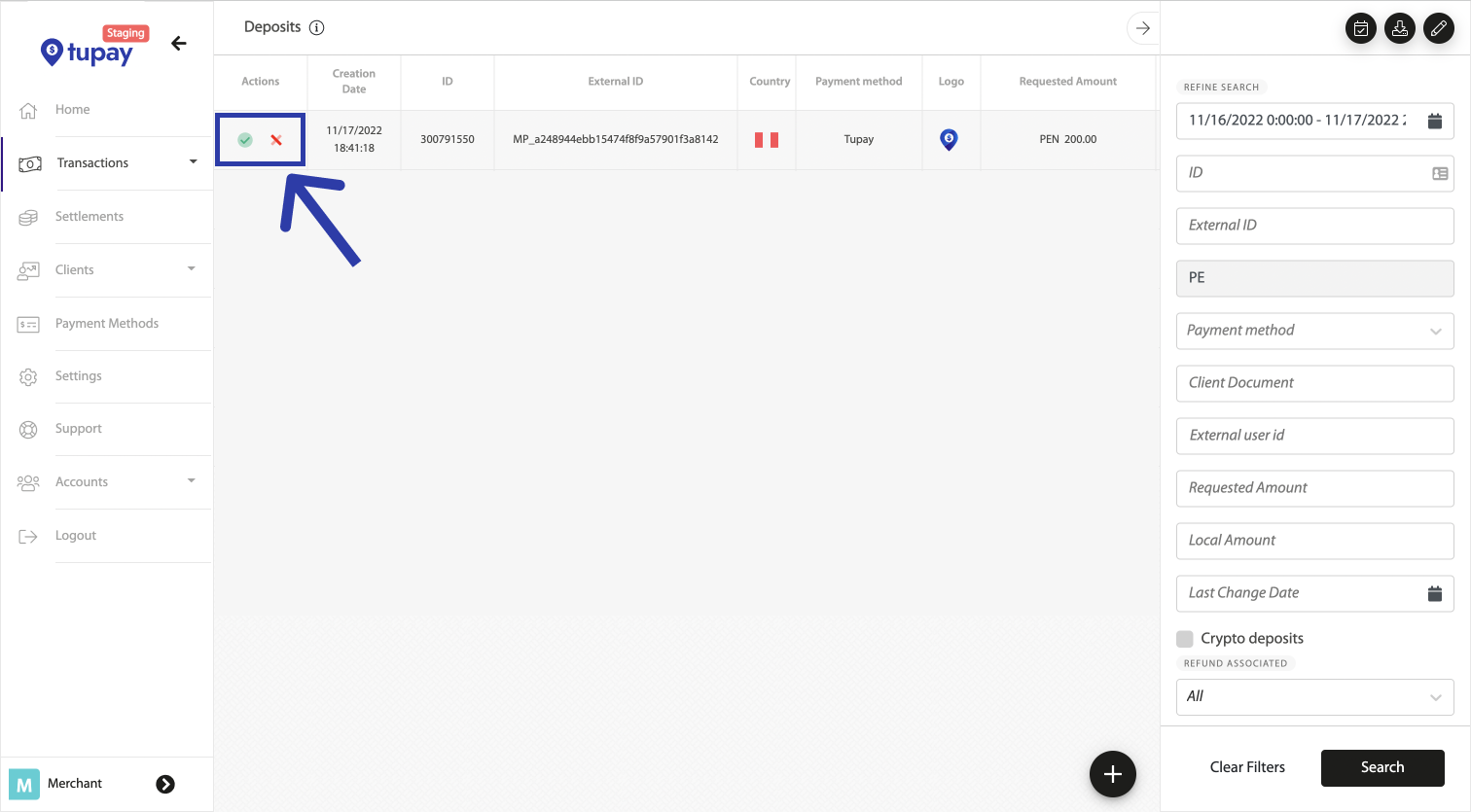
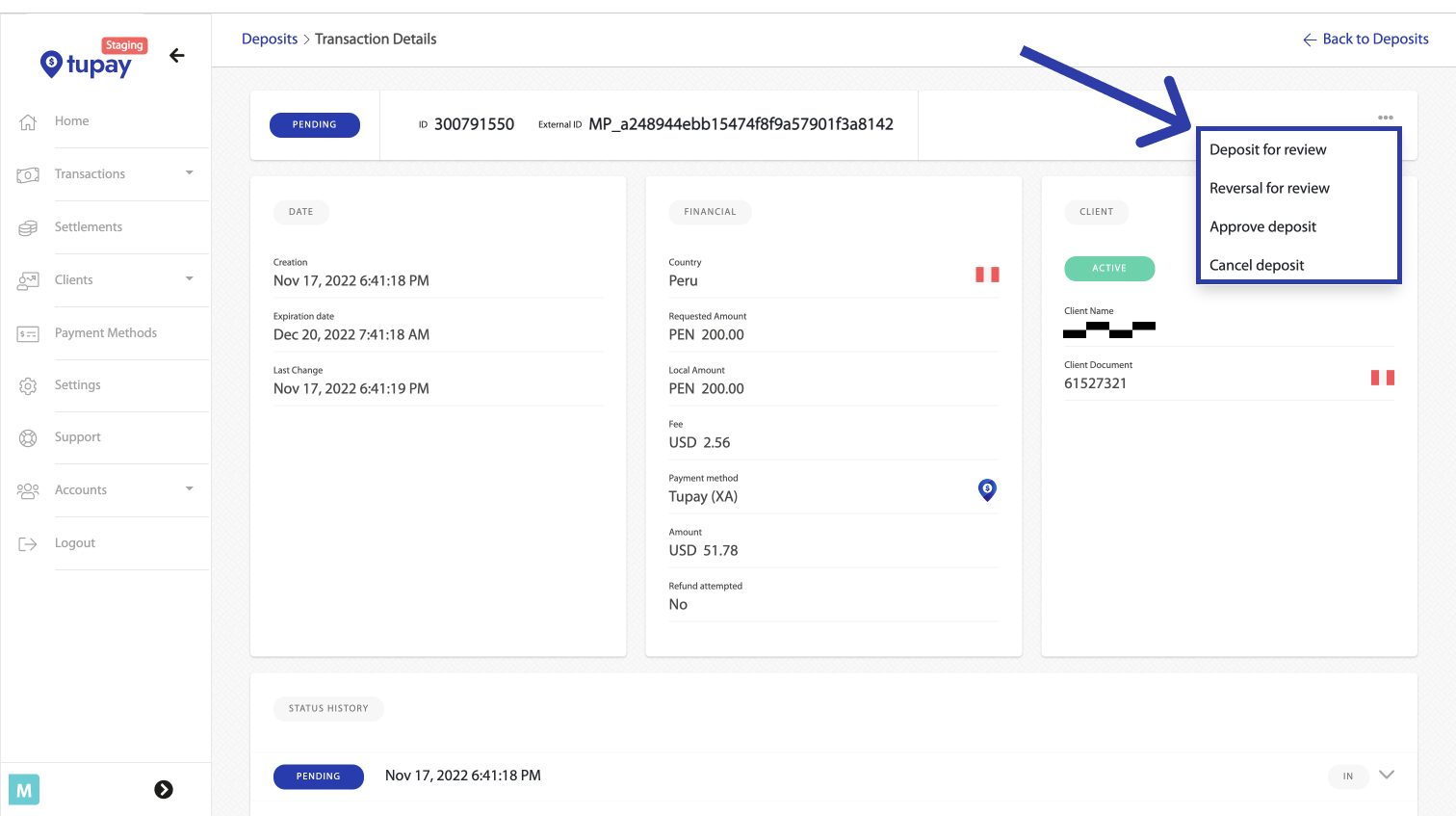
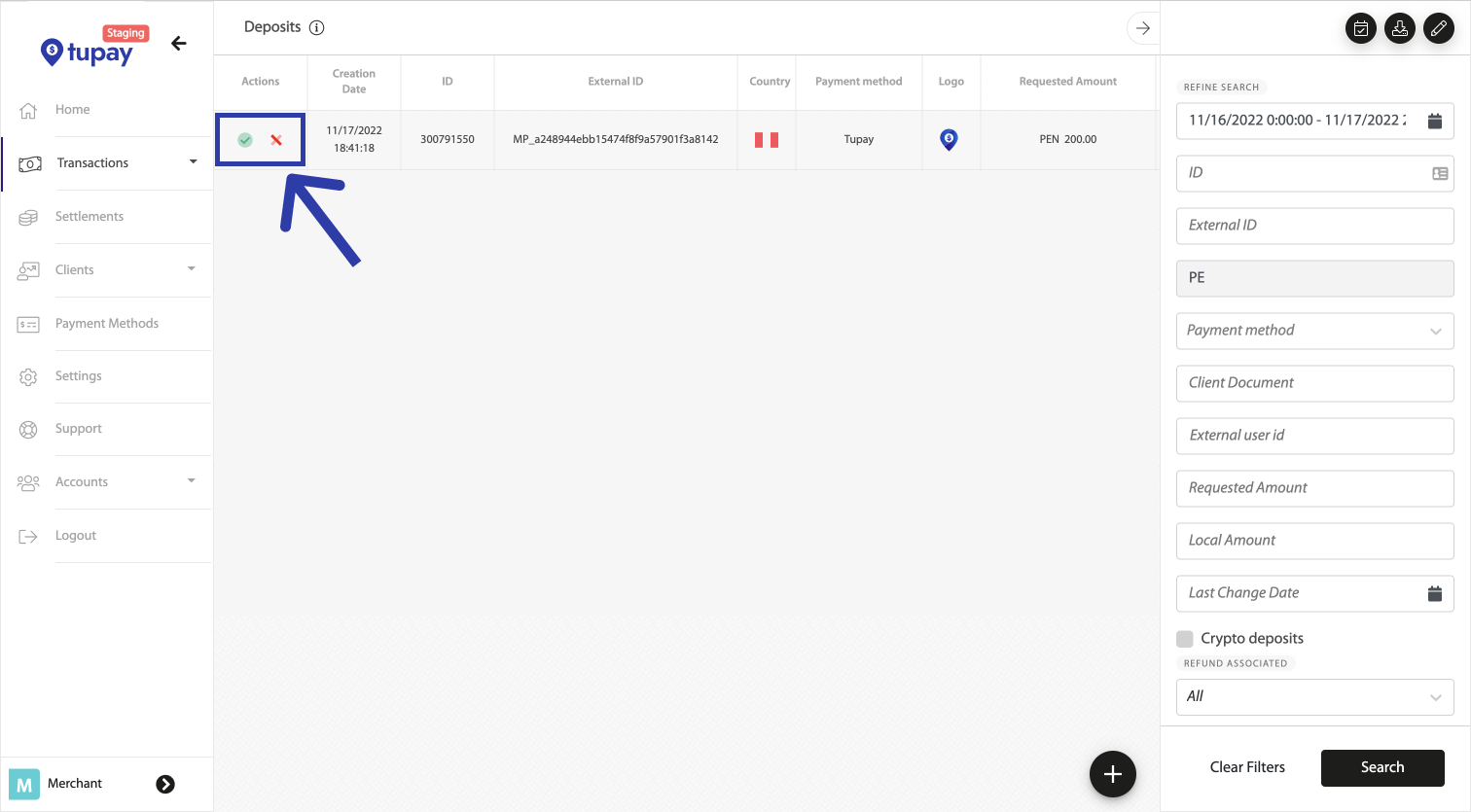
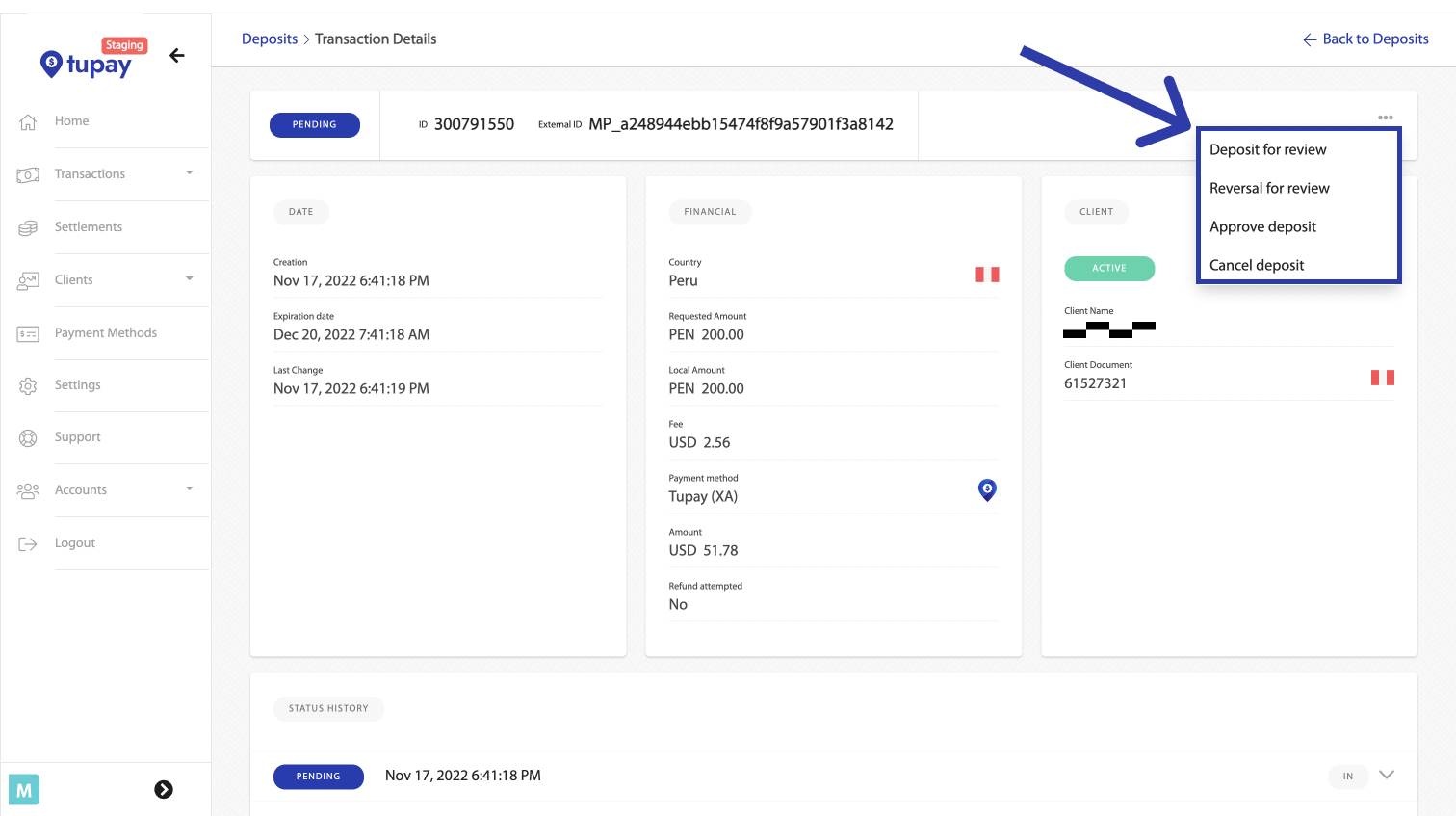
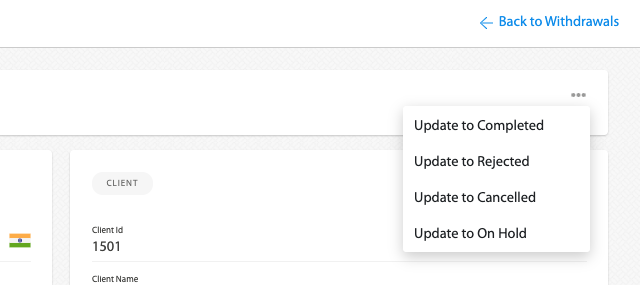
En el ambiente de STG tienen la posibilidad de probar el flujo completo tras completar o cancelar el estado de los depósitos de manera manual. Ingresando al STG Tupay Panel, yendo a Transactions -> Deposits. **Luego de cambiar el estado del depósito, enviaremos la notificación correspondiente a su `notification_url` después de unos minutos.**

<div><figure><img src="https://content.gitbook.com/content/GjMKy3VezYlJlCCcjySW/blobs/efCofpWzEO1tm9cfBtxP/Cancel%20deposits.png" alt=""><figcaption><p>Aprobar/Cancelar desde la sección de Depósitos. <span data-gb-custom-inline data-tag="emoji" data-code="1f60e">😎</span></p></figcaption></figure> <figure><img src="https://content.gitbook.com/content/GjMKy3VezYlJlCCcjySW/blobs/6G9Kd4kpu9Ry7JcF6BI1/Frame%206.png" alt=""><figcaption><p>También puedes Aprobar/Cancelar depósitos desde el detalle de la transacción.</p></figcaption></figure></div>

### <mark style="color:blue;">Respuesta de la notificación</mark> <a href="#notifications-fields" id="notifications-fields"></a>

```
{
"deposit_id": 3000000001
}​
```

<table><thead><tr><th width="158.33333333333331">Campo</th><th width="111">Formato</th><th>Descripción</th></tr></thead><tbody><tr><td>deposit_id</td><td>Number</td><td>Identificador del depósito.<br>Úselo para consultar el estado del Depósito.​</td></tr></tbody></table>

### <mark style="color:blue;">Lógica de Reintentos y Reenvío de Notificaciones</mark>

{% tabs %}
{% tab title="Lógica de reintento" %}
Cada vez que un depósito cambia su estado, le enviaremos una notificación para que pueda [consultar su nuevo estado](/documentacion-de-la-api/tu-multipay/endpoint-estado).

\
En caso de que por algún motivo su servidor no haya podido recibir la notificación y se nos haya devuelto un código HTTP distinto a 2XX, reintentaremos el envío de la notificación hasta 5 veces más o hasta que se nos responda con HTTP 2XX, lo que suceda primero.

{% hint style="info" %}
En caso de que por algún motivo su servidor no haya podido recibir la notificación, asegúrese de responder con un código HTTP distinto de 2XX, así reintentamos el envío.
{% endhint %}

El tiempo entre cada uno de los 5 reintentos de notificación es exponencial: 5, 25, 125 y 625 minutos, en ese orden.

\
Cuando el envío de una notificación falla, se verá de la siguiente manera en el Tupay Panel:

<figure><img src="https://2476386583-files.gitbook.io/~/files/v0/b/gitbook-legacy-files/o/assets%2F-M792I7hN0PzC-Sx95CP%2F-M9WWikD8y9ipNcz8Cq5%2F-M9_UqvQBGblaqYL1-oD%2Fimage.png?alt=media&#x26;token=a4343fd9-589b-4e31-bfc8-850daf84e58b" alt=""><figcaption></figcaption></figure>

Si usted ve errores como en la captura de pantalla superior, significa que el depósito fue completado con éxito, el dinero acredita en el balance de su cuenta, pero estamos recibiendo errores a la hora de notificar.
{% endtab %}

{% tab title="Reenvío de Notificaciones" %}
En caso de que no haya podido recibir ninguno de los 5 reintentos de notificación, siempre puede [volver a consultar el estado del Depósito.​](/documentacion-de-la-api/tu-multipay/endpoint-estado)

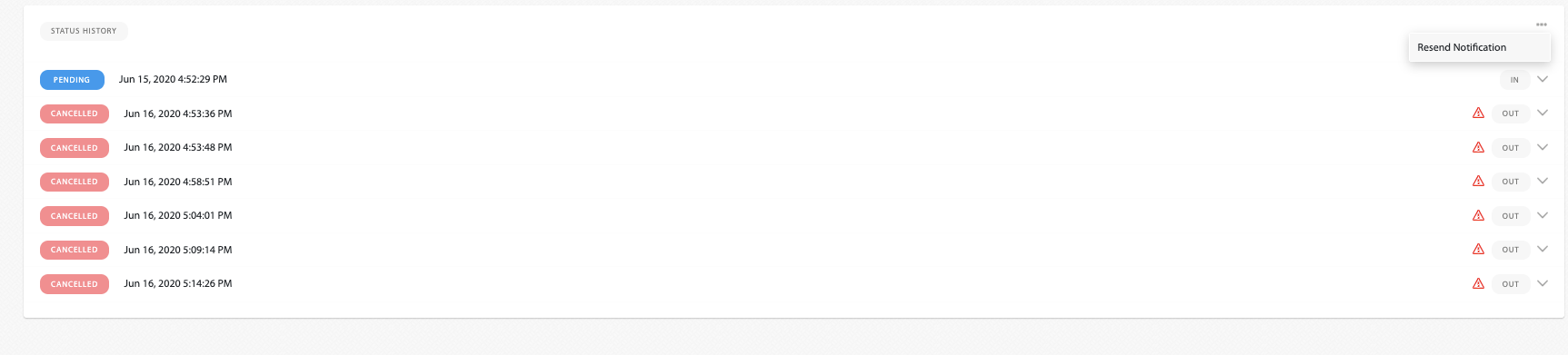
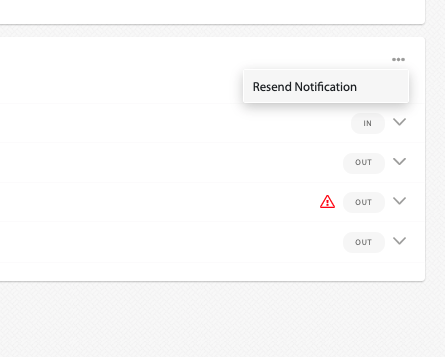
Si usted necesita ejecutar este consulta de estado a partir de nuestra notificación, una vez que haya resuelto el problema en la recepción de las notifcaciones, puede ir al Tupay Panel, localizar el Depósito (Transactions -> Deposits) y hacer click en el botón con tres puntos bajo la sección "Status History" y clickear en "Resend notification" para forzar el reenvío de una nueva notificación.

{% hint style="success" %}
Puede tomar hasta 1 minuto en que se vuelva a enviar la notificación.
{% endhint %}

<figure><img src="https://2476386583-files.gitbook.io/~/files/v0/b/gitbook-legacy-files/o/assets%2F-M792I7hN0PzC-Sx95CP%2F-M9zSa_quB7AK0C4EfRV%2F-M9zU27QNwGCCPG-JJEq%2Fimage.png?alt=media&#x26;token=3a420e35-11b0-4e22-9110-61a72568f557" alt=""><figcaption></figcaption></figure>
{% endtab %}
{% endtabs %}


# Tu Payout

Encuentre a continuación la descripción de un flujo de retiro utilizando la integración de retiros Tupay.

1 - A petición de su cliente, envía una solicitud de retiro a través de la API de Solicitud de retiro o a través del panel de Comerciantes (Transacciones -> Retiros -> Solicitar retiro).

2 - Las validaciones iniciales las realiza la API, como por ejemplo: Saldo de la cuenta comercial suficiente para cubrir el retiro Los límites de transacciones/diarios/mensuales de la cuenta de comerciante permiten el retiro Los datos de la cuenta bancaria de destino son correctos. Los datos del cliente son correctos. P. ej. Identificación del documento.

3 - Si el paso anterior es correcto, el retiro se crea y permanece en estado PENDIENTE, de lo contrario, se RECHAZA. Si es pendiente, se enviará al banco para su procesamiento; cuando esto suceda, el estado se establecerá en ENTREGADO.

4 - Una vez que la transacción regresa del banco, puede ser COMPLETADA o RECHAZADA (por el banco).

Hay algunos casos en los que el banco podría confirmar el retiro y luego rechazarlo porque la cuenta bancaria del destinatario, por algún motivo, no pudo recibir los fondos. Éste es un caso de esquina, pero debe considerarse al realizar la integración.


# Aspectos Técnicos

## <mark style="color:blue;">Consideraciones de Seguridad</mark>

* Todos los requests deben ser hechos mediante [HTTPS](http://en.wikipedia.org/wiki/HTTP_Secure). HTTP fallará
* Los pedidos a la API sin la signature también fallarán.
* Solo podrán utilizar nuestra API después de agregar IPs a las whitelist.

## <mark style="color:blue;">Ambientes</mark>

Los distintos ambientes tienen distintos dominios.

| Environment | Domain                                            |
| ----------- | ------------------------------------------------- |
| Staging     | `https://api-stg.tupayonline.com/`                |
| Producción  | Se le informará una vez que finalicen las pruebas |

{% hint style="info" %}
Notes:

* Se utilizará el ambiente de Staging para integrarse
* El ambiente de Staging y Producción no estan conectados de ninguna forma
* Ninguna transacción hecha en Staging se presentará en Producción.
* Las API Keys son distintas para Staging y Producción.
* En caso de ver el error "Insufficient Funds" en Staging pueden comunicarse vía <integration@tupaypagos.com>.
  {% endhint %}

## <mark style="color:blue;">Whitelist IPs</mark>

Por razones de seguridad, las IPs con las que llaman a nuestra API deben ser agregadas a una whitelist.

Para agregar sus IPs, debe ir a Configuración -> Api, y agregar todas las IPs que van a utilizar bajo las credenciales de "Retiros".

<figure><img src="https://2298703647-files.gitbook.io/~/files/v0/b/gitbook-x-prod.appspot.com/o/spaces%2FGjMKy3VezYlJlCCcjySW%2Fuploads%2FND2Lp27JSbfPd9e2C5SQ%2Fimage.png?alt=media&amp;token=9e4dce56-cf27-4b9e-b60c-3d26877dfe7b" alt="" width="298"><figcaption></figcaption></figure>

<details>

<summary><mark style="color:blue;">Nota</mark></summary>

Toda la data recibida es convertida a UTF-8. Asegúrense de que también sea convertido a UTF-8 de su lado, así ambas partes obtienen la misma información.

</details>


# Autentificación y cálculo de Signature

## <mark style="color:blue;">Autentificación</mark>

Para autenticarte, nuestra API de retiro utiliza API Keys en todos los requests. Las API Keys  se pueden obtener en Configuración -> API  -> Retiros.

{% hint style="info" %}

* Las API keys entre Staging y Produccion son distintas.
  {% endhint %}

Hay 3 credenciales que necesitara:

* Tu usuario: <mark style="color:blue;">**API KEY**</mark>
* Tu contraseña: <mark style="color:blue;">**API Passphrase**</mark>
* Tu clave secreta para generar la signature: <mark style="color:blue;">**API Signature**</mark>

<figure><img src="https://2298703647-files.gitbook.io/~/files/v0/b/gitbook-x-prod.appspot.com/o/spaces%2FGjMKy3VezYlJlCCcjySW%2Fuploads%2FQ1LyArv67UWh917C5SMk%2Fimage.png?alt=media&amp;token=5c0df9b8-9c17-453d-8ab4-37bd3cdb6311" alt=""><figcaption></figcaption></figure>

La autenticación a la API es realizado mediante [HTTP Basic Auth](http://en.wikipedia.org/wiki/Basic_access_authentication). Las API Keys deben estar en todos los  requests como el username and password.

Tu usuario y password son enviadas como <mark style="color:blue;">**API KEY**</mark>  y <mark style="color:blue;">**API Passphrase**</mark> respectivamente en el cuerpo del request.

Las API keys, como las IPs whitelisteadas, son formas de autenticarte, por ende, por favor no compartir las credenciales en ningún ámbito que sea público.

## <mark style="color:blue;">Encabezados</mark>

<table data-header-hidden><thead><tr><th width="195">Header</th><th width="101" align="center">Format</th><th width="119" align="center">Mandatory</th><th>Description</th></tr></thead><tbody><tr><td>Encabezado</td><td align="center">Formato</td><td align="center">Obligatorio</td><td>Descripción</td></tr><tr><td>Payload-Signature</td><td align="center">String</td><td align="center">Si</td><td>HMAC256 del archivo  JSON entero, utilizando su API signature</td></tr><tr><td>Content-Type</td><td align="center">String</td><td align="center">Si</td><td><code>application/json</code></td></tr><tr><td>User-Agent</td><td align="center">String</td><td align="center">Si</td><td>Server client user agent</td></tr></tbody></table>

## <mark style="color:blue;">Cálculo de Signature</mark>

Todos los requests a nuestra API de retiros deben tener el field `Payload-Signature` para asegurar la integridad y autenticarse, ya que estarán utilizando su propia API signature (secret key) para generar y encriptar un hash.&#x20;

Debe ser creado utilizando el encoding **HMAC-SHA-256 (RFC 2104)** y el payload se basa en toda la JSON Payload enviada en el body del request y notificaciones.

{% hint style="success" %}
Utilize su API Signature para generar el Hash
{% endhint %}

El campo `Payload-Signature`  en el header del request contendrá el hash generado, que incluye todo el payload del JSON

> Payload-Signature: HMAC256(jsonPayload)

Ejemplo:

> Payload-Signature: 223a9dd4784726f1536c926da7dc69155a57612c5c3c1e1b429c367a5eee67cf

<details>

<summary>Notas</summary>

* La`Payload-Signature` distingue mayúsculas y minúsculas (case sensitive)
* En caso de que el `jsonPayload` este vacío, utilice un string vacío en vez del jsonPayload
* El `jsonPayload` debe ser convertido a UTF-8 antes de convertirlo a hash, para evitar el error `Invalid Signature`

</details>

## Ejemplo <a href="#examples" id="examples"></a>

{% tabs %}
{% tab title="Java" %}

```java
import javax.crypto.Mac;
import javax.crypto.spec.SecretKeySpec;
import org.apache.commons.net.util.Base64;

String json_payload = "{ \"login\": \"cashout_API_Key\", \"pass\": \"cashout_API_Passphrase\",   \"external_id\": \"123456789\",  \"document_id\": \"1234567899\",  \"document_type\": \"\",   \"cashout_type\": \"BANK\", \"beneficiary_name\": \"Test User\", \"beneficiary_lastname\": \"Test User\",  \"country\": \"MX\",  \"amount\": 2000,  \"currency\": \"MXN\",  \"email\": \"test@test.com\", \"notification_url\": \"http:\\/\\/tupaypagos.com\\/notification\",  \"bank_code\": \"072\",\"bank_branch\": \"\",  \"bank_account\": \"1234567890\", \"account_type\": \"C\", \"address\": \"\"}";
String secretKey = "cashout_secret_key";
Mac hasher = Mac.getInstance("HmacSHA256");
hasher.init(new SecretKeySpec(secretKey.getBytes(), "HmacSHA256"));
String payload_signature = Base64.encodeBase64String(hasher.doFina
```

{% endtab %}

{% tab title="PHP" %}

```php
<?php
$json_payload = '{
"login": "cashout_API_Key",
"pass": "cashout_API_Passphrase",
"external_id": "123456789",
"document_id": "1234567899",
"document_type": "", 
"cashout_type": "BANK",
"beneficiary_name": "Test User",
"beneficiary_lastname": "Test User",
"country": "MX",
"amount": 2000,
"currency": "MXN",
"email": "test@test.com",
"notification_url": "http://www.tupayonline.com/notification",
"bank_code": "072",
"bank_branch": "",
"bank_account": "1234567890",
"account_type": "C",
"address": ""
}';
$secretKey = "cashout_secret_key";
$payload_signature = strtolower(hash_hmac('sha256', pack('A*', $json_payload), pack('A*', $secretKey)));
?>
```

{% endtab %}

{% tab title="C#" %}

```csharp
using System;
using System.Text;
using System.Security.Cryptography;

string jsonPayload = "{ \"login\": \"cashout_API_Key\", \"pass\": \"cashout_API_Passphrase\",   \"external_id\": \"123456789\",  \"document_id\": \"1234567899\",  \"document_type\": \"\",   \"cashout_type\": \"BANK\", \"beneficiary_name\": \"Test User\", \"beneficiary_lastname\": \"Test User\",  \"country\": \"MX\",  \"amount\": 2000,  \"currency\": \"MXN\",  \"email\": \"test@test.com\", \"notification_url\": \"http:\\/\\/www.tupayonline.com\\/notification\",  \"bank_code\": \"072\",\"bank_branch\": \"\",  \"bank_account\": \"1234567890\", \"account_type\": \"C\", \"address\": \"\"}";
string secretKey = "cashout_secret_key";        
byte[] keyByte = new ASCIIEncoding().GetBytes(secretKey);
byte[] jsonPayloadBytes = new ASCIIEncoding().GetBytes(jsonPayload);
byte[] hashmessage = new HMACSHA256(keyByte).ComputeHash(jsonPayloadBytes);
string payloadSignature = BitConverter.ToString(hashmessage).Replace("-", "").ToLower();
```

{% endtab %}
{% endtabs %}

<br>


# Endpoint Creación

## Endpoint Creación

<mark style="color:green;">`POST`</mark> `https://api-stg.tupayonline.com/v3/cashout`

#### Headers

| Name                                                | Type   | Description        |
| --------------------------------------------------- | ------ | ------------------ |
| Content-Type<mark style="color:red;">\*</mark>      | string | `application/json` |
| Payload-Signature<mark style="color:red;">\*</mark> | string | Control signature  |

#### Request Body

<table><thead><tr><th width="153.34765625">Name</th><th width="89.3125">Type</th><th>Description</th></tr></thead><tbody><tr><td>login<mark style="color:red;">*</mark></td><td>string</td><td><p>(max length: 32) </p><p>Tupay "Retiros" login key, encontrada en el merchant panel bajo Configuración -> API Access. </p></td></tr><tr><td>pass<mark style="color:red;">*</mark></td><td>string</td><td><p>(max length: 32) </p><p>Tupay "Retiros" Passphrase key, encontrada en el merchant panel bajo Configuracion -> API Access. </p></td></tr><tr><td>bank_account<mark style="color:red;">*</mark></td><td>string</td><td><p>(max length: 20)</p><p>CCI - Cuenta Interbancaria, únicamente números.</p></td></tr><tr><td>account_type<mark style="color:red;">*</mark></td><td>string</td><td><p>(C/S)</p><p>"C" Cuenta Corriente (Checking)<br>"S" Cuenta de ahorros (Savings)</p></td></tr><tr><td>amount<mark style="color:red;">*</mark></td><td>decimal</td><td><p>(hasta 2 decimales)</p><p>Monto del retiro en la moneda especificada</p></td></tr><tr><td>currency<mark style="color:red;">*</mark></td><td>string </td><td><p>(PEN / USD)</p><p>Tipo de moneda del Retiro <br>(<em>ISO 4217</em> format)</p></td></tr><tr><td>document_type<mark style="color:red;">*</mark></td><td>string</td><td><p>(max length: 4)</p><p><a href="#validacion-de-tipo-de-documento-de-identidad"><mark style="color:blue;"><strong>Tipo de documento de Identidad del cliente</strong></mark> </a></p></td></tr><tr><td>country<mark style="color:red;">*</mark></td><td>string</td><td><p><strong>(PE)</strong></p><p>País del retiro</p></td></tr><tr><td>beneficiary_name</td><td>string</td><td><p>(max length: 100)</p><p>Apellido del beneficiario</p></td></tr><tr><td>beneficiary_lastname<mark style="color:red;">*</mark></td><td>string</td><td><p>(max length: 100)</p><p>Nombre del beneficiario</p></td></tr><tr><td>phone</td><td>string</td><td>Número de teléfono</td></tr><tr><td>comments</td><td>string</td><td><p>(max length: 200)</p><p>Comentarios</p></td></tr><tr><td>notification_url</td><td>string</td><td><p>(max length: 300)</p><p>Si la URL de notificación es distinta a la configurada en el merchant panel, se puede configurar con este parámetro</p></td></tr><tr><td>external_id</td><td>string</td><td><p>(max length: 100)</p><p>ID único para retiros del lado de su lado</p></td></tr><tr><td>document_id<mark style="color:red;">*</mark></td><td>string</td><td><p>(max length: 12)</p><p>Numero de Identidad del cliente.</p></td></tr><tr><td>bank_code</td><td>number</td><td>Código de Billetera.</td></tr></tbody></table>

{% tabs %}
{% tab title="200 Solicitud de retiro creada exitosamente." %}

```bash
{
    "cashout_id": "8405147"
}
```

{% endtab %}

{% tab title="401 Las credenciales especificadas son incorrectas." %}

```bash
{
    "code": 401,
    "message": "Invalid credentials."
}
```

{% endtab %}

{% tab title="412 Error en la validación de datos." %}

```bash
{
    "code": 300,
    "message": "bank_account: must not be null; Invalid Bank account"
}
```

{% endtab %}
{% endtabs %}

## <mark style="color:blue;">Request de Ejemplo</mark>

{% tabs %}
{% tab title="Cashout CCI" %}

```json

{
  "login": "BcWeAdKs",
  "pass": "OGJSucxztCMEEPTdGPaxvdEzjWEM",
  "account_type": "S",
  "amount": "20",
  "bank_account": "00320001310356642337",
  "beneficiary_lastname": "Gonzales",
  "beneficiary_name": "Alex",
  "country": "PE",
  "currency": "PEN",
  "document_type": "DNI",
  "document_id": "71594743",
  "external_id": "65b3d062f0da510ead84f11d",
  "notification_url": "https://tupaypagos.com/0/notify/tupay",
  "comments":"Comentarios adicionales"
}
```

{% endtab %}

{% tab title="Cashout Wallet" %}

```json

{
  "login": "BcWeAdKs",
  "pass": "OGJSucxztCMEEPTdGPaxvdEzjWEM",
  "account_type": "",
  "bank_account": "",
  "amount": "20",
  "bank_code": "901",
  "beneficiary_lastname": "Gonzales",
  "beneficiary_name": "Alex",
  "country": "PE",
  "currency": "PEN",
  "document_type": "DNI",
  "document_id": "71594743",
  "phone": "987654321",
  "external_id": "65b3d062f0da510ead84f11d",
  "notification_url": "https://tupaypagos.com/0/notify/tupay",
  "comments":"Comentarios adicionales"
}
```

{% endtab %}
{% endtabs %}

{% tabs %}
{% tab title="Java" %}

```java
OkHttpClient client = new OkHttpClient().newBuilder()
  .build();
MediaType mediaType = MediaType.parse("application/json");
RequestBody body = RequestBody.create(mediaType, "{\n    \"login\": \"tKoFCFdhgI\",\n    \"pass\": \"7/s!w8@S:hDC2v\",\n    \"external_id\":\"postmanV3Public5321\",\n    \"account_type\": \"DNI\",\n    \"amount\": \"20\",\n    \"bank_account\": \"00320001310356642337\",\n    \"beneficiary_lastname\": \"Gonzales\",\n    \"beneficiary_name\": \"Alex\",\n    \"country\": \"PE\",\n    \"currency\": \"PEN\",\n    \"document_type\": \"DNI\",\n    \"document_id\": \"71594743\",\n    \"notification_url\": \"https://tupaypagos.com/0/notify/tupay\",\n    \"comments\":\"Comentarios adicionales\"\n}");
Request request = new Request.Builder()
  .url("https://api-stg.tupayonline.com/v3/deposits")
  .method("POST", body)
  .addHeader("Content-Type", "application/json")
  .addHeader("Payload-Signature", "af9b8d360fa1adde79db12eb700629a28dcc2b0fb61d7ddbf0b8ecc88d212056")
  .addHeader("Cookie", "GCLB=CLODnJ__1rqLhQE")
  .build();
Response response = client.newCall(request).execute();
```

{% endtab %}

{% tab title="Javascript" %}

```javascript
const myHeaders = new Headers();
myHeaders.append("Content-Type", "application/json");
myHeaders.append("Payload-Signature", "af9b8d360fa1adde79db12eb700629a28dcc2b0fb61d7ddbf0b8ecc88d212056");
myHeaders.append("Cookie", "GCLB=CLODnJ__1rqLhQE");

const raw = JSON.stringify({
  "login": "tKoFCFdhgI",
  "pass": "7/s!w8@S:hDC2v",
  "external_id": "postmanV3Public5321",
  "account_type": "DNI",
  "amount": "20",
  "bank_account": "00320001310356642337",
  "beneficiary_lastname": "Gonzales",
  "beneficiary_name": "Alex",
  "country": "PE",
  "currency": "PEN",
  "document_type": "DNI",
  "document_id": "71594743",
  "notification_url": "https://tupaypagos.com/0/notify/tupay",
  "comments": "Comentarios adicionales"
});

const requestOptions = {
  method: "POST",
  headers: myHeaders,
  body: raw,
  redirect: "follow"
};

fetch("https://api-stg.tupayonline.com/v3/deposits", requestOptions)
  .then((response) => response.text())
  .then((result) => console.log(result))
  .catch((error) => console.error(error));
```

{% endtab %}

{% tab title="PHP" %}

```php
<?php

$curl = curl_init();

curl_setopt_array($curl, array(
  CURLOPT_URL => 'https://api-stg.tupayonline.com/v3/deposits',
  CURLOPT_RETURNTRANSFER => true,
  CURLOPT_ENCODING => '',
  CURLOPT_MAXREDIRS => 10,
  CURLOPT_TIMEOUT => 0,
  CURLOPT_FOLLOWLOCATION => true,
  CURLOPT_HTTP_VERSION => CURL_HTTP_VERSION_1_1,
  CURLOPT_CUSTOMREQUEST => 'POST',
  CURLOPT_POSTFIELDS =>'{
    "login": "tKoFCFdhgI",
    "pass": "7/s!w8@S:hDC2v",
    "external_id":"postmanV3Public5321",
    "account_type": "DNI",
    "amount": "20",
    "bank_account": "00320001310356642337",
    "beneficiary_lastname": "Gonzales",
    "beneficiary_name": "Alex",
    "country": "PE",
    "currency": "PEN",
    "document_type": "DNI",
    "document_id": "71594743",
    "notification_url": "https://tupaypagos.com/0/notify/tupay",
    "comments":"Comentarios adicionales"
}',
  CURLOPT_HTTPHEADER => array(
    'Content-Type: application/json',
    'Payload-Signature: af9b8d360fa1adde79db12eb700629a28dcc2b0fb61d7ddbf0b8ecc88d212056',
    'Cookie: GCLB=CLODnJ__1rqLhQE'
  ),
));

$response = curl_exec($curl);

curl_close($curl);
echo $response;
```

{% endtab %}

{% tab title="C#" %}

```csharp
var options = new RestClientOptions("https://api-stg.tupayonline.com")
{
  MaxTimeout = -1,
};
var client = new RestClient(options);
var request = new RestRequest("/v3/deposits", Method.Post);
request.AddHeader("Content-Type", "application/json");
request.AddHeader("Payload-Signature", "af9b8d360fa1adde79db12eb700629a28dcc2b0fb61d7ddbf0b8ecc88d212056");
request.AddHeader("Cookie", "GCLB=CLODnJ__1rqLhQE");
var body = @"{" + "\n" +
@"    ""login"": ""tKoFCFdhgI""," + "\n" +
@"    ""pass"": ""7/s!w8@S:hDC2v""," + "\n" +
@"    ""external_id"":""postmanV3Public5321""," + "\n" +
@"    ""account_type"": ""DNI""," + "\n" +
@"    ""amount"": ""20""," + "\n" +
@"    ""bank_account"": ""00320001310356642337""," + "\n" +
@"    ""beneficiary_lastname"": ""Gonzales""," + "\n" +
@"    ""beneficiary_name"": ""Alex""," + "\n" +
@"    ""country"": ""PE""," + "\n" +
@"    ""currency"": ""PEN""," + "\n" +
@"    ""document_type"": ""DNI""," + "\n" +
@"    ""document_id"": ""71594743""," + "\n" +
@"    ""notification_url"": ""https://tupaypagos.com/0/notify/tupay""," + "\n" +
@"    ""comments"":""Comentarios adicionales""" + "\n" +
@"}";
request.AddStringBody(body, DataFormat.Json);
RestResponse response = await client.ExecuteAsync(request);
Console.WriteLine(response.Content);
```

{% endtab %}
{% endtabs %}

## <mark style="color:blue;">Código de Cashout para Billeteras</mark>

<table><thead><tr><th width="216.44921875">bank_code</th><th>descripcion</th></tr></thead><tbody><tr><td>901</td><td>Yape</td></tr><tr><td>902</td><td>Plin</td></tr><tr><td>921</td><td>Ligo</td></tr><tr><td>776</td><td>Prexpe</td></tr><tr><td>806</td><td>Wayki Caja Cusco</td></tr><tr><td>904</td><td>Bim</td></tr><tr><td>922</td><td>Dale</td></tr><tr><td>55</td><td>Ripley</td></tr><tr><td>775</td><td>Luquea</td></tr></tbody></table>

## <mark style="color:blue;">Validación de Tipo de Documento de Identidad</mark>

Dentro de la API de Tupay, será posible encontrar distintos tipos de documento de identidad, para ello se tiene una validación por la cantidad de dígitos. [<mark style="color:blue;">**"document\_type":"DNI"**</mark>](#user-content-fn-1)[^1] <mark style="color:blue;">**,"**</mark><mark style="color:blue;">**`document_id`**</mark><mark style="color:blue;">**":"86970864"**</mark>

<table><thead><tr><th width="353">document_type (valores)</th><th>document (Longitud de caracteres)</th></tr></thead><tbody><tr><td>PASS</td><td>Numérico 12 dígitos</td></tr><tr><td>RUC</td><td>Numérico 11 dígitos</td></tr><tr><td>CE</td><td>Numérico 9 dígitos</td></tr><tr><td>DNI</td><td>Numérico 8 dígitos</td></tr></tbody></table>

## <mark style="color:blue;">Código de Errores</mark>

### Códigos de error de rechazo de retiro.

<table><thead><tr><th width="105.33333333333331">Codigo</th><th width="245.2265625">Nombre</th><th>Description</th></tr></thead><tbody><tr><td>800</td><td><code>ERROR_ACCOUNT_INCORRECT</code></td><td>Cuenta de banco inválida</td></tr><tr><td>801</td><td><code>ERROR_ACCOUNT_CLOSED</code></td><td>Cuenta de banco cerrada</td></tr><tr><td>802</td><td><code>ERROR_AMOUNT_INCORRECT</code></td><td>Monto invalido</td></tr><tr><td>803</td><td><code>ERROR_BANK_INVALID</code></td><td>Bank code inválido</td></tr><tr><td>804</td><td><code>ERROR_BANK_BRANCH_INCORRECT</code></td><td>Bank branch inválida</td></tr><tr><td>805</td><td><code>ERROR_BENEFICIARY_DOCUMENT_ID_INVALID</code></td><td>Documento del cliente inválido</td></tr><tr><td>806</td><td><code>ERROR_BENEFICIARY_NAME_INCORRECT</code></td><td>Nombre del cliente distinto al de la cuenta bancaria</td></tr><tr><td>807</td><td><code>ERROR_REJECTED_BY_BANK</code></td><td>Rechazado por el banco</td></tr><tr><td>808</td><td><code>ERROR_OTHER</code></td><td>Otro</td></tr><tr><td>809</td><td><code>WITHDRAWAL_EXPIRED</code></td><td>Reitro expirado</td></tr><tr><td>810</td><td><code>LIMIT_EXCEEDED</code></td><td>Limite excedido</td></tr><tr><td>811</td><td><code>RISK_POLICY</code></td><td>Marcado como operación riesgosa por el banco</td></tr><tr><td>812</td><td><code>BLOCKED_FROZEN_ACCOUNT</code></td><td>Cuenta bloqueada/congelada</td></tr><tr><td>813</td><td><code>DOCUMENT_ACCOUNT_MISMATCH</code></td><td>Documento del cliente no coincide</td></tr><tr><td>816</td><td><code>INVALID_ACCOUNT_OR_IFSC_CODE</code></td><td>Cuenta de banco o código IFSC inválidos</td></tr><tr><td>818</td><td><code>ACCOUNT_UNABLE</code></td><td>Esta cuenta no puede recibir transferencias</td></tr><tr><td>819</td><td><code>INVALID_ACCOUNT_TYPE</code></td><td>Tipo de cuenta inválido</td></tr></tbody></table>

### Códigos de error internos de retiro

<table><thead><tr><th width="104">Codigo</th><th>Descripción</th></tr></thead><tbody><tr><td>300</td><td>Invalid params + [param name] + [reason]</td></tr><tr><td>302</td><td>Invalid control string. </td></tr><tr><td>303</td><td>Invalid bank code</td></tr><tr><td>401</td><td>Invalid credentials</td></tr><tr><td>402</td><td>Unregistered IP address (Go to API Access to whitelist the IP in the Merchant Panel)</td></tr><tr><td>502</td><td>Invalid request body  -  Please check that the JSON is well formatted</td></tr><tr><td>504</td><td>User unauthorized due to cadastral situation.</td></tr><tr><td>508</td><td>Limit exceeded: {TRANSACTION|DAILY|MONTHLY|USER MONTHLY QUANTITY}</td></tr><tr><td>509</td><td>Cashout not found with this ID</td></tr><tr><td>510</td><td>Invalid status: cashout is not Pending</td></tr><tr><td>511</td><td>External ID already used</td></tr><tr><td>514</td><td>Insufficient funds</td></tr><tr><td>515</td><td>Invalid user status: {BLACKLISTED|BLOCKED|SUSPENDED}</td></tr><tr><td>518</td><td>Country not available</td></tr><tr><td>519</td><td>Merchant not enabled. Contact your Account Manager</td></tr><tr><td>524</td><td>Invalid Credentials. Contact integration@tupaypagos.com</td></tr><tr><td>525</td><td>Close loop rejection</td></tr><tr><td>526</td><td>Invalid currency</td></tr><tr><td>533</td><td>Invalid Amount. The minimum amount is {currency} {amount} or equivalent in USD</td></tr><tr><td>537</td><td>Could not make the cashout. Contact integration@tupaypagos.com</td></tr><tr><td>538</td><td>Invalid account status: {BLACKLISTED}</td></tr><tr><td>539</td><td>Payout method unavailable. The country and/or bank selected is not available. Please check with your Account Manager</td></tr><tr><td>540</td><td>Beneficiary email or phone is required</td></tr><tr><td>541</td><td>email already used by another beneficiary</td></tr><tr><td>542</td><td>phone already used by another beneficiary</td></tr><tr><td>543</td><td>must be a<a href="broken://pages/-M8muWcG4tmJbnohBWM5#phone-numbers-validations"> </a>valid phone number</td></tr><tr><td>702</td><td>Could not cancel cashout</td></tr><tr><td>703</td><td>Could not make the cashout. Contact integration@tupaypagos.com</td></tr></tbody></table>

[^1]:


# Endpoint Estado

## Endpoint  Estado

<mark style="color:green;">`POST`</mark> `https://api-stg.tupayonline.com/v3/cashout/status`

#### Headers

| Name                                                | Type   | Description        |
| --------------------------------------------------- | ------ | ------------------ |
| Content-Type<mark style="color:red;">\*</mark>      | string | `application/json` |
| Payload-Signature<mark style="color:red;">\*</mark> | string | Control signature  |

#### Request Body

| Name                                           | Type   | Description                                                                                                                       |
| ---------------------------------------------- | ------ | --------------------------------------------------------------------------------------------------------------------------------- |
| login<mark style="color:red;">\*</mark>        | string | <p>(max length: 32) </p><p>Tupay "Retiros" login key, encontrada en el merchant panel bajo Configuración -> API Access. </p>      |
| external\_id<mark style="color:red;">\*</mark> | string | <p>(max length: 100)</p><p>ID único para retiros del lado de su lado</p>                                                          |
| cashout\_id<mark style="color:red;">\*</mark>  | number | El ID del retiro para verificar el estado. Es el que generó TuPay cuando se creó el retiro.                                       |
| pass<mark style="color:red;">\*</mark>         | string | <p>(max length: 32) </p><p>Tupay "Retiros" Passphrase key ,encontrada en el merchant panel bajo Configuracion -> API Access. </p> |

{% tabs %}
{% tab title="200 Solicitud de retiro creada exitosamente." %}

```bash
{
    "cashout_status": 1,
    "cashout_status_description": "Completed"
}
{
    "cashout_status": 3,
    "cashout_status_description": "Rejected",
    "rejection_code": 808,
    "rejection_reason": "ERROR_OTHER"
}
```

{% endtab %}

{% tab title="401 Las credenciales especificadas son incorrectas." %}

```bash
{
    "code": 401,
    "message": "Invalid credentials."
}
```

{% endtab %}

{% tab title="412 Retiro no encontrado con esta identificación" %}

```bash
{
    "code": 509,
    "message": "Cashout not found with this ID"
}
```

{% endtab %}
{% endtabs %}

```json
{ 
    "login": "cashout_login", 
    "pass": "cashout_pass", 
    "cashout_id": 11954,
    "external_id":"s2kdfm39494"
}
```

## <mark style="color:blue;">Flujo de Estado de Retiro</mark>

<figure><img src="https://2298703647-files.gitbook.io/~/files/v0/b/gitbook-x-prod.appspot.com/o/spaces%2FGjMKy3VezYlJlCCcjySW%2Fuploads%2FyLwWxfwE612Ztg3PnIw0%2Fimage.png?alt=media&amp;token=73d039f1-3820-47dc-9c1e-823bd9e8d639" alt=""><figcaption><p>Diagrama de estado de retiros</p></figcaption></figure>

## <mark style="color:blue;">Código de Estados</mark>

<table><thead><tr><th width="94" align="center">Code</th><th width="165" align="center">Meaning</th><th>Description</th></tr></thead><tbody><tr><td align="center">0</td><td align="center"><img src="https://2476386583-files.gitbook.io/~/files/v0/b/gitbook-legacy-files/o/assets%2F-M792I7hN0PzC-Sx95CP%2F-M9UZX6c7bK760aeWd8v%2F-M9Uq6hh3MZ301JtlBh4%2FUntitled%20Diagram.svg?alt=media&#x26;token=41bf91d1-9560-4eca-ae31-31076fa4318a" alt=""></td><td>El retiro fue aceptado por Tupay, pero todavía no fue enviado al banco. Todavía puede ser cancelado.</td></tr><tr><td align="center">1</td><td align="center"><img src="https://2476386583-files.gitbook.io/~/files/v0/b/gitbook-legacy-files/o/assets%2F-M792I7hN0PzC-Sx95CP%2F-M9UZX6c7bK760aeWd8v%2F-M9UsDlL5PDQXBDL5CUD%2FCOMPLETED.svg?alt=media&#x26;token=92d1f295-7b3c-4ad5-b0ce-eb123df5b7ed" alt=""></td><td>El dinero llegó a la cuenta del cliente.</td></tr><tr><td align="center">2</td><td align="center"><img src="https://2476386583-files.gitbook.io/~/files/v0/b/gitbook-legacy-files/o/assets%2F-M792I7hN0PzC-Sx95CP%2F-M9UZX6c7bK760aeWd8v%2F-M9UsJ4Co_cg-RzJZT6c%2FCANCELLED.svg?alt=media&#x26;token=740308bc-8d16-47b4-b463-5dcb696664f5" alt="" data-size="original"></td><td>El retiro fue cancelado por usted</td></tr><tr><td align="center">3</td><td align="center">REJECT</td><td>El retiro fue cancelado por el banco (documento inválido, cuenta inválida, etc.)</td></tr><tr><td align="center">4</td><td align="center">DELIVERED</td><td>El retiro fue enviado al banco para ser procesado. Ahora ya no puede ser cancelado</td></tr><tr><td align="center">5</td><td align="center">ON HOLD</td><td>El retiro fue puesto en espera. Pueden pasarlo nuevamente a pending cuando sea necesario.</td></tr></tbody></table>


# Proceso de Notificación

## <mark style="color:blue;">Notificación</mark>

Una notificación será enviada cada vez que cambie el status de un retiro.&#x20;

Por razones de seguridad no enviamos el estado del retiro en la notificación. Una vez que enviamos la notificación, puede ser sacada utilizando el Endpoint de Estado de Retiro.

&#x20;Las notificaciones serán enviadas a la `notification_url` en el request, o por de default en la "URL de Retiros" que está configurada en su panel vía **POST** protocolo en el formato **x-www-form-urlencoded.**

## <mark style="color:blue;">Testing en Staging</mark>

En el entorno STG, puede forzar que se envíe una notificación a su URL de notificación desde el Panel de Comerciantes de STG yendo a la página Transacciones -> Retiros, abriendo la transacción de retiro y haciendo clic en una de las opciones que aparecerán al hacer clic en el botón de tres puntos en la parte superior derecha de la pantalla. Esas opciones cambiarán el estado del retiro y enviarán la notificación respectiva después de unos minutos.

## &#x20;![](https://content.gitbook.com/content/GjMKy3VezYlJlCCcjySW/blobs/uSKTqNjUUjYLM3CDwDeL/image.png)

## <mark style="color:blue;">Respuesta de la notificación</mark> <a href="#notifications-fields" id="notifications-fields"></a>

```json
    date=2020-03-12%2020%3A26%3A11
    &bank_reference_id=
    &comments=
    &external_id=cashoutV35381
    &control=A4CFF64E78C4BD01F8BFCA4AFF04632EC4A33CC61BD6BBD156BA1289897892EB
    &cashout_id=60067
    &status_reason=
```

<table data-header-hidden><thead><tr><th width="186.33333333333331">Campo</th><th width="242">Formato</th><th>Descripcion</th></tr></thead><tbody><tr><td>Campo</td><td>Formato</td><td>Descripción</td></tr><tr><td>date</td><td>Fecha. Formato: YYYY-MM-DD HH:MM:SS (GMT)</td><td>Fecha que el retiro cambio su estado</td></tr><tr><td>bank_reference_id</td><td>string</td><td><p>(max length 50)</p><p>Id de referencia del banco (si aplica)</p></td></tr><tr><td>comments</td><td>string</td><td><p>(max length 200)</p><p>Comentarios (si aplica)</p></td></tr><tr><td>external_id</td><td>string</td><td><p>(max length 100)</p><p>ID del retiro que enviaron al crearlo</p></td></tr><tr><td>control</td><td>string</td><td>Control signature de la notificacion</td></tr><tr><td>cashout_id</td><td>number</td><td>ID del retiro de nuestro lado</td></tr><tr><td>status_reason</td><td>string</td><td>Razon del estado (si aplica)</td></tr></tbody></table>

El control string de las notificaciones está compuesto por caracteres aleatorios al principio y al fin del request, y la  `external_id` recibido en el medio.

{% hint style="info" %}
El control string debería ser generado utilizando su secret key (API Signature) y debe estar en mayúsculas.&#x20;

Asegurarse de convertir el mensaje a hash en formato UTF-8 para prevenir errores.
{% endhint %}

Ejemplos:

{% tabs %}
{% tab title="JAVA" %}

```java
public static void main(String[] args) throws IOException, NoSuchAlgorithmException, InvalidKeyException {
      String external_id = "cashoutID1234";
      String message = "Be4" + external_id + "Bo7";
      String apiSignature = "your_deposits_api_signature";

      Mac hasher = Mac.getInstance("HmacSHA256");
      hasher.init(new SecretKeySpec(apiSignature.getBytes(StandardCharsets.UTF_8), "HmacSHA256"));
      byte[] result = hasher.doFinal(message.getBytes(StandardCharsets.UTF_8));

      System.out.println(StringUtils.upperCase(DatatypeConverter.printHexBinary(result)));
}

```

{% endtab %}

{% tab title="PHP" %}

```php
$external_id = 'cashoutID1234';
$message = 'Be4' . $external_id . 'Bo7';
$api_signature = 'cashout_api_signature';

$hash = strtoupper(hash_hmac('sha256', pack('A*', $message), pack('A*', $api_signature)));

```

{% endtab %}

{% tab title="C#" %}

```csharp
 string external_id = "cashoutID1234";
 string message = "Be4" + external_id + "Bo7";
 string apiSignature = "your_cashouts_api_signature";
 
 byte[] keyByte = new System.Text.Encoding.UTF8.GetBytes(apiSignature);
 byte[] messageBytes = new System.Text.Encoding.UTF8.GetBytes(message);
 byte[] hashmessage = new HMACSHA256(keyByte).ComputeHash(messageBytes);

 string control = BitConverter.ToString(hashmessage).Replace("-", "").ToUpper();
```

{% endtab %}
{% endtabs %}

## <mark style="color:blue;">Lógica de Reintentos y Reenvió de Notificaciones</mark>

{% tabs %}
{% tab title="Logica de reintentos" %}
Cada vez que el estado del retiro cambie, enviaremos una notificación con este cambio.&#x20;

En caso de que su servidor no pueda recibir la notificación, y fue devuelto un código HTTP code diferente a 2XX, se reintentará enviar la notificación 5 veces o hasta que un código HTTP 2XX sea presente, lo que pase primero.&#x20;

{% hint style="success" %}
En caso de errores, asegúrense de que la notificación enviada sea distinta a una con código HTTP 2XX, así se reintenta automáticamente.
{% endhint %}
{% endtab %}

{% tab title="Reenviar notificaciones." %}
En caso de que su sistema no pudo recibir la notificación correcta luego de 5 intentos, se podrá realizar manualmente.&#x20;

Esto se puede realizar yendo al merchant panel, elegir el retiro (transacciones --> Retiros), y hacer click en los 3 puntos arriba a la derecha del estado de la notificación, y tocar "reenviar notificación".

{% hint style="success" %}
La notificación puede tardar hasta 2 minutos en ser reenviada.
{% endhint %}
{% endtab %}
{% endtabs %}


# Tu Recaudo


# Aspectos Técnicos

Aprende sobre nuestros aspectos técnicos y seguridad de nuestra API.

## Consideraciones Técnicas

* Todas las llamadas a nuestra API deben ser hechas sobre [HTTPS. ](http://en.wikipedia.org/wiki/HTTP_Secure)Llamadas hechas sobre HTTP Plain van a fallar.
* Llamadas a la API sin autenticación también fallarán.
* Solo podrán hacer pegadas a nuestras APIs desde las IPs que haya previamente whitelisteado desde el Panel Tupay (o Panel Tupay STG).

## Ambientes

Toda la integración debe ser hecha dentro de nuestro ambiente de STG, dónde pueden realizar pruebas sin riesgo de ningún tipo.

Cuando se registren con nosotros, les generaremos una cuenta en el ambiente de STG dónde podrán hacer lo siguiente:

* Ver las transacciones creadas
* Aprobar y cancelar transacciones
* Acceder a las credencials de la API de STG
* Whitelistear sus IPs, y más.

### Dominios de los Endpoints

Cada ambiente tiene su propio dominio. La ruta a los endpoints no cambian.

| Ambiente   | Dominio                                                                          |
| ---------- | -------------------------------------------------------------------------------- |
| Staging    | <https://turecaudo-api-stg.tupaypagos.com>                                       |
| Producción | [https://turecaudo-api.tupaypagos.com](https://turecaudo-api-stg.tupaypagos.com) |

{% hint style="info" %}
**Notas**

* Deben usar el Endpoint de STG durante la integración.
* Los ambientes de STG y Producción no están comunicados de ninguna manera.
* Ninguna transacción realizada en el ambiente STG se verá reflejada en Producción y viceversa.
* Las Credenciales de la API y las configuraciones entre ambientes tambien son diferentes.
  {% endhint %}


# Autorización y cálculo de Signature

## <mark style="color:blue;">Credenciales de la API</mark>

Nuestra API de Depósitos usa las Credenciales para autenticar todas las llamadas. Podrán encontrar sus credenciales en el **Panel Tupay**, desde **Settings -> API Access**.

* Las Credenciales de los ambientes de STG y Producción son diferentes.

Básicamente, hay dos juegos de credenciales:

* Un juego de Credenciales para llamadas del tipo POST, que contiene una API Key y una API Signature.
* Un juego de Credenciales read-only, que contiene una API Key.

La Autenticación para la API es hecha vía [HTTP Basic Auth](http://en.wikipedia.org/wiki/Basic_access_authentication). Se debe enviar la API Key en todos las llamadas como autenticación básica del valor username. No se requiere proveer una contraseña.

La API Key debe ser enviada en todas las llamadas a la API usando el campo X-Login en los encabezados del request.

## <mark style="color:blue;">Encabezados</mark>

<table><thead><tr><th width="204">Encabezado</th><th width="100">Formato</th><th width="122">Obligatorio</th><th>Descripción</th></tr></thead><tbody><tr><td>Authorization</td><td>String</td><td>Si</td><td><code>"TUPAY"</code> más un hash HMAC256 para verificar la integridad de las llamadas.</td></tr><tr><td>X-Login</td><td>String</td><td>Si</td><td>Su <code>API Key</code></td></tr><tr><td>X-Date</td><td>String</td><td>Si</td><td>Fecha según el estándar ISO 8601 en el siguiente formato: <code>yyyy-MM-dd'T'HH:mm:ssZ</code>. E.g.: <code>2020-06-21T12:33:20Z</code></td></tr><tr><td>Content-Type</td><td>String</td><td>Si</td><td><code>application/json</code></td></tr><tr><td>X-Idempotency-Key</td><td>String</td><td>Si</td><td>Valor único generado por el cliente que usa el servidor para reconocer reintentos subsecuentes de la misma llamada.</td></tr></tbody></table>

## <mark style="color:blue;">Cálculo de Signature</mark>

Todas las llamadas a nuestra API de Depósitos debe contener el campo Authorization en el encabezado para asegurar la integridad de la llamada y autenticar las credenciales del Comercio, ya que usaran su propia secret key (también llamada API Signature).

Tiene que ser creada usando codificación **HMAC-SHA-256 (RFC 2104)** y el contenido debe incluir los siguientes detalles:

> [X-Date](#notas) + [X-Login](#notas) + `JSONPayload`

{% hint style="success" %}
Usa tu API Signature para generar el valor `Authorization`.
{% endhint %}

El campo `Authorization` en el encabezado de la llamada debe contener el string "TUPAY " más el hash generado, en el siguiente formato:

> Authorization: "TUPAY " + HMAC256(X-Date + X-Login + JSONPayload)

Ejemplo:

> Authorization: TUPAY 223a9dd4784726f1536c926da7dc69155a57612c5c3c1e1b429c367a5eee67cf

<details>

<summary>Notas</summary>

* Él [`X-Login`](#notas) es su API Key, puede ser encontrada en el Tupay Panel, yendo a Settings -> API Access -> Deposit credentials -> API Key.
* El [`X-Date`](#notas) es la fecha en ISO8601 Datetime con huso horario. El formato esperado es:  ISO8601 Datetime con huso horario: <mark style="color:blue;">`yyyy-MM-dd'T'HH:mm:ssZ`</mark>. Ejemplo: [<mark style="color:blue;">`2020-06-21T12:33:20Z`</mark>](#user-content-fn-1)[^1].&#x20;
* El <mark style="color:blue;">`JSONPayload`</mark> debe ser convertido a UTF-8 antes del hashing para prevenir el error Invalid Signature cuando se envían caracteres con distinta codificación.

</details>

{% tabs %}
{% tab title="Llamadas Idempotencia" %}
Nuestra API soporta [Idempotencia](https://es.wikipedia.org/wiki/Idempotencia) para reintentar llamadas de forma segura, evitando realizar la misma operación de forma duplicada por error. Esto resulta útil cuando una llamada a la API es corrompida en tránsito y la respuesta no es recibida. Por ejemplo, si una llamada al Endpoint de Creación de Depósitos no tiene respuesta debido a un error en la conexión de red, puedes reintentar la llamada con la misma Idempotency key para garantizar que no se genere más de un depósito.

Para poder crear una llamada Idempotente se precisa enviar el encabezado `X-Idempotency-Key: <key>`  con un String generado aleatoriamente.

La Idempotencia funciona guardando el código de estatus y el cuerpo de la primer llamada hecha para cierta Idempotency key, sin importar si falló o tuvo éxito. Llamadas subsecuentes con una misma Idempotency key devolverán el mismo resultado, inclusive errores de HTTP `500`.

Una idempotency key es un valor único generado por un cliente el cual el servidor usa para reconocer llamadas con reintentos subsecuentes de la misma. Cómo se crean las claves únicas depende de usted, pero nosotros sugerimos usar V4 UUIDs, o cualquier otro string aleatorio con entropía suficiente para evitar colisiones.

Todas las llamadas `POST` aceptan idempotency keys. Enviar idempotency keys en llamadas `GET` y `DELETE` no tiene efecto alguno y deberían ser evitadas, ya que estas llamadas son idempotentes por definición.

### Content-Type

Nuestra API de Depósitos está diseñada para recibir y responder la información en formato JSON.

Este encabezado no cambiará a lo largo de las llamadas, y siempre será: `application/json`
{% endtab %}

{% tab title="IP Whitelisting" %}
Por motivos de seguridad, necesitarán hacer whitelist de sus IPs desde las cuales van a estar haciendo las llamada a nuestras APIs.\
Para hacer este proceso lo más eficiente y rápido posible, deben entrar al Tupay Panel e ir a **Settings -> API Access** y agregar la lista de IPs de las cuales podrían usar bajo la sección **Deposit IP Address**.

<figure><img src="https://2298703647-files.gitbook.io/~/files/v0/b/gitbook-x-prod.appspot.com/o/spaces%2FGjMKy3VezYlJlCCcjySW%2Fuploads%2F70vxR4qwPLqqVg69ULAd%2Fimage.png?alt=media&amp;token=5d07042c-75d7-4095-ba34-dc6291c9c8b1" alt="" width="298"><figcaption></figcaption></figure>
{% endtab %}
{% endtabs %}

<details>

<summary>Buenas Practicas</summary>

* Asegúrese siempre de verificar las Signatures control string enviados en las notificaciones para validar la veracidad.
* Toda la información que recibimos es convertida a UTF-8. Asegúrese de convertirla también a UTF-8 para garantizar que ambas partes tengan los mismos detalles.
* Siempre valide que un depósito no se libere más de una vez según el `deposit_id` (Las notificaciones se pueden enviar varias veces).\
  Asegúrese de que un depósito no es liberado más de una vez basándonos en el `deposit_id`, ya que la notificación puede ser enviada más de una vez.

</details>

## <mark style="color:blue;">Ejemplos</mark>

Revisa cómo calcular la Signature en los diferentes lenguajes.

{% tabs %}
{% tab title="PHP" %}

```php
<?php
class TupayExample {
	const TUPAY_AUTHORIZATION_SCHEME = "TUPAY ";
	const HMAC_SHA256 = 'sha256';
	
	public static function build_deposit_key_signature($api_signature, $x_date, $deposits_api_key, $json_payload) {
		// Concatenate the content of the header X-Date, your deposits API Key (X-Login) and 
		// the whole JSON payload of the body of the request
		
		$string = $x_date . $deposits_api_key . $json_payload;
		
		// Generate the HASH by using yur own deposits API Signature and 
		// concatenate "D24 " in front of the hash
		return  self::TUPAY_AUTHORIZATION_SCHEME . hash_hmac(self::HMAC_SHA256, $string, $api_signature);
	}
}
```

{% endtab %}

{% tab title="Java" %}

```java
import java.io.ByteArrayOutputStream;
import java.io.IOException;
import java.nio.charset.StandardCharsets;
import java.security.InvalidKeyException;
import java.security.NoSuchAlgorithmException;
import java.util.Formatter;
import javax.crypto.Mac;
import javax.crypto.spec.SecretKeySpec;

public static final String TUPAY_AUTHORIZATION_SCHEME = "TUPAY ";

private static final String HMAC_SHA256 = "HmacSHA256";

public static String buildDepositKeySignature(String apiSignature, String xDate, String depositKey, String JSONPayload)
      throws NoSuchAlgorithmException, InvalidKeyException, IOException {
   byte[] hmacSha256 = null;
   Mac mac = Mac.getInstance(HMAC_SHA256);
   SecretKeySpec secretKeySpec = new SecretKeySpec(apiSignature.getBytes(StandardCharsets.UTF_8), HMAC_SHA256);
   mac.init(secretKeySpec);
   hmacSha256 = mac.doFinal(buildByteArray(xDate, apiKey, JSONPayload));
   return TUPAY_AUTHORIZATION_SCHEME + toHexString(hmacSha256);
}

private static byte[] buildByteArray(String xDate, String apiKey, String JSONPayload) throws IOException {
   ByteArrayOutputStream bos = new ByteArrayOutputStream();
   bos.write(xDate.getBytes(StandardCharsets.UTF_8));
   bos.write(apiKey.getBytes(StandardCharsets.UTF_8));
   if (JSONPayload != null) {
      bos.write(payload.getBytes(StandardCharsets.UTF_8));
   }
   return bos.toByteArray();
}

private static String toHexString(byte[] bytes) {
   Formatter formatter = new Formatter();
   for (byte b : bytes) {
      formatter.format("%02x", b);
   }
   return formatter.toString();
}


```

{% endtab %}

{% tab title="C#" %}

```csharp
using System;
using System.Text;
using System.IO;
using System.Security.Cryptography;

namespace Application 
{

    class Directa24Example 
    {
    
        public readonly static string TUPAY_AUTHORIZATION_SCHEME = "TUPAY ";
        
        private readonly static string HMAC_SHA256 = "HmacSHA256";
        
        public static String buildDepositKeySignature(String apiSignature, String xDate, String depositKey, String jsonPayload)
        {
            byte[] hmacSha256 = null;
            var apiSignatureEncod = Encoding.UTF8.GetBytes(apiSignature);
            var hash = new HMACSHA256(apiSignatureEncod);
            hmacSha256 = hash.ComputeHash(buildByteArray(xDate, depositKey, jsonPayload));  
            return TUPAY_AUTHORIZATION_SCHEME + toHexString(hmacSha256).ToLower();
        }
        
        private static byte[] buildByteArray(String xDate, String apiKey, String jsonPayload)
        {
            try
            {
                MemoryStream stream = new MemoryStream();
                var xDateEncod = Encoding.UTF8.GetBytes(xDate);
                var apiKeyEncod = Encoding.UTF8.GetBytes(apiKey);
                stream.Write(xDateEncod, 0, xDateEncod.Length);
                stream.Write(apiKeyEncod, 0, apiKeyEncod.Length);
                if (!string.IsNullOrWhiteSpace(jsonPayload))
                {
                    var jsonPayloadEncod = Encoding.UTF8.GetBytes(jsonPayload);
                    stream.Write(jsonPayloadEncod, 0, jsonPayloadEncod.Length);
                }
                return stream.ToArray();
            }
            catch (Exception ex)
            {
                throw ex;
            }
        }
        
        private static string toHexString(byte[] bytes)
        {
            return BitConverter.ToString(bytes).Replace("-", string.Empty);
        }
    }
}


```

{% endtab %}
{% endtabs %}

[^1]:


# Orden de Pago Individual

## Endpoint Creación Lote Individual

<mark style="color:orange;">`STAGING POST`</mark> [<mark style="color:orange;">https://turecaudo-api-stg.tupaypagos.com/v1/payment-orders</mark>](https://turecaudo-api-stg.tupaypagos.com/v1/payment-orders)

<mark style="color:orange;">`PRODUCTION POST`</mark> [<mark style="color:orange;">https://turecaudo-api.tupaypagos.com/v1/payment-orders</mark>](https://turecaudo-api-stg.tupaypagos.com/v1/payment-orders)

#### Headers

| Name                                      | Type   | Description                                                                             |
| ----------------------------------------- | ------ | --------------------------------------------------------------------------------------- |
| Content-Type                              | string | `application/json`                                                                      |
| X-Date<mark style="color:red;">\*</mark>  | string | <p>Fecha según el estándar ISO8601 formato: <br><code>yyyy-MM-dd'T'HH:mm:ssZ</code></p> |
| X-Login<mark style="color:red;">\*</mark> | string | X-Login API Key del Comercio                                                            |
| Authorization                             | string | Hash de control de autorización                                                         |
| X-Idempotency-Key                         | string | Idempotency key única                                                                   |

#### Request Body

| Name                                                   | Type                       | Description                                                                            |
| ------------------------------------------------------ | -------------------------- | -------------------------------------------------------------------------------------- |
| `payment_reference` <mark style="color:red;">\*</mark> | String                     | Identificador único de la orden definido por el merchant. Debe ser único por merchant. |
| `concept` <mark style="color:red;">\*</mark>           | String                     | Concepto o título del pago.                                                            |
| `description` <mark style="color:red;">\*</mark>       | String                     | Descripción detallada del pago.                                                        |
| `currency` <mark style="color:red;">\*</mark>          | String (ISO 4217)          | Código de moneda en formato de 3 caracteres (ej: USD, PEN).                            |
| `amount` <mark style="color:red;">\*</mark>            | Number (Decimal)           | Monto principal del pago.                                                              |
| `late_payment_amount`                                  | Number (Decimal)           | Recargo aplicable por pago tardío.                                                     |
| `expiration` <mark style="color:red;">\*</mark>        | String (Date - dd/MM/yyyy) | Fecha de expiración de la orden.                                                       |
| `due_date` <mark style="color:red;">\*</mark>          | String (Date - dd/MM/yyyy) | Fecha de vencimiento del pago.                                                         |
| `type` <mark style="color:red;">\*</mark>              | String                     | Tipo de orden de pago.                                                                 |
| `client_name` <mark style="color:red;">\*</mark>       | String                     | Nombre del cliente.                                                                    |
| `client_last_name` <mark style="color:red;">\*</mark>  | String                     | Apellido del cliente.                                                                  |
| `document_type` <mark style="color:red;">\*</mark>     | String                     | Tipo de documento del cliente (DNI, RUC, CE, PASS).                                    |
| `client_document` <mark style="color:red;">\*</mark>   | String                     | Número de documento del cliente.                                                       |
| `client_email` <mark style="color:red;">\*</mark>      | String (Email)             | Correo electrónico del cliente.                                                        |
| `phone`                                                | String                     | Teléfono del cliente.                                                                  |
| `merchant_id` <mark style="color:red;">\*</mark>       | Integer                    | Identificador del merchant autenticado.                                                |
| `notification_url`                                     | String (URL)               | URL para recibir notificaciones webhook.                                               |

{% tabs %}
{% tab title="201 Solicitud de depósito creada exitosamente" %}
{% code overflow="wrap" fullWidth="false" %}

```json
{
  "id": 1234,
  "payment_reference": "INV-2024-001",
  "creation_date": "2026-02-04T10:30:00",
  "concept": "Monthly service fee",
  "description": "Payment for January services",
  "currency": "USD",
  "amount": 150.00,
  "late_payment_amount": 10.00,
  "expiration": "31/12/2026",
  "due_date": "15/12/2026",
  "client_name": "Juan",
  "client_last_name": "Perez",
  "document_type": "DNI",
  "client_document": "12345678",
  "client_email": "juan.perez@email.com",
  "phone": "+51987654321",
  "status": 2,
  "deposit_id": null,
  "redirect_url": null,
  "pay_order_batch": {
    "id": 500,
    "submission_date": "2026-02-04T10:30:00",
    "total_transactions": 1,
    "source_type": "API",
    "status": 1,
    "merchant_id": 18297
  }
}
```

{% endcode %}
{% endtab %}

{% tab title="401: Unauthorized Invalid signature" %}

```json
{
    "code": 102,
    "description": "Invalid signature",
    "type": "INVALID_SIGNATURE"
}
```

{% endtab %}

{% tab title="400: Bad Request La solictud de deposito fallo" %}

````json
**Referencia duplicada (409):**
```json
{
  "code": 18,
  "description": "Payment reference already exists for this merchant: INV2026001.",
  "details": [],
  "type": "DUPLICATE_PAYMENT_REFERENCE"
}
```

**Campo excede longitud maxima (400):**
```json
{
  "code": 19,
  "description": "Field payment_reference exceeds maximum allowed length of 255 characters.",
  "details": [],
  "type": "INVALID_FIELD_LENGTH"
}
```

**Campos requeridos faltantes (400):**
```json
{
  "code": 1,
  "description": "Field validation error. Check details",
  "details": [
    "amount: must not be null",
    "clientName: must not be blank"
  ],
  "type": "GENERIC_ERROR"
}
```

**Formato de referencia invalido (400):**
```json
{
  "code": 20,
  "description": "Payment reference must be alphanumeric and between 6 and 14 characters: INV-001.",
  "details": [],
  "type": "INVALID_PAYMENT_REFERENCE_FORMAT"
}
```

**Campo requerido faltante - expiration/due_date (400):**
```json
{
  "code": 21,
  "description": "Field expiration is required.",
  "details": [],
  "type": "REQUIRED_FIELD_MISSING"
}
```

**Tipo de documento invalido (400):**
```json
{
  "code": 24,
  "description": "Invalid document type: CEDULA. Allowed values: DNI, RUC, CE, PASS.",
  "details": [],
  "type": "INVALID_DOCUMENT_TYPE"
}
```

**Formato de documento invalido (400):**
```json
{
  "code": 25,
  "description": "Invalid document format for document type DNI: ABC123.",
  "details": [],
  "type": "INVALID_DOCUMENT_FORMAT"
}
```

**Formato de email invalido (400):**
```json
{
  "code": 26,
  "description": "Invalid email format: not-an-email.",
  "details": [],
  "type": "INVALID_EMAIL_FORMAT"
}
```

**Longitud exacta invalida (400):**
```json
{
  "code": 27,
  "description": "Field currency must be exactly 3 characters.",
  "details": [],
  "type": "INVALID_FIELD_EXACT_LENGTH"
}
```

**Fecha de expiracion anterior a fecha de pago (400):**
```json
{
  "code": 28,
  "description": "Expiration date must be on or after due date: expiration=01/01/2026, due_date=15/01/2026.",
  "details": [],
  "type": "INVALID_DATE_ORDER"
}
```

**Formato de fecha invalido (400):**
```json
{
  "code": 22,
  "description": "Field expiration must be a valid date in dd/MM/yyyy format: 32/13/2026.",
  "details": [],
  "type": "INVALID_DATE_FORMAT"
}
```

**Monto de recargo excede limite (400):**
```json
{
  "code": 23,
  "description": "Late payment amount exceeds maximum allowed limit of 1000.",
  "details": [],
  "type": "LATE_PAYMENT_AMOUNT_EXCEEDS_LIMIT"
}
```

**Merchant no autorizado (403):**
```json
{
  "code": 15,
  "description": "Merchant unauthorized.",
  "details": [],
  "type": "MERCHANT_UNAUTHORIZED"
}
```
````

{% endtab %}
{% endtabs %}

{% hint style="success" %}
Los parámetros del body que se encuentren con marcas \*  son campos obligatorios.
{% endhint %}

## <mark style="color:blue;">Request de Ejemplo</mark>

{% code overflow="wrap" %}

```json
{
  "payment_reference": "INV-2024-001",
  "concept": "Monthly service fee",
  "description": "Payment for January services",
  "currency": "USD",
  "amount": 150.00,
  "late_payment_amount": 10.00,
  "expiration": "31/12/2026",
  "due_date": "15/12/2026",
  "type": "invoice",
  "client_name": "Juan",
  "client_last_name": "Perez",
  "document_type": "DNI",
  "client_document": "12345678",
  "client_email": "juan.perez@email.com",
  "phone": "+51987654321",
  "merchant_id": 18297,
  "notification_url": "https://merchant.com/webhooks/payment"
}
```

{% endcode %}

## <mark style="color:blue;">Validación de Tipo de Documento de Identidad</mark>

Dentro de la API de Tupay, será posible encontrar distintos tipo de documento de identidad, para ello se tiene una validación por la cantidad de dígitos. [<mark style="color:blue;">**"document\_type":"DNI"**</mark>](#user-content-fn-1)[^1] <mark style="color:blue;">**,"**</mark><mark style="color:blue;">**`document`**</mark><mark style="color:blue;">**":"86970864"**</mark>

<table><thead><tr><th width="353">document_type (valores)</th><th>document (Longitud de caracteres)</th></tr></thead><tbody><tr><td>PASS</td><td>Min 9 Max 12 dígitos Alfanumerico</td></tr><tr><td>RUC</td><td>Numérico 11 dígitos</td></tr><tr><td>CE</td><td>Min 9 Max 12 dígitos Alfanumerico</td></tr><tr><td>DNI</td><td>Numérico 8 dígitos</td></tr></tbody></table>

## <mark style="color:green;">**Códigos de Errores**</mark>

Agrupamos los códigos de error en diferentes categorías para un mejor entendimiento.

* `1xx` - Errores de encabezado
* `2xx` - Error en la llamada o de configuración del comercio
* `3xx` - Errores del usuario
* `4xx` - Errores en la creación del depósito
* `5xx` - Otros errores
* `7xx` -  Errores internos

<table><thead><tr><th width="104">Código</th><th width="139">Código HTTP</th><th width="185">Tipo</th><th width="275">Mensaje</th><th width="350">Descripción</th></tr></thead><tbody><tr><td>100</td><td>401</td><td><code>INVALID_CREDENTIALS</code></td><td>Invalid Credentials</td><td>El <code>X-Login</code> enviado es incorrecto o no está activo aún.</td></tr><tr><td>101</td><td>400</td><td><code>MISSING_REQUIRED_HEADER</code></td><td>Missing or invalid format for required header {headerName}</td><td>Asegúrese de que todos los <a href="/documentacion-de-la-api/tu-multipay/aspectos-tecnicos#encabezados">encabezados</a> sean correctos.​</td></tr><tr><td>102</td><td>400</td><td><code>INVALID_SIGNATURE</code></td><td>Invalid signature</td><td>Invalid <code>Authorization</code> signature. <a href="https://docs.tupayonline.com/v/english/api-documentation/api-codes">Click here for instructions</a><br>Firma de <code>Authorization</code> inválida​. Revise <a href="/documentacion-de-la-api/tu-multipay/autorizacion-y-calculo-de-signature">aquí</a>.</td></tr><tr><td>103</td><td>400</td><td><code>INVALID_DATE_RANGE</code></td><td>X-Date header value out of valid range</td><td>The <code>X-Date</code> value you sent in the header is outside the allowed time-frame. <a href="https://docs.tupayonline.com/v/english/api-documentation/api-codes">Click here for details</a><br>El valor <code>X-Date</code> ​enviado en el encabezado está por fuera del marco temporal permitido. Revise <a href="/documentacion-de-la-api/tu-multipay/aspectos-tecnicos#x-date">aquí</a>.</td></tr><tr><td>104</td><td>400</td><td><code>IDEMPOTENCY_KEY_ALREADY_USED</code></td><td>Idempotency key {key} has been already used</td><td>La <code>X-Idempotency-Key</code> enviada ya ha sido usada.</td></tr><tr><td>105</td><td>400</td><td><code>EMPTY_HEADER_VALUE</code></td><td>Optional header {headerName} must not be blank</td><td>Si un encabezado opcional es enviado, puede venir vacío.</td></tr><tr><td>201</td><td>400</td><td><code>BEAN_VALIDATION_ERROR</code></td><td>Field validation error. Check details</td><td>Uno o más campos son incorrectos.</td></tr><tr><td>202</td><td>401</td><td><code>INVALID_IP</code></td><td>Unregistered IP address</td><td>Debes whitelistear la dirección IP. Revise <a href="/documentacion-de-la-api/tu-multipay/aspectos-tecnicos#ip-whitelisting">aquí</a>.​</td></tr><tr><td>203</td><td>429</td><td><code>VELOCITY_CHECK</code></td><td>Too many consecutive attempts for user (Velocity Check)</td><td>El usuario ha creado muchos depósitos en un corto periodo de tiempo.</td></tr><tr><td>204</td><td>400</td><td><code>INVALID_MEDIA_TYPE</code></td><td>Invalid media type</td><td>El formato de la llamada no es soportado. Asegúrse de que el encabezado <code>Content-Type</code> sea <code>application/json</code></td></tr><tr><td>205</td><td>400</td><td><code>MISSING_REQUEST_PARAMETER</code></td><td>Missing request parameter</td><td>La llamada carece de un parámetro importante.</td></tr><tr><td>206</td><td>400</td><td><code>MISSING_PATH_VARIABLE</code></td><td>Missing path variable</td><td>La llamada carece de una variable importante en la ruta.</td></tr><tr><td>207</td><td>400</td><td><code>INVALID_REQUEST_PARAMETER_TYPE</code></td><td>Invalid request parameter type</td><td>Se ha enviado un tipo de parametro incorrecto.</td></tr><tr><td>208</td><td>404</td><td><code>RESOURCE_NOT_FOUND</code></td><td>Resource not found</td><td>El <code>deposit_id</code> no existe.</td></tr><tr><td>209</td><td>400</td><td><code>INVALID_REQUEST_BODY</code></td><td>Invalid request body: {details}</td><td>Hay un error de sintaxis en el JSON.</td></tr><tr><td>217</td><td>403</td><td><code>FORBIDDEN_MERCHANT</code></td><td>Merchant has no authorization to use this API</td><td>Su comercio no está habilitado a utilizar esa API. Póngase en contacto con su Account Manager.</td></tr><tr><td>300</td><td>400</td><td><code>USER_BLACKLISTED</code></td><td>User blacklisted</td><td>El usuario ha cometido fraude previamente y el depósito fue declinado.</td></tr><tr><td>301</td><td>400</td><td><code>USER_GREYLISTED</code></td><td>User greylisted</td><td>Se ha detectado actividad inusual y hemos bloqueado al usuario.</td></tr><tr><td>302</td><td>400</td><td><code>USER_UNAUTHORIZED</code></td><td>User unauthorized</td><td>El usuario está bloqueado. Para más información acceda a la sección Clients del Tupay Panel.</td></tr><tr><td>303</td><td>400</td><td><code>USER_UNAUTHORIZED_REG_STATUS</code></td><td>User unauthorized due to cadastral situation</td><td>Revise la situación cadastral del usuario.</td></tr><tr><td>304</td><td>400</td><td><code>USER_LIMIT_EXCEEDED</code></td><td>The user limit has been exceeded: {TRANSACTION|DAILY|WEEKLY|MONTHLY}</td><td>Revise los limites del usuario en el Tupay Panel bajo la sección Clients.</td></tr><tr><td>305</td><td>400</td><td><code>PAYMENT_METHOD_RESTRICTED</code></td><td>Restricted payment method type</td><td>El tipo de pago se ha deshabilitado al usuario.</td></tr><tr><td>400</td><td>400</td><td><code>INVALID_AMOUNT</code></td><td>Invalid amount. The minimum is USD 2 or equivalent in local currency</td><td>El monto no ha a alcanzado el mínimo.</td></tr><tr><td>401</td><td>400</td><td><code>PAYMENT_METHOD_NOT_FOUND</code></td><td>Payment method not found</td><td>El <code>payment_method</code> enviado es incorrecto.</td></tr><tr><td>402</td><td>400</td><td><code>INVOICE_ALREADY_USED</code></td><td>Invoice already used</td><td>El <code>invoice_id</code> enviado ya ha sido usado previamente.</td></tr><tr><td>404</td><td>400</td><td><code>ERROR_CREATING_PAYMENT</code></td><td>Payment method provider unavailable</td><td>Nuestro proveedor no está disponible temporalmente, por favor intente nuevamente.</td></tr><tr><td>406</td><td>400</td><td><code>INVALID_ADDRESS</code></td><td>Invalid address</td><td>El valor <code>address</code> enviado es inválido.</td></tr><tr><td>407</td><td>400</td><td><code>INVALID_CITY</code></td><td>Invalid city</td><td>El valor <code>city</code> enviado es inválido.</td></tr><tr><td>408</td><td>400</td><td><code>PAYMENT_METHOD_LIMIT_EXCEEDED</code></td><td>Payment method limit exceeded</td><td>El <code>amount</code> excede el máximo permitido por nuestro proveedor. Intente nuevamente con un monto inferior.</td></tr><tr><td>410</td><td>400</td><td><code>PAYMENT_METHOD_MINIMUM_REQUIRED</code></td><td>Payment method minimum required</td><td>El <code>amount</code> es menor al mínimo permitido por nuestro proveedor. Intente nuevamente con un monto superior.</td></tr><tr><td>411</td><td>400</td><td><code>INVALID_USER_DOCUMENT</code></td><td>Invalid user document ID</td><td>El <code>document</code> enviado fue rechazado por nuestro proveedor. Por favor verifique su validez.</td></tr><tr><td>412</td><td>400</td><td><code>PAYMENT_METHOD_UNAVAILABLE</code></td><td>Payment Method Unavailable</td><td>El método de pago no está disponible temporalmente </td></tr><tr><td>418</td><td>400</td><td><code>MISSING_REQUIRED_FIELDS</code></td><td>Missing required fields in order to generate Deposit</td><td>La llamada carece de un campo requerido.</td></tr><tr><td>419</td><td>400</td><td><code>MISSING_PAYER_ID_OR_DOCUMENT</code></td><td>payer.id or payer.document field is missing</td><td>La llamada carece de <code>payer.id</code> o de <code>payer.document</code>.</td></tr><tr><td>500</td><td>500</td><td><code>GENERIC_ERROR</code></td><td>Oh no! Something has gone wrong. Please contact a system administrator</td><td>Error interno, por favor contacte a soporte.</td></tr><tr><td>720</td><td>400</td><td><code>MISSING_CONFIGURATION</code></td><td>Missing configuration for merchant account</td><td>Hay una configuración faltante, póngase en contacto con su Account Manager.</td></tr></tbody></table>

[^1]:


# Consultar Orden de Pago

## Endpoint Creación Lote Individual

<mark style="color:orange;">`STAGING POST`</mark> [<mark style="color:orange;">https://turecaudo-api-stg.tupaypagos.com/v1/payment-orders</mark>](https://turecaudo-api-stg.tupaypagos.com/v1/payment-orders)

<mark style="color:orange;">`PRODUCTION POST`</mark> [<mark style="color:orange;">https://turecaudo-api.tupaypagos.com/v1/payment-orders</mark>](https://turecaudo-api-stg.tupaypagos.com/v1/payment-orders)

#### Headers

| Name                                      | Type   | Description                                                                             |
| ----------------------------------------- | ------ | --------------------------------------------------------------------------------------- |
| Content-Type                              | string | `application/json`                                                                      |
| X-Date<mark style="color:red;">\*</mark>  | string | <p>Fecha según el estándar ISO8601 formato: <br><code>yyyy-MM-dd'T'HH:mm:ssZ</code></p> |
| X-Login<mark style="color:red;">\*</mark> | string | X-Login API Key del Comercio                                                            |
| Authorization                             | string | Hash de control de autorización                                                         |
| X-Idempotency-Key                         | string | Idempotency key única                                                                   |

#### Request Body

| Name                                                   | Type                       | Description                                                                            |
| ------------------------------------------------------ | -------------------------- | -------------------------------------------------------------------------------------- |
| `payment_reference` <mark style="color:red;">\*</mark> | String                     | Identificador único de la orden definido por el merchant. Debe ser único por merchant. |
| `concept` <mark style="color:red;">\*</mark>           | String                     | Concepto o título del pago.                                                            |
| `description` <mark style="color:red;">\*</mark>       | String                     | Descripción detallada del pago.                                                        |
| `currency` <mark style="color:red;">\*</mark>          | String (ISO 4217)          | Código de moneda en formato de 3 caracteres (ej: USD, PEN).                            |
| `amount` <mark style="color:red;">\*</mark>            | Number (Decimal)           | Monto principal del pago.                                                              |
| `late_payment_amount`                                  | Number (Decimal)           | Recargo aplicable por pago tardío.                                                     |
| `expiration` <mark style="color:red;">\*</mark>        | String (Date - dd/MM/yyyy) | Fecha de expiración de la orden.                                                       |
| `due_date` <mark style="color:red;">\*</mark>          | String (Date - dd/MM/yyyy) | Fecha de vencimiento del pago.                                                         |
| `type` <mark style="color:red;">\*</mark>              | String                     | Tipo de orden de pago.                                                                 |
| `client_name` <mark style="color:red;">\*</mark>       | String                     | Nombre del cliente.                                                                    |
| `client_last_name` <mark style="color:red;">\*</mark>  | String                     | Apellido del cliente.                                                                  |
| `document_type` <mark style="color:red;">\*</mark>     | String                     | Tipo de documento del cliente (DNI, RUC, CE, PASS).                                    |
| `client_document` <mark style="color:red;">\*</mark>   | String                     | Número de documento del cliente.                                                       |
| `client_email` <mark style="color:red;">\*</mark>      | String (Email)             | Correo electrónico del cliente.                                                        |
| `phone`                                                | String                     | Teléfono del cliente.                                                                  |
| `merchant_id` <mark style="color:red;">\*</mark>       | Integer                    | Identificador del merchant autenticado.                                                |
| `notification_url`                                     | String (URL)               | URL para recibir notificaciones webhook.                                               |

{% tabs %}
{% tab title="201 Solicitud de depósito creada exitosamente" %}
{% code overflow="wrap" fullWidth="false" %}

```json
{
  "id": 1234,
  "payment_reference": "INV-2024-001",
  "creation_date": "2026-02-04T10:30:00",
  "concept": "Monthly service fee",
  "description": "Payment for January services",
  "currency": "USD",
  "amount": 150.00,
  "late_payment_amount": 10.00,
  "expiration": "31/12/2026",
  "due_date": "15/12/2026",
  "client_name": "Juan",
  "client_last_name": "Perez",
  "document_type": "DNI",
  "client_document": "12345678",
  "client_email": "juan.perez@email.com",
  "phone": "+51987654321",
  "status": 2,
  "deposit_id": null,
  "redirect_url": null,
  "pay_order_batch": {
    "id": 500,
    "submission_date": "2026-02-04T10:30:00",
    "total_transactions": 1,
    "source_type": "API",
    "status": 1,
    "merchant_id": 18297
  }
}
```

{% endcode %}
{% endtab %}

{% tab title="401: Unauthorized Invalid signature" %}

```json
{
    "code": 102,
    "description": "Invalid signature",
    "type": "INVALID_SIGNATURE"
}
```

{% endtab %}

{% tab title="400: Bad Request La solictud de deposito fallo" %}

````json
**Referencia duplicada (409):**
```json
{
  "code": 18,
  "description": "Payment reference already exists for this merchant: INV2026001.",
  "details": [],
  "type": "DUPLICATE_PAYMENT_REFERENCE"
}
```

**Campo excede longitud maxima (400):**
```json
{
  "code": 19,
  "description": "Field payment_reference exceeds maximum allowed length of 255 characters.",
  "details": [],
  "type": "INVALID_FIELD_LENGTH"
}
```

**Campos requeridos faltantes (400):**
```json
{
  "code": 1,
  "description": "Field validation error. Check details",
  "details": [
    "amount: must not be null",
    "clientName: must not be blank"
  ],
  "type": "GENERIC_ERROR"
}
```

**Formato de referencia invalido (400):**
```json
{
  "code": 20,
  "description": "Payment reference must be alphanumeric and between 6 and 14 characters: INV-001.",
  "details": [],
  "type": "INVALID_PAYMENT_REFERENCE_FORMAT"
}
```

**Campo requerido faltante - expiration/due_date (400):**
```json
{
  "code": 21,
  "description": "Field expiration is required.",
  "details": [],
  "type": "REQUIRED_FIELD_MISSING"
}
```

**Tipo de documento invalido (400):**
```json
{
  "code": 24,
  "description": "Invalid document type: CEDULA. Allowed values: DNI, RUC, CE, PASS.",
  "details": [],
  "type": "INVALID_DOCUMENT_TYPE"
}
```

**Formato de documento invalido (400):**
```json
{
  "code": 25,
  "description": "Invalid document format for document type DNI: ABC123.",
  "details": [],
  "type": "INVALID_DOCUMENT_FORMAT"
}
```

**Formato de email invalido (400):**
```json
{
  "code": 26,
  "description": "Invalid email format: not-an-email.",
  "details": [],
  "type": "INVALID_EMAIL_FORMAT"
}
```

**Longitud exacta invalida (400):**
```json
{
  "code": 27,
  "description": "Field currency must be exactly 3 characters.",
  "details": [],
  "type": "INVALID_FIELD_EXACT_LENGTH"
}
```

**Fecha de expiracion anterior a fecha de pago (400):**
```json
{
  "code": 28,
  "description": "Expiration date must be on or after due date: expiration=01/01/2026, due_date=15/01/2026.",
  "details": [],
  "type": "INVALID_DATE_ORDER"
}
```

**Formato de fecha invalido (400):**
```json
{
  "code": 22,
  "description": "Field expiration must be a valid date in dd/MM/yyyy format: 32/13/2026.",
  "details": [],
  "type": "INVALID_DATE_FORMAT"
}
```

**Monto de recargo excede limite (400):**
```json
{
  "code": 23,
  "description": "Late payment amount exceeds maximum allowed limit of 1000.",
  "details": [],
  "type": "LATE_PAYMENT_AMOUNT_EXCEEDS_LIMIT"
}
```

**Merchant no autorizado (403):**
```json
{
  "code": 15,
  "description": "Merchant unauthorized.",
  "details": [],
  "type": "MERCHANT_UNAUTHORIZED"
}
```
````

{% endtab %}
{% endtabs %}

{% hint style="success" %}
Los parámetros del body que se encuentren con marcas \*  son campos obligatorios.
{% endhint %}

## <mark style="color:blue;">Request de Ejemplo</mark>

{% code overflow="wrap" %}

```json
{
  "payment_reference": "INV-2024-001",
  "concept": "Monthly service fee",
  "description": "Payment for January services",
  "currency": "USD",
  "amount": 150.00,
  "late_payment_amount": 10.00,
  "expiration": "31/12/2026",
  "due_date": "15/12/2026",
  "type": "invoice",
  "client_name": "Juan",
  "client_last_name": "Perez",
  "document_type": "DNI",
  "client_document": "12345678",
  "client_email": "juan.perez@email.com",
  "phone": "+51987654321",
  "merchant_id": 18297,
  "notification_url": "https://merchant.com/webhooks/payment"
}
```

{% endcode %}

## <mark style="color:blue;">Validación de Tipo de Documento de Identidad</mark>

Dentro de la API de Tupay, será posible encontrar distintos tipo de documento de identidad, para ello se tiene una validación por la cantidad de dígitos. [<mark style="color:blue;">**"document\_type":"DNI"**</mark>](#user-content-fn-1)[^1] <mark style="color:blue;">**,"**</mark><mark style="color:blue;">**`document`**</mark><mark style="color:blue;">**":"86970864"**</mark>

<table><thead><tr><th width="353">document_type (valores)</th><th>document (Longitud de caracteres)</th></tr></thead><tbody><tr><td>PASS</td><td>Min 9 Max 12 dígitos Alfanumerico</td></tr><tr><td>RUC</td><td>Numérico 11 dígitos</td></tr><tr><td>CE</td><td>Min 9 Max 12 dígitos Alfanumerico</td></tr><tr><td>DNI</td><td>Numérico 8 dígitos</td></tr></tbody></table>

## <mark style="color:green;">**Códigos de Errores**</mark>

Agrupamos los códigos de error en diferentes categorías para un mejor entendimiento.

* `1xx` - Errores de encabezado
* `2xx` - Error en la llamada o de configuración del comercio
* `3xx` - Errores del usuario
* `4xx` - Errores en la creación del depósito
* `5xx` - Otros errores
* `7xx` -  Errores internos

<table><thead><tr><th width="104">Código</th><th width="139">Código HTTP</th><th width="185">Tipo</th><th width="275">Mensaje</th><th width="350">Descripción</th></tr></thead><tbody><tr><td>100</td><td>401</td><td><code>INVALID_CREDENTIALS</code></td><td>Invalid Credentials</td><td>El <code>X-Login</code> enviado es incorrecto o no está activo aún.</td></tr><tr><td>101</td><td>400</td><td><code>MISSING_REQUIRED_HEADER</code></td><td>Missing or invalid format for required header {headerName}</td><td>Asegúrese de que todos los <a href="/documentacion-de-la-api/tu-multipay/aspectos-tecnicos#encabezados">encabezados</a> sean correctos.​</td></tr><tr><td>102</td><td>400</td><td><code>INVALID_SIGNATURE</code></td><td>Invalid signature</td><td>Invalid <code>Authorization</code> signature. <a href="https://docs.tupayonline.com/v/english/api-documentation/api-codes">Click here for instructions</a><br>Firma de <code>Authorization</code> inválida​. Revise <a href="/documentacion-de-la-api/tu-multipay/autorizacion-y-calculo-de-signature">aquí</a>.</td></tr><tr><td>103</td><td>400</td><td><code>INVALID_DATE_RANGE</code></td><td>X-Date header value out of valid range</td><td>The <code>X-Date</code> value you sent in the header is outside the allowed time-frame. <a href="https://docs.tupayonline.com/v/english/api-documentation/api-codes">Click here for details</a><br>El valor <code>X-Date</code> ​enviado en el encabezado está por fuera del marco temporal permitido. Revise <a href="/documentacion-de-la-api/tu-multipay/aspectos-tecnicos#x-date">aquí</a>.</td></tr><tr><td>104</td><td>400</td><td><code>IDEMPOTENCY_KEY_ALREADY_USED</code></td><td>Idempotency key {key} has been already used</td><td>La <code>X-Idempotency-Key</code> enviada ya ha sido usada.</td></tr><tr><td>105</td><td>400</td><td><code>EMPTY_HEADER_VALUE</code></td><td>Optional header {headerName} must not be blank</td><td>Si un encabezado opcional es enviado, puede venir vacío.</td></tr><tr><td>201</td><td>400</td><td><code>BEAN_VALIDATION_ERROR</code></td><td>Field validation error. Check details</td><td>Uno o más campos son incorrectos.</td></tr><tr><td>202</td><td>401</td><td><code>INVALID_IP</code></td><td>Unregistered IP address</td><td>Debes whitelistear la dirección IP. Revise <a href="/documentacion-de-la-api/tu-multipay/aspectos-tecnicos#ip-whitelisting">aquí</a>.​</td></tr><tr><td>203</td><td>429</td><td><code>VELOCITY_CHECK</code></td><td>Too many consecutive attempts for user (Velocity Check)</td><td>El usuario ha creado muchos depósitos en un corto periodo de tiempo.</td></tr><tr><td>204</td><td>400</td><td><code>INVALID_MEDIA_TYPE</code></td><td>Invalid media type</td><td>El formato de la llamada no es soportado. Asegúrse de que el encabezado <code>Content-Type</code> sea <code>application/json</code></td></tr><tr><td>205</td><td>400</td><td><code>MISSING_REQUEST_PARAMETER</code></td><td>Missing request parameter</td><td>La llamada carece de un parámetro importante.</td></tr><tr><td>206</td><td>400</td><td><code>MISSING_PATH_VARIABLE</code></td><td>Missing path variable</td><td>La llamada carece de una variable importante en la ruta.</td></tr><tr><td>207</td><td>400</td><td><code>INVALID_REQUEST_PARAMETER_TYPE</code></td><td>Invalid request parameter type</td><td>Se ha enviado un tipo de parametro incorrecto.</td></tr><tr><td>208</td><td>404</td><td><code>RESOURCE_NOT_FOUND</code></td><td>Resource not found</td><td>El <code>deposit_id</code> no existe.</td></tr><tr><td>209</td><td>400</td><td><code>INVALID_REQUEST_BODY</code></td><td>Invalid request body: {details}</td><td>Hay un error de sintaxis en el JSON.</td></tr><tr><td>217</td><td>403</td><td><code>FORBIDDEN_MERCHANT</code></td><td>Merchant has no authorization to use this API</td><td>Su comercio no está habilitado a utilizar esa API. Póngase en contacto con su Account Manager.</td></tr><tr><td>300</td><td>400</td><td><code>USER_BLACKLISTED</code></td><td>User blacklisted</td><td>El usuario ha cometido fraude previamente y el depósito fue declinado.</td></tr><tr><td>301</td><td>400</td><td><code>USER_GREYLISTED</code></td><td>User greylisted</td><td>Se ha detectado actividad inusual y hemos bloqueado al usuario.</td></tr><tr><td>302</td><td>400</td><td><code>USER_UNAUTHORIZED</code></td><td>User unauthorized</td><td>El usuario está bloqueado. Para más información acceda a la sección Clients del Tupay Panel.</td></tr><tr><td>303</td><td>400</td><td><code>USER_UNAUTHORIZED_REG_STATUS</code></td><td>User unauthorized due to cadastral situation</td><td>Revise la situación cadastral del usuario.</td></tr><tr><td>304</td><td>400</td><td><code>USER_LIMIT_EXCEEDED</code></td><td>The user limit has been exceeded: {TRANSACTION|DAILY|WEEKLY|MONTHLY}</td><td>Revise los limites del usuario en el Tupay Panel bajo la sección Clients.</td></tr><tr><td>305</td><td>400</td><td><code>PAYMENT_METHOD_RESTRICTED</code></td><td>Restricted payment method type</td><td>El tipo de pago se ha deshabilitado al usuario.</td></tr><tr><td>400</td><td>400</td><td><code>INVALID_AMOUNT</code></td><td>Invalid amount. The minimum is USD 2 or equivalent in local currency</td><td>El monto no ha a alcanzado el mínimo.</td></tr><tr><td>401</td><td>400</td><td><code>PAYMENT_METHOD_NOT_FOUND</code></td><td>Payment method not found</td><td>El <code>payment_method</code> enviado es incorrecto.</td></tr><tr><td>402</td><td>400</td><td><code>INVOICE_ALREADY_USED</code></td><td>Invoice already used</td><td>El <code>invoice_id</code> enviado ya ha sido usado previamente.</td></tr><tr><td>404</td><td>400</td><td><code>ERROR_CREATING_PAYMENT</code></td><td>Payment method provider unavailable</td><td>Nuestro proveedor no está disponible temporalmente, por favor intente nuevamente.</td></tr><tr><td>406</td><td>400</td><td><code>INVALID_ADDRESS</code></td><td>Invalid address</td><td>El valor <code>address</code> enviado es inválido.</td></tr><tr><td>407</td><td>400</td><td><code>INVALID_CITY</code></td><td>Invalid city</td><td>El valor <code>city</code> enviado es inválido.</td></tr><tr><td>408</td><td>400</td><td><code>PAYMENT_METHOD_LIMIT_EXCEEDED</code></td><td>Payment method limit exceeded</td><td>El <code>amount</code> excede el máximo permitido por nuestro proveedor. Intente nuevamente con un monto inferior.</td></tr><tr><td>410</td><td>400</td><td><code>PAYMENT_METHOD_MINIMUM_REQUIRED</code></td><td>Payment method minimum required</td><td>El <code>amount</code> es menor al mínimo permitido por nuestro proveedor. Intente nuevamente con un monto superior.</td></tr><tr><td>411</td><td>400</td><td><code>INVALID_USER_DOCUMENT</code></td><td>Invalid user document ID</td><td>El <code>document</code> enviado fue rechazado por nuestro proveedor. Por favor verifique su validez.</td></tr><tr><td>412</td><td>400</td><td><code>PAYMENT_METHOD_UNAVAILABLE</code></td><td>Payment Method Unavailable</td><td>El método de pago no está disponible temporalmente </td></tr><tr><td>418</td><td>400</td><td><code>MISSING_REQUIRED_FIELDS</code></td><td>Missing required fields in order to generate Deposit</td><td>La llamada carece de un campo requerido.</td></tr><tr><td>419</td><td>400</td><td><code>MISSING_PAYER_ID_OR_DOCUMENT</code></td><td>payer.id or payer.document field is missing</td><td>La llamada carece de <code>payer.id</code> o de <code>payer.document</code>.</td></tr><tr><td>500</td><td>500</td><td><code>GENERIC_ERROR</code></td><td>Oh no! Something has gone wrong. Please contact a system administrator</td><td>Error interno, por favor contacte a soporte.</td></tr><tr><td>720</td><td>400</td><td><code>MISSING_CONFIGURATION</code></td><td>Missing configuration for merchant account</td><td>Hay una configuración faltante, póngase en contacto con su Account Manager.</td></tr></tbody></table>

[^1]:


# Buscar Ordenes de Pago


# Actualizar Orden de Pago


# Cancelar Orden de Pago


# Lote de Ordenes

## Endpoint Creación Lote Individual

<mark style="color:orange;">`STAGING POST`</mark> [<mark style="color:orange;">https://turecaudo-api-stg.tupaypagos.com/v1/payment-orders</mark>](https://turecaudo-api-stg.tupaypagos.com/v1/payment-orders)

<mark style="color:orange;">`PRODUCTION POST`</mark> [<mark style="color:orange;">https://turecaudo-api.tupaypagos.com/v1/payment-orders</mark>](https://turecaudo-api-stg.tupaypagos.com/v1/payment-orders)

#### Headers

| Name                                      | Type   | Description                                                                             |
| ----------------------------------------- | ------ | --------------------------------------------------------------------------------------- |
| Content-Type                              | string | `application/json`                                                                      |
| X-Date<mark style="color:red;">\*</mark>  | string | <p>Fecha según el estándar ISO8601 formato: <br><code>yyyy-MM-dd'T'HH:mm:ssZ</code></p> |
| X-Login<mark style="color:red;">\*</mark> | string | X-Login API Key del Comercio                                                            |
| Authorization                             | string | Hash de control de autorización                                                         |
| X-Idempotency-Key                         | string | Idempotency key única                                                                   |

#### Request Body

| Name                                                   | Type                       | Description                                                                            |
| ------------------------------------------------------ | -------------------------- | -------------------------------------------------------------------------------------- |
| `payment_reference` <mark style="color:red;">\*</mark> | String                     | Identificador único de la orden definido por el merchant. Debe ser único por merchant. |
| `concept` <mark style="color:red;">\*</mark>           | String                     | Concepto o título del pago.                                                            |
| `description` <mark style="color:red;">\*</mark>       | String                     | Descripción detallada del pago.                                                        |
| `currency` <mark style="color:red;">\*</mark>          | String (ISO 4217)          | Código de moneda en formato de 3 caracteres (ej: USD, PEN).                            |
| `amount` <mark style="color:red;">\*</mark>            | Number (Decimal)           | Monto principal del pago.                                                              |
| `late_payment_amount`                                  | Number (Decimal)           | Recargo aplicable por pago tardío.                                                     |
| `expiration` <mark style="color:red;">\*</mark>        | String (Date - dd/MM/yyyy) | Fecha de expiración de la orden.                                                       |
| `due_date` <mark style="color:red;">\*</mark>          | String (Date - dd/MM/yyyy) | Fecha de vencimiento del pago.                                                         |
| `type` <mark style="color:red;">\*</mark>              | String                     | Tipo de orden de pago.                                                                 |
| `client_name` <mark style="color:red;">\*</mark>       | String                     | Nombre del cliente.                                                                    |
| `client_last_name` <mark style="color:red;">\*</mark>  | String                     | Apellido del cliente.                                                                  |
| `document_type` <mark style="color:red;">\*</mark>     | String                     | Tipo de documento del cliente (DNI, RUC, CE, PASS).                                    |
| `client_document` <mark style="color:red;">\*</mark>   | String                     | Número de documento del cliente.                                                       |
| `client_email` <mark style="color:red;">\*</mark>      | String (Email)             | Correo electrónico del cliente.                                                        |
| `phone`                                                | String                     | Teléfono del cliente.                                                                  |
| `merchant_id` <mark style="color:red;">\*</mark>       | Integer                    | Identificador del merchant autenticado.                                                |
| `notification_url`                                     | String (URL)               | URL para recibir notificaciones webhook.                                               |

{% tabs %}
{% tab title="201 Solicitud de depósito creada exitosamente" %}
{% code overflow="wrap" fullWidth="false" %}

```json
{
  "id": 1234,
  "payment_reference": "INV-2024-001",
  "creation_date": "2026-02-04T10:30:00",
  "concept": "Monthly service fee",
  "description": "Payment for January services",
  "currency": "USD",
  "amount": 150.00,
  "late_payment_amount": 10.00,
  "expiration": "31/12/2026",
  "due_date": "15/12/2026",
  "client_name": "Juan",
  "client_last_name": "Perez",
  "document_type": "DNI",
  "client_document": "12345678",
  "client_email": "juan.perez@email.com",
  "phone": "+51987654321",
  "status": 2,
  "deposit_id": null,
  "redirect_url": null,
  "pay_order_batch": {
    "id": 500,
    "submission_date": "2026-02-04T10:30:00",
    "total_transactions": 1,
    "source_type": "API",
    "status": 1,
    "merchant_id": 18297
  }
}
```

{% endcode %}
{% endtab %}

{% tab title="401: Unauthorized Invalid signature" %}

```json
{
    "code": 102,
    "description": "Invalid signature",
    "type": "INVALID_SIGNATURE"
}
```

{% endtab %}

{% tab title="400: Bad Request La solictud de deposito fallo" %}

````json
**Referencia duplicada (409):**
```json
{
  "code": 18,
  "description": "Payment reference already exists for this merchant: INV2026001.",
  "details": [],
  "type": "DUPLICATE_PAYMENT_REFERENCE"
}
```

**Campo excede longitud maxima (400):**
```json
{
  "code": 19,
  "description": "Field payment_reference exceeds maximum allowed length of 255 characters.",
  "details": [],
  "type": "INVALID_FIELD_LENGTH"
}
```

**Campos requeridos faltantes (400):**
```json
{
  "code": 1,
  "description": "Field validation error. Check details",
  "details": [
    "amount: must not be null",
    "clientName: must not be blank"
  ],
  "type": "GENERIC_ERROR"
}
```

**Formato de referencia invalido (400):**
```json
{
  "code": 20,
  "description": "Payment reference must be alphanumeric and between 6 and 14 characters: INV-001.",
  "details": [],
  "type": "INVALID_PAYMENT_REFERENCE_FORMAT"
}
```

**Campo requerido faltante - expiration/due_date (400):**
```json
{
  "code": 21,
  "description": "Field expiration is required.",
  "details": [],
  "type": "REQUIRED_FIELD_MISSING"
}
```

**Tipo de documento invalido (400):**
```json
{
  "code": 24,
  "description": "Invalid document type: CEDULA. Allowed values: DNI, RUC, CE, PASS.",
  "details": [],
  "type": "INVALID_DOCUMENT_TYPE"
}
```

**Formato de documento invalido (400):**
```json
{
  "code": 25,
  "description": "Invalid document format for document type DNI: ABC123.",
  "details": [],
  "type": "INVALID_DOCUMENT_FORMAT"
}
```

**Formato de email invalido (400):**
```json
{
  "code": 26,
  "description": "Invalid email format: not-an-email.",
  "details": [],
  "type": "INVALID_EMAIL_FORMAT"
}
```

**Longitud exacta invalida (400):**
```json
{
  "code": 27,
  "description": "Field currency must be exactly 3 characters.",
  "details": [],
  "type": "INVALID_FIELD_EXACT_LENGTH"
}
```

**Fecha de expiracion anterior a fecha de pago (400):**
```json
{
  "code": 28,
  "description": "Expiration date must be on or after due date: expiration=01/01/2026, due_date=15/01/2026.",
  "details": [],
  "type": "INVALID_DATE_ORDER"
}
```

**Formato de fecha invalido (400):**
```json
{
  "code": 22,
  "description": "Field expiration must be a valid date in dd/MM/yyyy format: 32/13/2026.",
  "details": [],
  "type": "INVALID_DATE_FORMAT"
}
```

**Monto de recargo excede limite (400):**
```json
{
  "code": 23,
  "description": "Late payment amount exceeds maximum allowed limit of 1000.",
  "details": [],
  "type": "LATE_PAYMENT_AMOUNT_EXCEEDS_LIMIT"
}
```

**Merchant no autorizado (403):**
```json
{
  "code": 15,
  "description": "Merchant unauthorized.",
  "details": [],
  "type": "MERCHANT_UNAUTHORIZED"
}
```
````

{% endtab %}
{% endtabs %}

{% hint style="success" %}
Los parámetros del body que se encuentren con marcas \*  son campos obligatorios.
{% endhint %}

## <mark style="color:blue;">Request de Ejemplo</mark>

{% code overflow="wrap" %}

```json
{
  "payment_reference": "INV-2024-001",
  "concept": "Monthly service fee",
  "description": "Payment for January services",
  "currency": "USD",
  "amount": 150.00,
  "late_payment_amount": 10.00,
  "expiration": "31/12/2026",
  "due_date": "15/12/2026",
  "type": "invoice",
  "client_name": "Juan",
  "client_last_name": "Perez",
  "document_type": "DNI",
  "client_document": "12345678",
  "client_email": "juan.perez@email.com",
  "phone": "+51987654321",
  "merchant_id": 18297,
  "notification_url": "https://merchant.com/webhooks/payment"
}
```

{% endcode %}

## <mark style="color:blue;">Validación de Tipo de Documento de Identidad</mark>

Dentro de la API de Tupay, será posible encontrar distintos tipo de documento de identidad, para ello se tiene una validación por la cantidad de dígitos. [<mark style="color:blue;">**"document\_type":"DNI"**</mark>](#user-content-fn-1)[^1] <mark style="color:blue;">**,"**</mark><mark style="color:blue;">**`document`**</mark><mark style="color:blue;">**":"86970864"**</mark>

<table><thead><tr><th width="353">document_type (valores)</th><th>document (Longitud de caracteres)</th></tr></thead><tbody><tr><td>PASS</td><td>Min 9 Max 12 dígitos Alfanumerico</td></tr><tr><td>RUC</td><td>Numérico 11 dígitos</td></tr><tr><td>CE</td><td>Min 9 Max 12 dígitos Alfanumerico</td></tr><tr><td>DNI</td><td>Numérico 8 dígitos</td></tr></tbody></table>

## <mark style="color:green;">**Códigos de Errores**</mark>

Agrupamos los códigos de error en diferentes categorías para un mejor entendimiento.

* `1xx` - Errores de encabezado
* `2xx` - Error en la llamada o de configuración del comercio
* `3xx` - Errores del usuario
* `4xx` - Errores en la creación del depósito
* `5xx` - Otros errores
* `7xx` -  Errores internos

<table><thead><tr><th width="104">Código</th><th width="139">Código HTTP</th><th width="185">Tipo</th><th width="275">Mensaje</th><th width="350">Descripción</th></tr></thead><tbody><tr><td>100</td><td>401</td><td><code>INVALID_CREDENTIALS</code></td><td>Invalid Credentials</td><td>El <code>X-Login</code> enviado es incorrecto o no está activo aún.</td></tr><tr><td>101</td><td>400</td><td><code>MISSING_REQUIRED_HEADER</code></td><td>Missing or invalid format for required header {headerName}</td><td>Asegúrese de que todos los <a href="/documentacion-de-la-api/tu-multipay/aspectos-tecnicos#encabezados">encabezados</a> sean correctos.​</td></tr><tr><td>102</td><td>400</td><td><code>INVALID_SIGNATURE</code></td><td>Invalid signature</td><td>Invalid <code>Authorization</code> signature. <a href="https://docs.tupayonline.com/v/english/api-documentation/api-codes">Click here for instructions</a><br>Firma de <code>Authorization</code> inválida​. Revise <a href="/documentacion-de-la-api/tu-multipay/autorizacion-y-calculo-de-signature">aquí</a>.</td></tr><tr><td>103</td><td>400</td><td><code>INVALID_DATE_RANGE</code></td><td>X-Date header value out of valid range</td><td>The <code>X-Date</code> value you sent in the header is outside the allowed time-frame. <a href="https://docs.tupayonline.com/v/english/api-documentation/api-codes">Click here for details</a><br>El valor <code>X-Date</code> ​enviado en el encabezado está por fuera del marco temporal permitido. Revise <a href="/documentacion-de-la-api/tu-multipay/aspectos-tecnicos#x-date">aquí</a>.</td></tr><tr><td>104</td><td>400</td><td><code>IDEMPOTENCY_KEY_ALREADY_USED</code></td><td>Idempotency key {key} has been already used</td><td>La <code>X-Idempotency-Key</code> enviada ya ha sido usada.</td></tr><tr><td>105</td><td>400</td><td><code>EMPTY_HEADER_VALUE</code></td><td>Optional header {headerName} must not be blank</td><td>Si un encabezado opcional es enviado, puede venir vacío.</td></tr><tr><td>201</td><td>400</td><td><code>BEAN_VALIDATION_ERROR</code></td><td>Field validation error. Check details</td><td>Uno o más campos son incorrectos.</td></tr><tr><td>202</td><td>401</td><td><code>INVALID_IP</code></td><td>Unregistered IP address</td><td>Debes whitelistear la dirección IP. Revise <a href="/documentacion-de-la-api/tu-multipay/aspectos-tecnicos#ip-whitelisting">aquí</a>.​</td></tr><tr><td>203</td><td>429</td><td><code>VELOCITY_CHECK</code></td><td>Too many consecutive attempts for user (Velocity Check)</td><td>El usuario ha creado muchos depósitos en un corto periodo de tiempo.</td></tr><tr><td>204</td><td>400</td><td><code>INVALID_MEDIA_TYPE</code></td><td>Invalid media type</td><td>El formato de la llamada no es soportado. Asegúrse de que el encabezado <code>Content-Type</code> sea <code>application/json</code></td></tr><tr><td>205</td><td>400</td><td><code>MISSING_REQUEST_PARAMETER</code></td><td>Missing request parameter</td><td>La llamada carece de un parámetro importante.</td></tr><tr><td>206</td><td>400</td><td><code>MISSING_PATH_VARIABLE</code></td><td>Missing path variable</td><td>La llamada carece de una variable importante en la ruta.</td></tr><tr><td>207</td><td>400</td><td><code>INVALID_REQUEST_PARAMETER_TYPE</code></td><td>Invalid request parameter type</td><td>Se ha enviado un tipo de parametro incorrecto.</td></tr><tr><td>208</td><td>404</td><td><code>RESOURCE_NOT_FOUND</code></td><td>Resource not found</td><td>El <code>deposit_id</code> no existe.</td></tr><tr><td>209</td><td>400</td><td><code>INVALID_REQUEST_BODY</code></td><td>Invalid request body: {details}</td><td>Hay un error de sintaxis en el JSON.</td></tr><tr><td>217</td><td>403</td><td><code>FORBIDDEN_MERCHANT</code></td><td>Merchant has no authorization to use this API</td><td>Su comercio no está habilitado a utilizar esa API. Póngase en contacto con su Account Manager.</td></tr><tr><td>300</td><td>400</td><td><code>USER_BLACKLISTED</code></td><td>User blacklisted</td><td>El usuario ha cometido fraude previamente y el depósito fue declinado.</td></tr><tr><td>301</td><td>400</td><td><code>USER_GREYLISTED</code></td><td>User greylisted</td><td>Se ha detectado actividad inusual y hemos bloqueado al usuario.</td></tr><tr><td>302</td><td>400</td><td><code>USER_UNAUTHORIZED</code></td><td>User unauthorized</td><td>El usuario está bloqueado. Para más información acceda a la sección Clients del Tupay Panel.</td></tr><tr><td>303</td><td>400</td><td><code>USER_UNAUTHORIZED_REG_STATUS</code></td><td>User unauthorized due to cadastral situation</td><td>Revise la situación cadastral del usuario.</td></tr><tr><td>304</td><td>400</td><td><code>USER_LIMIT_EXCEEDED</code></td><td>The user limit has been exceeded: {TRANSACTION|DAILY|WEEKLY|MONTHLY}</td><td>Revise los limites del usuario en el Tupay Panel bajo la sección Clients.</td></tr><tr><td>305</td><td>400</td><td><code>PAYMENT_METHOD_RESTRICTED</code></td><td>Restricted payment method type</td><td>El tipo de pago se ha deshabilitado al usuario.</td></tr><tr><td>400</td><td>400</td><td><code>INVALID_AMOUNT</code></td><td>Invalid amount. The minimum is USD 2 or equivalent in local currency</td><td>El monto no ha a alcanzado el mínimo.</td></tr><tr><td>401</td><td>400</td><td><code>PAYMENT_METHOD_NOT_FOUND</code></td><td>Payment method not found</td><td>El <code>payment_method</code> enviado es incorrecto.</td></tr><tr><td>402</td><td>400</td><td><code>INVOICE_ALREADY_USED</code></td><td>Invoice already used</td><td>El <code>invoice_id</code> enviado ya ha sido usado previamente.</td></tr><tr><td>404</td><td>400</td><td><code>ERROR_CREATING_PAYMENT</code></td><td>Payment method provider unavailable</td><td>Nuestro proveedor no está disponible temporalmente, por favor intente nuevamente.</td></tr><tr><td>406</td><td>400</td><td><code>INVALID_ADDRESS</code></td><td>Invalid address</td><td>El valor <code>address</code> enviado es inválido.</td></tr><tr><td>407</td><td>400</td><td><code>INVALID_CITY</code></td><td>Invalid city</td><td>El valor <code>city</code> enviado es inválido.</td></tr><tr><td>408</td><td>400</td><td><code>PAYMENT_METHOD_LIMIT_EXCEEDED</code></td><td>Payment method limit exceeded</td><td>El <code>amount</code> excede el máximo permitido por nuestro proveedor. Intente nuevamente con un monto inferior.</td></tr><tr><td>410</td><td>400</td><td><code>PAYMENT_METHOD_MINIMUM_REQUIRED</code></td><td>Payment method minimum required</td><td>El <code>amount</code> es menor al mínimo permitido por nuestro proveedor. Intente nuevamente con un monto superior.</td></tr><tr><td>411</td><td>400</td><td><code>INVALID_USER_DOCUMENT</code></td><td>Invalid user document ID</td><td>El <code>document</code> enviado fue rechazado por nuestro proveedor. Por favor verifique su validez.</td></tr><tr><td>412</td><td>400</td><td><code>PAYMENT_METHOD_UNAVAILABLE</code></td><td>Payment Method Unavailable</td><td>El método de pago no está disponible temporalmente </td></tr><tr><td>418</td><td>400</td><td><code>MISSING_REQUIRED_FIELDS</code></td><td>Missing required fields in order to generate Deposit</td><td>La llamada carece de un campo requerido.</td></tr><tr><td>419</td><td>400</td><td><code>MISSING_PAYER_ID_OR_DOCUMENT</code></td><td>payer.id or payer.document field is missing</td><td>La llamada carece de <code>payer.id</code> o de <code>payer.document</code>.</td></tr><tr><td>500</td><td>500</td><td><code>GENERIC_ERROR</code></td><td>Oh no! Something has gone wrong. Please contact a system administrator</td><td>Error interno, por favor contacte a soporte.</td></tr><tr><td>720</td><td>400</td><td><code>MISSING_CONFIGURATION</code></td><td>Missing configuration for merchant account</td><td>Hay una configuración faltante, póngase en contacto con su Account Manager.</td></tr></tbody></table>

[^1]:


# Crear Lote de Ordenes

## Endpoint Creación Lote Individual

<mark style="color:orange;">`STAGING POST`</mark> [<mark style="color:orange;">https://turecaudo-api-stg.tupaypagos.com/v1/payment-orders</mark>](https://turecaudo-api-stg.tupaypagos.com/v1/payment-orders)

<mark style="color:orange;">`PRODUCTION POST`</mark> [<mark style="color:orange;">https://turecaudo-api.tupaypagos.com/v1/payment-orders</mark>](https://turecaudo-api-stg.tupaypagos.com/v1/payment-orders)

#### Headers

| Name                                      | Type   | Description                                                                             |
| ----------------------------------------- | ------ | --------------------------------------------------------------------------------------- |
| Content-Type                              | string | `application/json`                                                                      |
| X-Date<mark style="color:red;">\*</mark>  | string | <p>Fecha según el estándar ISO8601 formato: <br><code>yyyy-MM-dd'T'HH:mm:ssZ</code></p> |
| X-Login<mark style="color:red;">\*</mark> | string | X-Login API Key del Comercio                                                            |
| Authorization                             | string | Hash de control de autorización                                                         |
| X-Idempotency-Key                         | string | Idempotency key única                                                                   |

#### Request Body

| Name                                                   | Type                       | Description                                                                            |
| ------------------------------------------------------ | -------------------------- | -------------------------------------------------------------------------------------- |
| `payment_reference` <mark style="color:red;">\*</mark> | String                     | Identificador único de la orden definido por el merchant. Debe ser único por merchant. |
| `concept` <mark style="color:red;">\*</mark>           | String                     | Concepto o título del pago.                                                            |
| `description` <mark style="color:red;">\*</mark>       | String                     | Descripción detallada del pago.                                                        |
| `currency` <mark style="color:red;">\*</mark>          | String (ISO 4217)          | Código de moneda en formato de 3 caracteres (ej: USD, PEN).                            |
| `amount` <mark style="color:red;">\*</mark>            | Number (Decimal)           | Monto principal del pago.                                                              |
| `late_payment_amount`                                  | Number (Decimal)           | Recargo aplicable por pago tardío.                                                     |
| `expiration` <mark style="color:red;">\*</mark>        | String (Date - dd/MM/yyyy) | Fecha de expiración de la orden.                                                       |
| `due_date` <mark style="color:red;">\*</mark>          | String (Date - dd/MM/yyyy) | Fecha de vencimiento del pago.                                                         |
| `type` <mark style="color:red;">\*</mark>              | String                     | Tipo de orden de pago.                                                                 |
| `client_name` <mark style="color:red;">\*</mark>       | String                     | Nombre del cliente.                                                                    |
| `client_last_name` <mark style="color:red;">\*</mark>  | String                     | Apellido del cliente.                                                                  |
| `document_type` <mark style="color:red;">\*</mark>     | String                     | Tipo de documento del cliente (DNI, RUC, CE, PASS).                                    |
| `client_document` <mark style="color:red;">\*</mark>   | String                     | Número de documento del cliente.                                                       |
| `client_email` <mark style="color:red;">\*</mark>      | String (Email)             | Correo electrónico del cliente.                                                        |
| `phone`                                                | String                     | Teléfono del cliente.                                                                  |
| `merchant_id` <mark style="color:red;">\*</mark>       | Integer                    | Identificador del merchant autenticado.                                                |
| `notification_url`                                     | String (URL)               | URL para recibir notificaciones webhook.                                               |

{% tabs %}
{% tab title="201 Solicitud de depósito creada exitosamente" %}
{% code overflow="wrap" fullWidth="false" %}

```json
{
  "id": 1234,
  "payment_reference": "INV-2024-001",
  "creation_date": "2026-02-04T10:30:00",
  "concept": "Monthly service fee",
  "description": "Payment for January services",
  "currency": "USD",
  "amount": 150.00,
  "late_payment_amount": 10.00,
  "expiration": "31/12/2026",
  "due_date": "15/12/2026",
  "client_name": "Juan",
  "client_last_name": "Perez",
  "document_type": "DNI",
  "client_document": "12345678",
  "client_email": "juan.perez@email.com",
  "phone": "+51987654321",
  "status": 2,
  "deposit_id": null,
  "redirect_url": null,
  "pay_order_batch": {
    "id": 500,
    "submission_date": "2026-02-04T10:30:00",
    "total_transactions": 1,
    "source_type": "API",
    "status": 1,
    "merchant_id": 18297
  }
}
```

{% endcode %}
{% endtab %}

{% tab title="401: Unauthorized Invalid signature" %}

```json
{
    "code": 102,
    "description": "Invalid signature",
    "type": "INVALID_SIGNATURE"
}
```

{% endtab %}

{% tab title="400: Bad Request La solictud de deposito fallo" %}

````json
**Referencia duplicada (409):**
```json
{
  "code": 18,
  "description": "Payment reference already exists for this merchant: INV2026001.",
  "details": [],
  "type": "DUPLICATE_PAYMENT_REFERENCE"
}
```

**Campo excede longitud maxima (400):**
```json
{
  "code": 19,
  "description": "Field payment_reference exceeds maximum allowed length of 255 characters.",
  "details": [],
  "type": "INVALID_FIELD_LENGTH"
}
```

**Campos requeridos faltantes (400):**
```json
{
  "code": 1,
  "description": "Field validation error. Check details",
  "details": [
    "amount: must not be null",
    "clientName: must not be blank"
  ],
  "type": "GENERIC_ERROR"
}
```

**Formato de referencia invalido (400):**
```json
{
  "code": 20,
  "description": "Payment reference must be alphanumeric and between 6 and 14 characters: INV-001.",
  "details": [],
  "type": "INVALID_PAYMENT_REFERENCE_FORMAT"
}
```

**Campo requerido faltante - expiration/due_date (400):**
```json
{
  "code": 21,
  "description": "Field expiration is required.",
  "details": [],
  "type": "REQUIRED_FIELD_MISSING"
}
```

**Tipo de documento invalido (400):**
```json
{
  "code": 24,
  "description": "Invalid document type: CEDULA. Allowed values: DNI, RUC, CE, PASS.",
  "details": [],
  "type": "INVALID_DOCUMENT_TYPE"
}
```

**Formato de documento invalido (400):**
```json
{
  "code": 25,
  "description": "Invalid document format for document type DNI: ABC123.",
  "details": [],
  "type": "INVALID_DOCUMENT_FORMAT"
}
```

**Formato de email invalido (400):**
```json
{
  "code": 26,
  "description": "Invalid email format: not-an-email.",
  "details": [],
  "type": "INVALID_EMAIL_FORMAT"
}
```

**Longitud exacta invalida (400):**
```json
{
  "code": 27,
  "description": "Field currency must be exactly 3 characters.",
  "details": [],
  "type": "INVALID_FIELD_EXACT_LENGTH"
}
```

**Fecha de expiracion anterior a fecha de pago (400):**
```json
{
  "code": 28,
  "description": "Expiration date must be on or after due date: expiration=01/01/2026, due_date=15/01/2026.",
  "details": [],
  "type": "INVALID_DATE_ORDER"
}
```

**Formato de fecha invalido (400):**
```json
{
  "code": 22,
  "description": "Field expiration must be a valid date in dd/MM/yyyy format: 32/13/2026.",
  "details": [],
  "type": "INVALID_DATE_FORMAT"
}
```

**Monto de recargo excede limite (400):**
```json
{
  "code": 23,
  "description": "Late payment amount exceeds maximum allowed limit of 1000.",
  "details": [],
  "type": "LATE_PAYMENT_AMOUNT_EXCEEDS_LIMIT"
}
```

**Merchant no autorizado (403):**
```json
{
  "code": 15,
  "description": "Merchant unauthorized.",
  "details": [],
  "type": "MERCHANT_UNAUTHORIZED"
}
```
````

{% endtab %}
{% endtabs %}

{% hint style="success" %}
Los parámetros del body que se encuentren con marcas \*  son campos obligatorios.
{% endhint %}

## <mark style="color:blue;">Request de Ejemplo</mark>

{% code overflow="wrap" %}

```json
{
  "payment_reference": "INV-2024-001",
  "concept": "Monthly service fee",
  "description": "Payment for January services",
  "currency": "USD",
  "amount": 150.00,
  "late_payment_amount": 10.00,
  "expiration": "31/12/2026",
  "due_date": "15/12/2026",
  "type": "invoice",
  "client_name": "Juan",
  "client_last_name": "Perez",
  "document_type": "DNI",
  "client_document": "12345678",
  "client_email": "juan.perez@email.com",
  "phone": "+51987654321",
  "merchant_id": 18297,
  "notification_url": "https://merchant.com/webhooks/payment"
}
```

{% endcode %}

## <mark style="color:blue;">Validación de Tipo de Documento de Identidad</mark>

Dentro de la API de Tupay, será posible encontrar distintos tipo de documento de identidad, para ello se tiene una validación por la cantidad de dígitos. [<mark style="color:blue;">**"document\_type":"DNI"**</mark>](#user-content-fn-1)[^1] <mark style="color:blue;">**,"**</mark><mark style="color:blue;">**`document`**</mark><mark style="color:blue;">**":"86970864"**</mark>

<table><thead><tr><th width="353">document_type (valores)</th><th>document (Longitud de caracteres)</th></tr></thead><tbody><tr><td>PASS</td><td>Min 9 Max 12 dígitos Alfanumerico</td></tr><tr><td>RUC</td><td>Numérico 11 dígitos</td></tr><tr><td>CE</td><td>Min 9 Max 12 dígitos Alfanumerico</td></tr><tr><td>DNI</td><td>Numérico 8 dígitos</td></tr></tbody></table>

## <mark style="color:green;">**Códigos de Errores**</mark>

Agrupamos los códigos de error en diferentes categorías para un mejor entendimiento.

* `1xx` - Errores de encabezado
* `2xx` - Error en la llamada o de configuración del comercio
* `3xx` - Errores del usuario
* `4xx` - Errores en la creación del depósito
* `5xx` - Otros errores
* `7xx` -  Errores internos

<table><thead><tr><th width="104">Código</th><th width="139">Código HTTP</th><th width="185">Tipo</th><th width="275">Mensaje</th><th width="350">Descripción</th></tr></thead><tbody><tr><td>100</td><td>401</td><td><code>INVALID_CREDENTIALS</code></td><td>Invalid Credentials</td><td>El <code>X-Login</code> enviado es incorrecto o no está activo aún.</td></tr><tr><td>101</td><td>400</td><td><code>MISSING_REQUIRED_HEADER</code></td><td>Missing or invalid format for required header {headerName}</td><td>Asegúrese de que todos los <a href="/documentacion-de-la-api/tu-multipay/aspectos-tecnicos#encabezados">encabezados</a> sean correctos.​</td></tr><tr><td>102</td><td>400</td><td><code>INVALID_SIGNATURE</code></td><td>Invalid signature</td><td>Invalid <code>Authorization</code> signature. <a href="https://docs.tupayonline.com/v/english/api-documentation/api-codes">Click here for instructions</a><br>Firma de <code>Authorization</code> inválida​. Revise <a href="/documentacion-de-la-api/tu-multipay/autorizacion-y-calculo-de-signature">aquí</a>.</td></tr><tr><td>103</td><td>400</td><td><code>INVALID_DATE_RANGE</code></td><td>X-Date header value out of valid range</td><td>The <code>X-Date</code> value you sent in the header is outside the allowed time-frame. <a href="https://docs.tupayonline.com/v/english/api-documentation/api-codes">Click here for details</a><br>El valor <code>X-Date</code> ​enviado en el encabezado está por fuera del marco temporal permitido. Revise <a href="/documentacion-de-la-api/tu-multipay/aspectos-tecnicos#x-date">aquí</a>.</td></tr><tr><td>104</td><td>400</td><td><code>IDEMPOTENCY_KEY_ALREADY_USED</code></td><td>Idempotency key {key} has been already used</td><td>La <code>X-Idempotency-Key</code> enviada ya ha sido usada.</td></tr><tr><td>105</td><td>400</td><td><code>EMPTY_HEADER_VALUE</code></td><td>Optional header {headerName} must not be blank</td><td>Si un encabezado opcional es enviado, puede venir vacío.</td></tr><tr><td>201</td><td>400</td><td><code>BEAN_VALIDATION_ERROR</code></td><td>Field validation error. Check details</td><td>Uno o más campos son incorrectos.</td></tr><tr><td>202</td><td>401</td><td><code>INVALID_IP</code></td><td>Unregistered IP address</td><td>Debes whitelistear la dirección IP. Revise <a href="/documentacion-de-la-api/tu-multipay/aspectos-tecnicos#ip-whitelisting">aquí</a>.​</td></tr><tr><td>203</td><td>429</td><td><code>VELOCITY_CHECK</code></td><td>Too many consecutive attempts for user (Velocity Check)</td><td>El usuario ha creado muchos depósitos en un corto periodo de tiempo.</td></tr><tr><td>204</td><td>400</td><td><code>INVALID_MEDIA_TYPE</code></td><td>Invalid media type</td><td>El formato de la llamada no es soportado. Asegúrse de que el encabezado <code>Content-Type</code> sea <code>application/json</code></td></tr><tr><td>205</td><td>400</td><td><code>MISSING_REQUEST_PARAMETER</code></td><td>Missing request parameter</td><td>La llamada carece de un parámetro importante.</td></tr><tr><td>206</td><td>400</td><td><code>MISSING_PATH_VARIABLE</code></td><td>Missing path variable</td><td>La llamada carece de una variable importante en la ruta.</td></tr><tr><td>207</td><td>400</td><td><code>INVALID_REQUEST_PARAMETER_TYPE</code></td><td>Invalid request parameter type</td><td>Se ha enviado un tipo de parametro incorrecto.</td></tr><tr><td>208</td><td>404</td><td><code>RESOURCE_NOT_FOUND</code></td><td>Resource not found</td><td>El <code>deposit_id</code> no existe.</td></tr><tr><td>209</td><td>400</td><td><code>INVALID_REQUEST_BODY</code></td><td>Invalid request body: {details}</td><td>Hay un error de sintaxis en el JSON.</td></tr><tr><td>217</td><td>403</td><td><code>FORBIDDEN_MERCHANT</code></td><td>Merchant has no authorization to use this API</td><td>Su comercio no está habilitado a utilizar esa API. Póngase en contacto con su Account Manager.</td></tr><tr><td>300</td><td>400</td><td><code>USER_BLACKLISTED</code></td><td>User blacklisted</td><td>El usuario ha cometido fraude previamente y el depósito fue declinado.</td></tr><tr><td>301</td><td>400</td><td><code>USER_GREYLISTED</code></td><td>User greylisted</td><td>Se ha detectado actividad inusual y hemos bloqueado al usuario.</td></tr><tr><td>302</td><td>400</td><td><code>USER_UNAUTHORIZED</code></td><td>User unauthorized</td><td>El usuario está bloqueado. Para más información acceda a la sección Clients del Tupay Panel.</td></tr><tr><td>303</td><td>400</td><td><code>USER_UNAUTHORIZED_REG_STATUS</code></td><td>User unauthorized due to cadastral situation</td><td>Revise la situación cadastral del usuario.</td></tr><tr><td>304</td><td>400</td><td><code>USER_LIMIT_EXCEEDED</code></td><td>The user limit has been exceeded: {TRANSACTION|DAILY|WEEKLY|MONTHLY}</td><td>Revise los limites del usuario en el Tupay Panel bajo la sección Clients.</td></tr><tr><td>305</td><td>400</td><td><code>PAYMENT_METHOD_RESTRICTED</code></td><td>Restricted payment method type</td><td>El tipo de pago se ha deshabilitado al usuario.</td></tr><tr><td>400</td><td>400</td><td><code>INVALID_AMOUNT</code></td><td>Invalid amount. The minimum is USD 2 or equivalent in local currency</td><td>El monto no ha a alcanzado el mínimo.</td></tr><tr><td>401</td><td>400</td><td><code>PAYMENT_METHOD_NOT_FOUND</code></td><td>Payment method not found</td><td>El <code>payment_method</code> enviado es incorrecto.</td></tr><tr><td>402</td><td>400</td><td><code>INVOICE_ALREADY_USED</code></td><td>Invoice already used</td><td>El <code>invoice_id</code> enviado ya ha sido usado previamente.</td></tr><tr><td>404</td><td>400</td><td><code>ERROR_CREATING_PAYMENT</code></td><td>Payment method provider unavailable</td><td>Nuestro proveedor no está disponible temporalmente, por favor intente nuevamente.</td></tr><tr><td>406</td><td>400</td><td><code>INVALID_ADDRESS</code></td><td>Invalid address</td><td>El valor <code>address</code> enviado es inválido.</td></tr><tr><td>407</td><td>400</td><td><code>INVALID_CITY</code></td><td>Invalid city</td><td>El valor <code>city</code> enviado es inválido.</td></tr><tr><td>408</td><td>400</td><td><code>PAYMENT_METHOD_LIMIT_EXCEEDED</code></td><td>Payment method limit exceeded</td><td>El <code>amount</code> excede el máximo permitido por nuestro proveedor. Intente nuevamente con un monto inferior.</td></tr><tr><td>410</td><td>400</td><td><code>PAYMENT_METHOD_MINIMUM_REQUIRED</code></td><td>Payment method minimum required</td><td>El <code>amount</code> es menor al mínimo permitido por nuestro proveedor. Intente nuevamente con un monto superior.</td></tr><tr><td>411</td><td>400</td><td><code>INVALID_USER_DOCUMENT</code></td><td>Invalid user document ID</td><td>El <code>document</code> enviado fue rechazado por nuestro proveedor. Por favor verifique su validez.</td></tr><tr><td>412</td><td>400</td><td><code>PAYMENT_METHOD_UNAVAILABLE</code></td><td>Payment Method Unavailable</td><td>El método de pago no está disponible temporalmente </td></tr><tr><td>418</td><td>400</td><td><code>MISSING_REQUIRED_FIELDS</code></td><td>Missing required fields in order to generate Deposit</td><td>La llamada carece de un campo requerido.</td></tr><tr><td>419</td><td>400</td><td><code>MISSING_PAYER_ID_OR_DOCUMENT</code></td><td>payer.id or payer.document field is missing</td><td>La llamada carece de <code>payer.id</code> o de <code>payer.document</code>.</td></tr><tr><td>500</td><td>500</td><td><code>GENERIC_ERROR</code></td><td>Oh no! Something has gone wrong. Please contact a system administrator</td><td>Error interno, por favor contacte a soporte.</td></tr><tr><td>720</td><td>400</td><td><code>MISSING_CONFIGURATION</code></td><td>Missing configuration for merchant account</td><td>Hay una configuración faltante, póngase en contacto con su Account Manager.</td></tr></tbody></table>

[^1]:


# Consultar Lote


# Listar Lotes


# Cambiar Estado de Lote


# Cancelar Lote


# Conciliación

La API de conciliación te permitirá automatizar las tareas de conciliación.

### Introducción

Para tus tareas de conciliación, puedes descargar los reportes de cada tipo de transacción desde el Merchant Panel. En caso de que desees automatizarlo, te ofrecemos la siguiente solución  para obtener los reportes de transacciones.

### Descripción

La API de conciliación te permitirá obtener el detalle de una o más transacciones a demanda, en cualquier momento.

Las respuestas son generadas en formato JSON, que podrás parsear al formato que resulte más conveniente  (.CSV por ejemplo).

Antes de comenzar a usar la  API de conciliación, hay algunas configuraciones que requieren de tu atención. Las IPs que vayas a usar deberán ser whitelisteadas, y las credenciales que uses para autenticarte serán las de un usuario que crees en el Merchant Panel.

### Flujo de la API de conciliación

Para integrarte a esta API, deberás usar nuestro ambiente de STG. Una vez que la integración esté completa, pasarás a nuestro ambiente de Producción. Debajo describiremos el flujo de uso de la API de conciliación:

**1 -** **Registro:** crea un usuario en nuestro **Staging Merchant Panel**. No podrás utilizar esta cuenta para loguearte vía web una vez que haya sido configurada para el uso de la API.

**2 -** **Configuración de la cuenta:** envía un email a <mark style="color:blue;">**<integration@eroninternational.com>**</mark> con las direcciones de correo de las cuentas que creaste y el listado de IPs que quieres agregar a la whitelist para configurar las cuentas para el uso de la API.

**3 -** **Integrarte:** una vez que nuestro equipo de Integration haya configurado tu cuenta, podrás comenzar a integrarte con la API en nuestro ambiente de STG.

**4 -** **Login:** loguéate usando el correo y el password del **paso 1** usando y **Login Endpoint**.

**5 -** **Consulta el  detalle:** llama a nuestros [**Transactions Endpoints**](broken://pages/dgZ0IkFBc4XZKZzZYmWH) para obtener los detalles deseados.

**6 -** **Logout:** tan pronto finalices tus tareas, podrías necesitar usar el [**Logout Endpoint**](broken://pages/Z3cvZICJumSnd5G6X496#endpoint-de-logout) para cerrar la sesión.

**7 -** **Pasa a Producción:** tan pronto como hayas completado las pruebas y desees comenzar a usar nuestro entorno de Producción, por favor repite los pasos **1** y **2** usando nuestro **Production Merchant Panel**.

### Configuraciones iniciales

Para comenzar a usar la API de conciliación, necesitarás crear una cuenta de usuario y agregar las IPs a la whitelist. Por favor chequea las dos secciones debajo y continúa enviando un email a <mark style="color:blue;">**<fabian.astrada@tupaypagos.com>**</mark> incluyendo la dirección de e-mail con la que creaste la/s cuentas de usuario junto con las IP's solicitando que sean añadidas a la whitelist.

### Crea una cuenta

Comienza por loguearte en el Staging Merchant Panel y crea una cuenta de usuario. Ten en cuenta que una vez configurada, esta cuenta no podrá acceder al Merchant Panel, pero sí a la API. Una vez que hayas completado las pruebas, crea una cuenta de usuario en el Merchant Panel de Producción.

### Whitelistea las IPs

Teniendo en cuanta que solo podrás acceder a la API desde las IPs whitelisteadas, deberás recolectar las IPs necesarias y compartirlas con el equipo de Integración.&#x20;


# Aspectos técnicos y de seguridad

Aprende sobre los aspectos técnicos y de seguridad de nuestra API de Conciliación.

## Autenticación

La API de Conciliación requiere de tu autenticación usando el email y password de la cuenta de usuario que deberás crear en el Merchant Panel. Una vez que solicites la autenticación al [<mark style="color:orange;">**Login**</mark>](broken://pages/dgZ0IkFBc4XZKZzZYmWH#login-endpoint), responderemos con una cookie llamada **BEARER\_TOKEN** que contiene un  **token** que deberás usar en las siguientes llamadas a la API para permanecer logueado.

La cookie **BEARER\_TOKEN** expirará a los 15 minutos de recibida la última llamada. Asimismo, puedes usar el [<mark style="color:orange;">**Logout**</mark> ](broken://pages/dgZ0IkFBc4XZKZzZYmWH#logout)para invalidar la cookie para próximas llamadas.

{% hint style="info" %}
La cookie **BEARER\_TOKEN** expirará a los 15 minutos de recibida la última llamada. Asimismo, puedes usar el [<mark style="color:orange;">**Logout**</mark> ](broken://pages/dgZ0IkFBc4XZKZzZYmWH#logout)para invalidar la cookie para próximas llamadas.
{% endhint %}

## Aspectos técnicos y de seguridad

Todas las comunicaciones entre tú y la API de Conciliación deberán ser establecidas mediante conexiones seguras HTTPS.

Solo los usuarios configurados para el uso de la API serán capaces de obtener el detalle.

Solo serán aceptadas las conexiones desde las IPs incluidas en la whitelist.

Necesitas tu email y password para usar la API.


# Login

Una vez que su cuenta esté lista para usar la API de comerciantes, el primer paso será autenticarse. Este proceso de autenticación requiere el envío de una solicitud POST al punto final de inicio de sesión. Mencionado abajo. Esta solicitud debe incluir la clave de acceso (correo electrónico) y la clave secreta (contraseña) en formato JSON para validar y establecer las credenciales del usuario.

<mark style="color:orange;">`POST STAGING`</mark> [`https://merchants-api-stg.tupayonline.com/v1/auth/login`](https://merchants-api-stg.tupayonline.com/v1/auth/login)

<mark style="color:orange;">`POST PRODUCCION`</mark> [`https://merchants-api.tupayonline.com/v1/auth/login`](https://merchants-api-stg.tupayonline.com/v1/auth/login)

#### Request Body

<table><thead><tr><th width="119">Name</th><th width="87">Type</th><th>Description</th></tr></thead><tbody><tr><td>accessKey<mark style="color:red;">*</mark></td><td>string</td><td>Dirección de correo electrónico del usuario de API configurada</td></tr><tr><td>secretKey<mark style="color:red;">*</mark></td><td>string</td><td>Contraseña del usuario API configurado</td></tr></tbody></table>

{% tabs %}
{% tab title="Request" %}

```postman_json
{
    "accessKey":"test@tupaypagos.com",
    "secretKey":"test@"
}
```

{% endtab %}

{% tab title="Response" %}

```postman_json
{
    "idUser": 11946,
    "username": "paul.quiroz@aedificium.pe",
    "idMerchant": 23287,
    "transferEnabled": false,
    "uploadVoucherEnabled": false,
    "displayReferralFee": true,
    "displayReferralFeeOption": "SEPARATE",
    "firstTimeKyc": false,
    "hasWallet": false,
    "hasRolling": false
}
```

{% endtab %}
{% endtabs %}

> Asegúrese de agregar en el encabezado de la solicitud el siguiente valor: Content-Type: application/json

### <mark style="color:green;">BEARER\_TOKEN cookie</mark>

La respuesta incluirá un campo de encabezado llamado Set-Cookie. Este campo en particular llevará una cookie etiquetada como **BEARER\_TOKEN** que debe enviarse de regreso al servidor en todas las siguientes solicitudes para permanecer conectado.

Ejemplo de cookie en el encabezado con el valor BEARER\_TOKEN:

```
cookie: BEARER_TOKEN=U3dcUx8IRJ5nLjb0WYM4cHa3qHFqnrqAk
```

Consulte esta [página](https://developer.mozilla.org/es/docs/Web/HTTP/Cookies) para obtener más información sobre las cookies.

***

A continuación se describen los puntos finales para cada tipo de transacciones.

Para enviar solicitudes, asegúrese de incluir el BEARER\_TOKEN obtenido del punto final de inicio de sesión en el campo del encabezado de autenticación de las solicitudes. Puedes usarlo de las siguientes maneras:

**Como parte del encabezado:**

```
Authorization: Bearer U3dcUx8IRJ5nLjb0WYM4cHa3qHFqnrqAk
```

**O como cookie:**

```
cookie: BEARER_TOKEN=U3dcUx8IRJ5nLjb0WYM4cHa3qHFqnrqAk
```

Hay ciertos parámetros que puede enviar en la solicitud GET request. Éstos parámetros vienen en pares de nombres y valores conocidos como name-value. Se agregan a la URL después de un signo de “?”, y se pueden utilizar múltiples parámetros, separados por un signo “&”. El nombre y el valor siempre se separan mediante un signo “=”.

La sintaxis es la siguiente (ejemplos):

**Staging**

```
https://merchants-api-stg.tupayonline.com/v1/cashouts?page=0&from=1577836800&to=1580515200 
```

**Producción**&#x20;

```
https://merchants-api.tupayonline.com/v1/cashouts?page=0&from=1577836800&to=1580515200
```

{% hint style="info" %}
Los valores "from" y "to" siguen el formato unixTimeStamp, permitiendo una diferencia máxima de hasta 60 días entre ellos. El valor "from" no puede exceder el valor "to".
{% endhint %}

Una respuesta básica tiene el siguiente formato:

```json
{
 "data": [],
 "page": 0,
 "rows": 0,
 "maxRows": 50
 }
```

* El campo de datos es una matriz que contendrá múltiples objetos JSON, uno para cada transacción. Cada uno con sus propios detalles.
* La respuesta de estos puntos finales puede mostrar un máximo de 50 registros por página. En caso de que haya más de 50 registros, deberá solicitar la página siguiente utilizando el parámetro de página en la solicitud GET. Comience siempre con la página = 0.
* El campo de filas indica cuántas transacciones devolvió la solicitud.
* El campo maxRows muestra el número máximo de transacciones que una solicitud puede recuperar. En caso de que las "filas" sean iguales a "maxRows", debe realizar otra solicitud especificando la página más una. Repita esto hasta que el valor de las filas sea menor que el de maxRows.


# Deposits

API de Consulta de Depósitos (Deposits)

#### Descripción general

Este endpoint permite **consultar los depósitos (transacciones de ingreso)** registrados en la plataforma Tupay dentro de un **rango de fechas**, utilizando como referencia la **fecha de creación de la transacción en formato Unix Timestamp**.\
El servicio está orientado principalmente a **procesos de conciliación**, reportes y validaciones operativas.

#### Endpoint

<mark style="color:$success;">`GET STAGING`</mark> [`https://merchants-api-stg.tupayonline.com/v1/deposits`](https://merchants-api.tupayonline.com/v1/deposits)

<mark style="color:$success;">`GET PRODUCCION`</mark> [`https://merchants-api.tupayonline.com/v1/deposits`](https://merchants-api.tupayonline.com/v1/deposits)

#### Autenticación

El endpoint requiere autenticación mediante **headers de autorización** provistos por Tupay (por ejemplo, API Key / Bearer Token), los cuales deben ser enviados en cada solicitud.

#### Parámetros de consulta (Query Params)

<table><thead><tr><th width="153">Parámetro</th><th width="90">Tipo</th><th width="118">Obligatorio</th><th>Descripción</th></tr></thead><tbody><tr><td><code>from</code></td><td>integer</td><td>Sí</td><td>Fecha inicial del rango de búsqueda, expresada en <strong>Unix Timestamp</strong>. Corresponde a la fecha de creación de la transacción.</td></tr><tr><td><code>to</code></td><td>integer</td><td>Sí</td><td>Fecha final del rango de búsqueda, expresada en <strong>Unix Timestamp</strong>. Debe respetar el rango máximo permitido por el servicio.</td></tr><tr><td><code>page</code></td><td>integer</td><td>No</td><td>Número de página para paginación de resultados.</td></tr><tr><td><code>country</code></td><td>string</td><td>No</td><td>Código del país asociado a la transacción (ejemplo: <code>PE</code>).</td></tr><tr><td><code>paymentMethod</code></td><td>string</td><td>No</td><td>Código del método de pago utilizado (por ejemplo: XA, XAQR, XABT,etc.).</td></tr><tr><td><code>status</code></td><td>string</td><td>No</td><td>Estado de la transacción (por ejemplo: approved, pending, rejected).</td></tr><tr><td><code>clientDocument</code></td><td>string</td><td>No</td><td>Documento de identidad del cliente asociado a la transacción.</td></tr></tbody></table>

## RESPONSE

#### Deposits API – Campos de Respuesta

<table><thead><tr><th width="179">Campo</th><th width="175">Tipo</th><th>Descripción</th></tr></thead><tbody><tr><td><code>idDeposit</code></td><td>integer</td><td>Identificador único del depósito en Tupay.</td></tr><tr><td><code>externalId</code></td><td>string</td><td>Identificador externo de la transacción proporcionado por el comercio.</td></tr><tr><td><code>creationDate</code></td><td>string (ISO 8601)</td><td>Fecha y hora de creación de la transacción en UTC.</td></tr><tr><td><code>lastChangeDate</code></td><td>string (ISO 8601)</td><td>Fecha y hora de la última actualización del estado de la transacción.</td></tr><tr><td><code>countryName</code></td><td>string</td><td>Nombre del país donde se procesó la transacción.</td></tr><tr><td><code>country</code></td><td>string</td><td>Código ISO del país (ej. <code>PE</code>).</td></tr><tr><td><code>paymentMethodName</code></td><td>string</td><td>Nombre del método de pago procesado.</td></tr><tr><td><code>paymentMethodCode</code></td><td>string</td><td>Código del método de pago procesado.</td></tr><tr><td><code>requestedPaymentMethod</code></td><td>string</td><td>Código del método de pago solicitado originalmente.</td></tr><tr><td><code>requestedPaymentMethodName</code></td><td>string</td><td>Nombre del método de pago solicitado originalmente.</td></tr><tr><td><code>clientDocument</code></td><td>string</td><td>Documento de identificación del cliente.</td></tr><tr><td><code>amount</code></td><td>number</td><td>Monto final procesado de la transacción.</td></tr><tr><td><code>currency</code></td><td>string</td><td>Moneda del monto procesado.</td></tr><tr><td><code>balanceCurrency</code></td><td>string</td><td>Moneda del balance del comercio.</td></tr><tr><td><code>requestedAmount</code></td><td>number</td><td>Monto solicitado inicialmente por el cliente.</td></tr><tr><td><code>requestedCurrency</code></td><td>string</td><td>Moneda del monto solicitado.</td></tr><tr><td><code>localAmount</code></td><td>number</td><td>Monto de la transacción en moneda local.</td></tr><tr><td><code>localCurrency</code></td><td>string</td><td>Código de la moneda local.</td></tr><tr><td><code>localCountryTaxFee</code></td><td>number</td><td>Impuesto del país aplicado en moneda local.</td></tr><tr><td><code>usdCountryTaxFee</code></td><td>number</td><td>Impuesto del país aplicado en USD.</td></tr><tr><td><code>fee</code></td><td>number</td><td>Comisión cobrada por Tupay.</td></tr><tr><td><code>feeCurrency</code></td><td>string</td><td>Moneda de la comisión aplicada.</td></tr><tr><td><code>status</code></td><td>string</td><td>Estado actual de la transacción (ej. <code>APPROVED</code>, <code>CANCELLED</code>, <code>PENDING</code>).</td></tr><tr><td><code>idUser</code></td><td>string</td><td>Identificador interno del usuario.</td></tr><tr><td><code>flags</code></td><td>array</td><td>Indicadores adicionales asociados a la transacción.</td></tr><tr><td><code>idMerchant</code></td><td>integer</td><td>Identificador del comercio en Tupay.</td></tr><tr><td><code>merchantName</code></td><td>string</td><td>Nombre del comercio.</td></tr><tr><td><code>refundAttempted</code></td><td>boolean</td><td>Indica si se intentó realizar un reembolso.</td></tr><tr><td><code>installments</code></td><td>integer</td><td>Número de cuotas asociadas a la transacción.</td></tr><tr><td><code>allowPixApiRefund</code></td><td>boolean</td><td>Indica si la transacción permite reembolsos vía API.</td></tr><tr><td><code>page</code></td><td>integer</td><td>Número de página del resultado.</td></tr><tr><td><code>rows</code></td><td>integer</td><td>Cantidad de registros retornados en la página actual.</td></tr><tr><td><code>maxRows</code></td><td>integer</td><td>Número máximo de registros permitidos por página.</td></tr></tbody></table>


# Balance Actual

API de Consulta de Balance Actual

#### Descripción general

Este endpoint permite **consultar el balance actual del comercio** en la plataforma Tupay.\
El servicio retorna la información de saldos **por moneda**, incluyendo el **saldo total**, **saldo disponible**, y los **montos en proceso de liquidación**, lo que lo hace ideal para **conciliación financiera**, validaciones operativas y monitoreo de fondos.

La respuesta puede incluir uno o varios balances, dependiendo de la configuración del comercio (por ejemplo, múltiples monedas o tipos de cuenta).

#### Endpoint

<mark style="color:$success;">`GET STAGING`</mark> [`https://merchants-api-stg.tupayonline.com/v1/balance`](https://merchants-api.tupayonline.com/v1/deposits)

<mark style="color:$success;">`GET PRODUCCION`</mark> [`https://merchants-api.tupayonline.com/v1/balance`](https://merchants-api.tupayonline.com/v1/deposits)

#### Autenticación

El endpoint requiere autenticación mediante **headers de autorización** provistos por Tupay (por ejemplo, API Key / Bearer Token), los cuales deben ser enviados en cada solicitud

#### Response

<table><thead><tr><th width="342">Campo</th><th width="149">Tipo</th><th>Descripción</th></tr></thead><tbody><tr><td><code>balances</code></td><td>array</td><td>Lista de balances asociados al comercio.</td></tr><tr><td><code>balances.currency</code></td><td>string</td><td>Moneda del balance (ej. <code>PEN</code>).</td></tr><tr><td><code>balances.type</code></td><td>string</td><td>Tipo de balance (ej. <code>PRIMARY</code>).</td></tr><tr><td><code>balances.data</code></td><td>object</td><td>Información detallada del balance.</td></tr><tr><td><code>balances.data.totalBalance</code></td><td>number</td><td>Saldo total de la cuenta.</td></tr><tr><td><code>balances.data.availableBalance</code></td><td>number</td><td>Saldo disponible para uso o retiro.</td></tr><tr><td><code>balances.data.depositSettlementPeriod</code></td><td>number</td><td>Monto correspondiente a depósitos en proceso de liquidación.</td></tr><tr><td><code>balances.data.accountNumber</code></td><td>string</td><td>Número de cuenta asociado al balance.</td></tr><tr><td><code>hasWallet</code></td><td>boolean</td><td>Indica si el comercio tiene una billetera habilitada.</td></tr><tr><td><code>hasRolling</code></td><td>boolean</td><td>Indica si el comercio tiene un esquema de rolling habilitado.</td></tr></tbody></table>


# Logout

API de Consulta de Balance Actual

#### Descripción general

Este endpoint permite **consultar el balance actual del comercio** en la plataforma Tupay.\
El servicio retorna la información de saldos **por moneda**, incluyendo el **saldo total**, **saldo disponible**, y los **montos en proceso de liquidación**, lo que lo hace ideal para **conciliación financiera**, validaciones operativas y monitoreo de fondos.

La respuesta puede incluir uno o varios balances, dependiendo de la configuración del comercio (por ejemplo, múltiples monedas o tipos de cuenta).

#### Endpoint

<mark style="color:red;">`DELETE STAGING`</mark> [`https://merchants-api-stg.tupayonline.com/v1/auth/session/destroy`](https://merchants-api.tupayonline.com/v1/auth/session/destroy)

<mark style="color:red;">`DELETE PRODUCCION`</mark> [`https://merchants-api.tupayonline.com/v1/auth/session/destroy`](https://merchants-api.tupayonline.com/v1/auth/session/destroy)

#### Autenticación

El endpoint requiere autenticación mediante **headers de autorización** (por ejemplo, Bearer Token).\
El token enviado será invalidado al ejecutar la operación.

#### Consideraciones

* El cierre de sesión invalida inmediatamente el token activo.
* Cualquier intento de uso posterior del token retornará un error de autenticación.
* Se recomienda ejecutar este endpoint al finalizar la sesión del usuario o como parte de procesos de seguridad.
* Este endpoint no genera movimientos financieros ni afecta balances.


# Tu Payplus


# Tu plugin


# WooCommerce

### <mark style="color:orange;">Introducción</mark>

El plug-in Tupay para WooCommerce permite integrar la pasarela de pago Tupay en tu tienda en línea, ofreciendo a tus clientes múltiples formas de pago, incluyendo pago mediante QR. Esta guía te llevará paso a paso a través del proceso de instalación, configuración y uso del plug-in Tupay para WooCommerce.

### <mark style="color:orange;">Requisitos</mark>

* <mark style="color:purple;">WooCommerce</mark>: Asegúrate de tener WooCommerce instalado y activado en tu sitio web de WordPress.
* <mark style="color:purple;">Cuenta Tupay</mark>: Necesitarás una cuenta activa con Tupay para obtener las credenciales API necesarias.

### <mark style="color:orange;">Instalación</mark>

1. Descarga el Plug-in: Asegúrate de tener el archivo del plug-in Tupay para WooCommerce descargado en tu computadora.
2. Sube el Plug-in:
   * Ve al panel de administración de WordPress.
   * Navega a Plug-ins > Añadir nuevo.
   * Haz clic en Subir plug-in.
   * Selecciona el archivo ZIP del plug-in Tupay y haz clic en Instalar ahora.
3. Activa el Plug-in:

   Una vez instalado, haz clic en Activar Plug-in.

<figure><img src="https://2298703647-files.gitbook.io/~/files/v0/b/gitbook-x-prod.appspot.com/o/spaces%2FGjMKy3VezYlJlCCcjySW%2Fuploads%2FMw7RZQmVfVnxCc1JZqNt%2Fimage.png?alt=media&amp;token=e0024703-22a7-40d4-a580-f10d7c08a172" alt="" width="563"><figcaption></figcaption></figure>

<figure><img src="https://2298703647-files.gitbook.io/~/files/v0/b/gitbook-x-prod.appspot.com/o/spaces%2FGjMKy3VezYlJlCCcjySW%2Fuploads%2FHT0YmBzYZf6INDTQU6RP%2Fimage.png?alt=media&amp;token=fe296e22-e977-4504-9270-d698f957f551" alt="" width="563"><figcaption></figcaption></figure>

### <mark style="color:orange;">Configuración del Método de Pago</mark>

1. **Accede a la Configuración**

* Ve a WooCommerce > Ajuste > Pagos
* Encuentra Tupay XA y XAQR en la lista de pagos y haz clic en Configuración

<figure><img src="https://2298703647-files.gitbook.io/~/files/v0/b/gitbook-x-prod.appspot.com/o/spaces%2FGjMKy3VezYlJlCCcjySW%2Fuploads%2FnsiWZPFYLpyCS7cbjRbm%2Fimage.png?alt=media&amp;token=f0802517-0ed2-458d-bf5b-1c7f28a5b4ed" alt="" width="563"><figcaption></figcaption></figure>

2. **Configura los detalles**

* <mark style="color:blue;">**Habilitar/Deshabilitar**</mark>: Marca la casilla para habilitar el método de pago Tupay XA o Tupay XAQR.
* <mark style="color:blue;">**Título:**</mark> Ingresa el título que se mostrará a los usuarios durante el proceso de pago.
* <mark style="color:blue;">**Descripción:**</mark> Proporciona una descripción detallada de la opción de pago.
* [<mark style="color:blue;">**Moneda:**</mark>](#user-content-fn-1)[^1] Selecciona la moneda en la que se realizarán los pagos.
* <mark style="color:blue;">**API Key:**</mark> Ingresa la API Key proporcionada por Tupay.
* <mark style="color:blue;">**API Signature:**</mark> Ingresa la API Signature proporcionada por Tupay.

<figure><img src="https://2298703647-files.gitbook.io/~/files/v0/b/gitbook-x-prod.appspot.com/o/spaces%2FGjMKy3VezYlJlCCcjySW%2Fuploads%2FAGvDJZEOja283lv9aCND%2Fimage.png?alt=media&amp;token=16006c83-9754-49c4-9ae8-ad39290b271f" alt="" width="563"><figcaption></figcaption></figure>

### <mark style="color:orange;">Uso de Plug-in</mark>&#x20;

1. Proceso de Pago:&#x20;
   1. Cuando un cliente selecciona Tupay XA o Tupay XAQR como método de pago y completa el pedido, será redirigido a la pasarela de pago de Tupay para completar la transacción.
   2. En el panel de administración de WooCommerce, el pedido aparecerá en estado on-hold (en espera) hasta que se confirme el pago.
2. Verificar pago:

Los detalles del pago, incluyendo la URL de redirección y el ID de depósito, se almacenarán en los metadatos del pedido en WooCommerce

<figure><img src="https://2298703647-files.gitbook.io/~/files/v0/b/gitbook-x-prod.appspot.com/o/spaces%2FGjMKy3VezYlJlCCcjySW%2Fuploads%2FANMLS6Ggd8wzr5DTaUKq%2Fimage.png?alt=media&amp;token=9422a1bd-71da-45e5-8cdb-912345f6074a" alt=""><figcaption></figcaption></figure>

### <mark style="color:orange;">**Desinstalación de Plug-in**</mark>

1. Desactivar el Plugin:
   1. Ve a Plugins > Plugins instalados.
   2. Encuentra Tupay para WooCommerce en la lista y haz clic en Desactivar.
2. Eliminar el Plugin:
   1. &#x20;Después de desactivar el plug-in, haz clic en Eliminar.
3. Eliminar Configuración:
   1. &#x20;La configuración de Tupay se eliminará automáticamente de la base de datos cuando se desinstale el plug-in.

<figure><img src="https://2298703647-files.gitbook.io/~/files/v0/b/gitbook-x-prod.appspot.com/o/spaces%2FGjMKy3VezYlJlCCcjySW%2Fuploads%2FMDJSTgfhgGvZ9eurkl57%2Fimage.png?alt=media&amp;token=4e26bc65-6150-4f26-a36e-56f2e09747c3" alt=""><figcaption></figcaption></figure>

### <mark style="color:orange;">**Link de Descarga**</mark><br>

{% file src="/files/dheugt9qwEQTRae7CaHN" %}

[^1]:


# Vtex

## <mark style="color:orange;">Objetivo</mark>

Este manual ha sido creado con el propósito de proporcionar instrucciones detalladas sobre&#x20;cómo llevar a cabo la instalación correcta y exitosa del Conector de Pagos en el entorno&#x20;vtex. Se encontrarán pasos claros y guías específicas diseñadas para asegurar la fluidez y&#x20;eficiencia en la integración de pagos en la plataforma de comercio electrónico.

## <mark style="color:orange;">Instalación del conector de pagos Tupay en ambiente VTEX</mark>

### <mark style="color:blue;">Paso 1: Preparación</mark>

* Antes de comenzar con la instalación del Conector de Pagos, asegúrese de contar con las credenciales de acceso al panel de administración de VTEX.
* Asegúrese de contar con las credenciales para el conector de pagos Tupay.

### <mark style="color:blue;">Paso 2: Acceso al panel de administración VTEX</mark>

* Abra su navegador web y acceda al panel de administración de su tienda VTEX.
* Inicie sesión en su tienda VTEX.

### <mark style="color:blue;">Paso 3: Navegación al conector de pagos y configuración del mismo</mark>

* Una vez dentro del panel de administración, busque la sección de configuración de tienda en la parte inferior izquierda de la pantalla como se muestra en la imagen.

<figure><img src="https://2298703647-files.gitbook.io/~/files/v0/b/gitbook-x-prod.appspot.com/o/spaces%2FGjMKy3VezYlJlCCcjySW%2Fuploads%2Fx4bImfebYxjBo1AtUOIb%2Fimage.png?alt=media&amp;token=ad1a9e3a-4800-4226-a145-e331b69fcc47" alt=""><figcaption></figcaption></figure>

* Una vez en la sección de configuración, ingrese al menú de proveedores del módulo de pago.

<figure><img src="https://2298703647-files.gitbook.io/~/files/v0/b/gitbook-x-prod.appspot.com/o/spaces%2FGjMKy3VezYlJlCCcjySW%2Fuploads%2FnrmFERneMCcjBXIBg4lW%2Fimage.png?alt=media&amp;token=ee3e367d-5933-4596-8879-9d8d7c84bf46" alt=""><figcaption></figcaption></figure>

* En el panel de configuración, seleccionar el botón Nuevo Proveedor

<figure><img src="https://2298703647-files.gitbook.io/~/files/v0/b/gitbook-x-prod.appspot.com/o/spaces%2FGjMKy3VezYlJlCCcjySW%2Fuploads%2FBvBTqhLv8JEenjPyhA5T%2Fimage.png?alt=media&amp;token=99edf154-e018-4bfe-891e-01566f116ca0" alt=""><figcaption></figcaption></figure>

* Es necesario configurar un nuevo proveedor, seleccionando de la lista o puede filtrar con el buscador.

<figure><img src="https://2298703647-files.gitbook.io/~/files/v0/b/gitbook-x-prod.appspot.com/o/spaces%2FGjMKy3VezYlJlCCcjySW%2Fuploads%2Fv6UBf08JitZ78g18DyAD%2Fimage.png?alt=media&amp;token=ae9e981e-021e-434f-97a1-492c9f28b297" alt=""><figcaption></figcaption></figure>

* Clic sobre el proveedor TuPay.

<figure><img src="https://2298703647-files.gitbook.io/~/files/v0/b/gitbook-x-prod.appspot.com/o/spaces%2FGjMKy3VezYlJlCCcjySW%2Fuploads%2FtHQQke3gi9alSIkIhYqI%2Fimage.png?alt=media&amp;token=f70b417f-14b1-444e-868b-85bae885c33f" alt=""><figcaption></figcaption></figure>

* Luego de seleccionar el proveedor se abrirá un panel de configuración.

<figure><img src="https://2298703647-files.gitbook.io/~/files/v0/b/gitbook-x-prod.appspot.com/o/spaces%2FGjMKy3VezYlJlCCcjySW%2Fuploads%2FQocIzWsvV0UoiMe30oBb%2Fimage.png?alt=media&amp;token=8c9797a2-9b81-4ea1-a1e1-c5570cd35755" alt=""><figcaption></figcaption></figure>

Allí es necesario configurar las credenciales proporcionadas por Tupay.

#### <mark style="color:$primary;">Credenciales necesarias para configurar proveedor Tupay</mark>:

**Autorización del proveedor:**

* **AppKey**: Corresponde al API Key del portal de configuración de Tupay
* **AppToken**: Corresponde al API Signature del portal de configuración de Tupay

**Información general:**

* **Name**: TuPay (Este nombre puede modificarse según sea el caso)

**Control de pago**:

* **Enable Test Mode**: Este check permite indicar si esta configuración es de pruebas o es de producción, marcar en caso de que corresponda a pruebas.
* **Automatic Settlement**: Seleccionar opción Desactivado.

**Campos del proveedor:**

* **APIPassphrase**: Dejar como valor por defecto “0”
* **Expiration**: Tiempo en minutos en que se espera la expiración del pago
* **PaymentMethod**: Lista desplegable que contienen los medios de pago que se pueden utilizar:
  * Tupay
  * Tupay Billeteras digitales
  * Tupay Banca en línea
  * Tupay Tarjetas de crédito y débito

<figure><img src="https://2298703647-files.gitbook.io/~/files/v0/b/gitbook-x-prod.appspot.com/o/spaces%2FGjMKy3VezYlJlCCcjySW%2Fuploads%2FmDbICd8jjOmfQfuLAC1d%2Fimage.png?alt=media&amp;token=31adae03-eb97-499c-b593-20c6a6601ad5" alt=""><figcaption></figcaption></figure>

* Una vez guardada la configuración puede verificar que el proveedor queda en el listado de proveedores.

<figure><img src="https://2298703647-files.gitbook.io/~/files/v0/b/gitbook-x-prod.appspot.com/o/spaces%2FGjMKy3VezYlJlCCcjySW%2Fuploads%2FiaVnSLep66Rp9tgqemv8%2Fimage.png?alt=media&amp;token=094babf5-09cb-4f02-b3f1-49071f234b15" alt=""><figcaption></figcaption></figure>

* Después de configurar el proveedor, ingrese al menú de Configuración del módulo de pago.

<figure><img src="https://2298703647-files.gitbook.io/~/files/v0/b/gitbook-x-prod.appspot.com/o/spaces%2FGjMKy3VezYlJlCCcjySW%2Fuploads%2FvMPaNdokicuqb44dHfXq%2Fimage.png?alt=media&amp;token=c19d11b9-3ef0-4222-9f9a-5bea2178e436" alt=""><figcaption></figcaption></figure>

* Agregue una nueva condición de pago usando el icono verde en la parte superior derecha de la pantalla

<figure><img src="https://2298703647-files.gitbook.io/~/files/v0/b/gitbook-x-prod.appspot.com/o/spaces%2FGjMKy3VezYlJlCCcjySW%2Fuploads%2F6QoKprFAPI2OXqgFgnEZ%2Fimage.png?alt=media&amp;token=1f93ad85-f99a-45e1-a36e-97fec3038f98" alt=""><figcaption></figcaption></figure>

* Se abrirá un listado de condiciones de pago disponibles.

<figure><img src="https://2298703647-files.gitbook.io/~/files/v0/b/gitbook-x-prod.appspot.com/o/spaces%2FGjMKy3VezYlJlCCcjySW%2Fuploads%2FXbAGo7PC61X9HI27lGL6%2Fimage.png?alt=media&amp;token=8b3c04e1-e1e6-4a99-8151-186797c677c5" alt=""><figcaption></figcaption></figure>

* Busque la condición de pago Tupay (Aquí puede seleccionar las condiciones de pago que vaya a utilizar en el checkout).

<figure><img src="https://2298703647-files.gitbook.io/~/files/v0/b/gitbook-x-prod.appspot.com/o/spaces%2FGjMKy3VezYlJlCCcjySW%2Fuploads%2FnHIHEvBG5BR7DIBCYuWn%2Fimage.png?alt=media&amp;token=75084dd3-a713-4f92-b2c8-299c6ac05f11" alt=""><figcaption></figcaption></figure>

* Una vez elegida la condición, aparecerá la pantalla de configuración para la

  condición de pago.

<figure><img src="https://2298703647-files.gitbook.io/~/files/v0/b/gitbook-x-prod.appspot.com/o/spaces%2FGjMKy3VezYlJlCCcjySW%2Fuploads%2FJlaCvEvUtpLt7a41XS50%2Fimage.png?alt=media&amp;token=f60a2ade-6520-467b-b395-f8e0c501108b" alt=""><figcaption></figcaption></figure>

* Asigne nombre, active, elija el proveedor que acaba de configurar y guarde la

  configuración de la condición de pago.

<figure><img src="https://2298703647-files.gitbook.io/~/files/v0/b/gitbook-x-prod.appspot.com/o/spaces%2FGjMKy3VezYlJlCCcjySW%2Fuploads%2Fr3tNefHgxuxOekeix8Tw%2Fimage.png?alt=media&amp;token=680b4dad-b593-401e-8cef-3c6e3f42b19f" alt=""><figcaption></figcaption></figure>

* &#x20;Una vez configurada la condición de pago podrá verla en la lista de condiciones de pago.

<figure><img src="https://2298703647-files.gitbook.io/~/files/v0/b/gitbook-x-prod.appspot.com/o/spaces%2FGjMKy3VezYlJlCCcjySW%2Fuploads%2FZvX4nrbOxIDRifwsuhbw%2Fimage.png?alt=media&amp;token=1e4c40b9-0af9-4f2f-8842-20a3fb937b2b" alt=""><figcaption></figcaption></figure>

### &#xD;<mark style="color:blue;">Paso 4: Verificación de configuración del conector</mark>

* Simule una compra y una vez en el checkout podrá ver la condición de pago

  configurada en este proceso

<figure><img src="https://2298703647-files.gitbook.io/~/files/v0/b/gitbook-x-prod.appspot.com/o/spaces%2FGjMKy3VezYlJlCCcjySW%2Fuploads%2F2IoSwHdaRRwKEFsjkdo1%2Fimage.png?alt=media&amp;token=ad786512-42c8-4dd1-9cde-9a8f8dfa835a" alt=""><figcaption></figcaption></figure>

* Al seleccionar “comprar ahora” una ventana modal será mostrada y allí podrá ver el código QR, esta ventana se cerrará automáticamente una vez confirmado o rechazado el pago.

<figure><img src="https://2298703647-files.gitbook.io/~/files/v0/b/gitbook-x-prod.appspot.com/o/spaces%2FGjMKy3VezYlJlCCcjySW%2Fuploads%2FxcPw5WnXjiCytP8Z1Fx9%2Fimage.png?alt=media&amp;token=be071fea-ac58-48d1-bd36-e11646975875" alt=""><figcaption></figcaption></figure>

<figure><img src="https://2298703647-files.gitbook.io/~/files/v0/b/gitbook-x-prod.appspot.com/o/spaces%2FGjMKy3VezYlJlCCcjySW%2Fuploads%2FvlqvnK8CpcJkfxSLXWm9%2Fimage.png?alt=media&amp;token=d2cb00bc-ad8d-4d90-a6bf-387cd7353a3b" alt=""><figcaption></figcaption></figure>

### <mark style="color:blue;">Paso 5: Revision de transacciones</mark>

* Diríjase al menú lateral de pedidos.

<figure><img src="https://2298703647-files.gitbook.io/~/files/v0/b/gitbook-x-prod.appspot.com/o/spaces%2FGjMKy3VezYlJlCCcjySW%2Fuploads%2F0JbqlbkxyQvtGBTq4xbp%2Fimage.png?alt=media&amp;token=ab7c850d-f1a6-4ec5-b213-20f9b425336d" alt=""><figcaption></figcaption></figure>

* Ingrese al submenú transacciones

<figure><img src="https://2298703647-files.gitbook.io/~/files/v0/b/gitbook-x-prod.appspot.com/o/spaces%2FGjMKy3VezYlJlCCcjySW%2Fuploads%2FVAmLBC23McxHoqCm2TRY%2Fimage.png?alt=media&amp;token=a86e71bd-1b6d-4426-bf3a-79866f0b8785" alt=""><figcaption></figcaption></figure>

* Allí podrá ver la lista de transacciones.

<figure><img src="https://2298703647-files.gitbook.io/~/files/v0/b/gitbook-x-prod.appspot.com/o/spaces%2FGjMKy3VezYlJlCCcjySW%2Fuploads%2FWIihnwZHARdhbnZl0REB%2Fimage.png?alt=media&amp;token=43894edd-ff9d-4161-8ecc-e127848d426e" alt=""><figcaption></figcaption></figure>

* Al ingresar a los elementos de la lista podrá ver los eventos para cada transacción.

<figure><img src="https://2298703647-files.gitbook.io/~/files/v0/b/gitbook-x-prod.appspot.com/o/spaces%2FGjMKy3VezYlJlCCcjySW%2Fuploads%2FwcZMDHwzs6mYcfGRFMxo%2Fimage.png?alt=media&amp;token=8b873728-ad25-4a61-9986-e41d06e211f7" alt=""><figcaption></figcaption></figure>

* Para verificar información de los pedidos, ingrese al submenú Todos los pedidos.

<figure><img src="https://2298703647-files.gitbook.io/~/files/v0/b/gitbook-x-prod.appspot.com/o/spaces%2FGjMKy3VezYlJlCCcjySW%2Fuploads%2F9RDY8xSjOecRnef3UIbi%2Fimage.png?alt=media&amp;token=957d6d37-9696-4227-9609-aff1252b5797" alt=""><figcaption></figcaption></figure>

* Al ingresar a los elementos de la lista, podrá ver información del pago en la parte izquierda, en el recuadro de pago.

<figure><img src="https://2298703647-files.gitbook.io/~/files/v0/b/gitbook-x-prod.appspot.com/o/spaces%2FGjMKy3VezYlJlCCcjySW%2Fuploads%2FQDlktW6silJ6nVMu4G0X%2Fimage.png?alt=media&amp;token=1a8d335d-6921-4915-ab46-ebab95599641" alt=""><figcaption></figcaption></figure>


# Tu Verify

Realice validaciones KYC sobre la información de sus clientes Esta API le permite mejorar su proceso KYC (Know Your Customer) validando la identidad de sus clientes, sin fricciones y en tiempo real.&#x20;

Realizamos validaciones sobre la siguiente información:&#x20;

El Número de Documento de Identidad:&#x20;

La situación del cliente se verifica contra nuestras propias bases de datos, con el objetivo de saber si el nombre del número de documento es correcto.

Con toda esta información, usted y su equipo de cumplimiento pueden empezar a identificar y evitar que usuarios fraudulentos afecten a sus operaciones automatizando su proceso KYC, o manualmente cuando sus agentes requieran más información sobre uno de sus usuarios:


# Aspectos Tecnicos

## Consideraciones de seguridad

* Todas las solicitudes a la API deben realizarse a través de HTTPS. Las llamadas realizadas a través de HTTP simple fallarán
* Las solicitudes de API sin autenticación también fallarán.
* Solo podrá acceder a nuestras APIs desde las IPs que haya incluido previamente en la lista blanca del panel de Tupay.

## Ambientes

Toda la integración debe realizarse en nuestro entorno de PRUEBAS, donde podrá realizar sus pruebas libremente sin riesgos de ningún tipo.

Cuando te registres con nosotros, te generaremos una cuenta en nuestro entorno STG donde podrás:

* Ver las transacciones creadas
* Aprobar y cancelar transacciones
* Recuperar sus claves API
* Poner en lista blanca tus IPs, y más

## Dominios de los Endpoints

Cada ambiente tiene su propio dominio. La ruta a los endpoints no cambian.

| Ambiente   | Dominio                                          |
| ---------- | ------------------------------------------------ |
| STG        | `https://api-stg.tupayonline.com/`               |
| Producción | Se lo proveeremos una vez que pase a Producción. |

{% hint style="info" %}

### **Notas**

* Deben usar el Endpoint de STG durante la integración.
* Los ambientes de STG y Producción no están comunicados de ninguna manera.
* Ninguna transacción realizada en el ambiente STG se verá reflejada en Producción y viceversa.
* Las Credenciales de la API y las configuraciones entre ambientes tambien son diferentes.
  {% endhint %}


# Autorización y cálculo de Signature

## <mark style="color:blue;">Credenciales de la API</mark>

Nuestra API de Depósitos usa las Credenciales para autenticar todas las llamadas. Podrán encontrar sus credenciales en el **Panel Tupay**, desde **Settings -> API Access**.

* Las Credenciales de los ambientes de STG y Producción son diferentes.

Básicamente, hay dos juegos de credenciales:

* Un juego de Credenciales para llamadas del tipo POST, que contiene una API Key y una API Signature.
* Un juego de Credenciales read-only, que contiene una API Key.

La Autenticación para la API es hecha vía [HTTP Basic Auth](http://en.wikipedia.org/wiki/Basic_access_authentication). Se debe enviar la API Key en todos las llamadas como autenticación básica del valor username. No se requiere proveer una contraseña.

La API Key debe ser enviada en todas las llamadas a la API usando el campo X-Login en los encabezados del request.

## <mark style="color:blue;">Encabezados</mark>

<table><thead><tr><th width="204">Encabezado</th><th width="100">Formato</th><th width="122">Obligatorio</th><th>Descripción</th></tr></thead><tbody><tr><td>Authorization</td><td>String</td><td>Si</td><td><code>"D24"</code> más un hash HMAC256 para verificar la integridad de las llamadas.</td></tr><tr><td>X-Login</td><td>String</td><td>Si</td><td>Su <code>API Key</code></td></tr><tr><td>X-Date</td><td>String</td><td>Si</td><td>Fecha según el estándar ISO 8601 en el siguiente formato: <code>yyyy-MM-dd'T'HH:mm:ssZ</code>. E.g.: <code>2020-06-21T12:33:20Z</code></td></tr><tr><td>Content-Type</td><td>String</td><td>Si</td><td><code>application/json</code></td></tr><tr><td>X-Idempotency-Key</td><td>String</td><td>Si</td><td>Valor único generado por el cliente que usa el servidor para reconocer reintentos subsecuentes de la misma llamada.</td></tr></tbody></table>

## <mark style="color:blue;">Cálculo de Signature</mark>

Todas las llamadas a nuestra API de Depósitos debe contener el campo Authorization en el encabezado para asegurar la integridad de la llamada y autenticar las credenciales del Comercio, ya que usaran su propia secret key (también llamada API Signature).

Tiene que ser creada usando codificación **HMAC-SHA-256 (RFC 2104)** y el contenido debe incluir los siguientes detalles:

> [X-Date](#notas) + [X-Login](#notas) + `JSONPayload`

{% hint style="success" %}
Usa tu API Signature para generar el valor `Authorization`.
{% endhint %}

El campo `Authorization` en el encabezado de la llamada debe contener el string "**D24** " más el hash generado, en el siguiente formato:

> Authorization: "D24 " + HMAC256(X-Date + X-Login + JSONPayload)

Ejemplo:

> Authorization: D24 223a9dd4784726f1536c926da7dc69155a57612c5c3c1e1b429c367a5eee67cf

<details>

<summary>Notas</summary>

* Él [`X-Login`](#notas) es su API Key, puede ser encontrada en el Tupay Panel, yendo a Settings -> API Access -> Deposit credentials -> API Key.
* El [`X-Date`](#notas) es la fecha en ISO8601 Datetime con huso horario. El formato esperado es:  ISO8601 Datetime con huso horario: <mark style="color:blue;">`yyyy-MM-dd'T'HH:mm:ssZ`</mark>. Ejemplo: [<mark style="color:blue;">`2020-06-21T12:33:20Z`</mark>](#user-content-fn-1)[^1].&#x20;
* El <mark style="color:blue;">`JSONPayload`</mark> debe ser convertido a UTF-8 antes del hashing para prevenir el error Invalid Signature cuando se envían caracteres con distinta codificación.

</details>

{% tabs %}
{% tab title="IP Whitelisting" %}
Por motivos de seguridad, necesitarán hacer whitelist de sus IPs desde las cuales van a estar haciendo las llamada a nuestras APIs.\
Para hacer este proceso lo más eficiente y rápido posible, deben entrar al Tupay Panel e ir a **Settings -> API Access** y agregar la lista de IPs de las cuales podrían usar bajo la sección **Deposit IP Address**.

<figure><img src="https://2298703647-files.gitbook.io/~/files/v0/b/gitbook-x-prod.appspot.com/o/spaces%2FGjMKy3VezYlJlCCcjySW%2Fuploads%2F70vxR4qwPLqqVg69ULAd%2Fimage.png?alt=media&amp;token=5d07042c-75d7-4095-ba34-dc6291c9c8b1" alt="" width="298"><figcaption></figcaption></figure>
{% endtab %}
{% endtabs %}

<details>

<summary>Buenas Practicas</summary>

* Asegúrese siempre de verificar las Signatures control string enviados en las notificaciones para validar la veracidad.
* Toda la información que recibimos es convertida a UTF-8. Asegúrese de convertirla también a UTF-8 para garantizar que ambas partes tengan los mismos detalles.
* Siempre valide que un depósito no se libere más de una vez según el `deposit_id` (Las notificaciones se pueden enviar varias veces).\
  Asegúrese de que un depósito no es liberado más de una vez basándonos en el `deposit_id`, ya que la notificación puede ser enviada más de una vez.

</details>

## <mark style="color:blue;">Ejemplos</mark>

Revisa cómo calcular la Signature en los diferentes lenguajes.

{% tabs %}
{% tab title="PHP" %}

```php
<?php
class TupayExample {
	const D24_AUTHORIZATION_SCHEME = "D24 ";
	const HMAC_SHA256 = 'sha256';
	
	public static function build_deposit_key_signature($api_signature, $x_date, $deposits_api_key, $json_payload) {
		// Concatenate the content of the header X-Date, your deposits API Key (X-Login) and 
		// the whole JSON payload of the body of the request
		
		$string = $x_date . $deposits_api_key . $json_payload;
		
		// Generate the HASH by using yur own deposits API Signature and 
		// concatenate "D24 " in front of the hash
		return  self::D24_AUTHORIZATION_SCHEME . hash_hmac(self::HMAC_SHA256, $string, $api_signature);
	}
}
```

{% endtab %}

{% tab title="JAVA" %}

```java
import java.io.ByteArrayOutputStream;
import java.io.IOException;
import java.nio.charset.StandardCharsets;
import java.security.InvalidKeyException;
import java.security.NoSuchAlgorithmException;
import java.util.Formatter;
import javax.crypto.Mac;
import javax.crypto.spec.SecretKeySpec;

public static final String D24_AUTHORIZATION_SCHEME = "D24 ";

private static final String HMAC_SHA256 = "HmacSHA256";

public static String buildDepositKeySignature(String apiSignature, String xDate, String depositKey, String JSONPayload)
      throws NoSuchAlgorithmException, InvalidKeyException, IOException {
   byte[] hmacSha256 = null;
   Mac mac = Mac.getInstance(HMAC_SHA256);
   SecretKeySpec secretKeySpec = new SecretKeySpec(apiSignature.getBytes(StandardCharsets.UTF_8), HMAC_SHA256);
   mac.init(secretKeySpec);
   hmacSha256 = mac.doFinal(buildByteArray(xDate, apiKey, JSONPayload));
   return D24_AUTHORIZATION_SCHEME + toHexString(hmacSha256);
}

private static byte[] buildByteArray(String xDate, String apiKey, String JSONPayload) throws IOException {
   ByteArrayOutputStream bos = new ByteArrayOutputStream();
   bos.write(xDate.getBytes(StandardCharsets.UTF_8));
   bos.write(apiKey.getBytes(StandardCharsets.UTF_8));
   if (JSONPayload != null) {
      bos.write(payload.getBytes(StandardCharsets.UTF_8));
   }
   return bos.toByteArray();
}

private static String toHexString(byte[] bytes) {
   Formatter formatter = new Formatter();
   for (byte b : bytes) {
      formatter.format("%02x", b);
   }
   return formatter.toString();
}
```

{% endtab %}

{% tab title="C#" %}

```csharp
using System;
using System.Text;
using System.IO;
using System.Security.Cryptography;

namespace Application 
{

    class Directa24Example 
    {
    
        public readonly static string D24_AUTHORIZATION_SCHEME = "D24 ";
        
        private readonly static string HMAC_SHA256 = "HmacSHA256";
        
        public static String buildDepositKeySignature(String apiSignature, String xDate, String depositKey, String jsonPayload)
        {
            byte[] hmacSha256 = null;
            var apiSignatureEncod = Encoding.UTF8.GetBytes(apiSignature);
            var hash = new HMACSHA256(apiSignatureEncod);
            hmacSha256 = hash.ComputeHash(buildByteArray(xDate, depositKey, jsonPayload));  
            return D24_AUTHORIZATION_SCHEME + toHexString(hmacSha256).ToLower();
        }
        
        private static byte[] buildByteArray(String xDate, String apiKey, String jsonPayload)
        {
            try
            {
                MemoryStream stream = new MemoryStream();
                var xDateEncod = Encoding.UTF8.GetBytes(xDate);
                var apiKeyEncod = Encoding.UTF8.GetBytes(apiKey);
                stream.Write(xDateEncod, 0, xDateEncod.Length);
                stream.Write(apiKeyEncod, 0, apiKeyEncod.Length);
                if (!string.IsNullOrWhiteSpace(jsonPayload))
                {
                    var jsonPayloadEncod = Encoding.UTF8.GetBytes(jsonPayload);
                    stream.Write(jsonPayloadEncod, 0, jsonPayloadEncod.Length);
                }
                return stream.ToArray();
            }
            catch (Exception ex)
            {
                throw ex;
            }
        }
        
        private static string toHexString(byte[] bytes)
        {
            return BitConverter.ToString(bytes).Replace("-", string.Empty);
        }
    }
}
```

{% endtab %}
{% endtabs %}

[^1]:


# Endpoint

KYC REQUEST

<mark style="color:green;">`POST`</mark> `https://api-stg.tupayonline.com/v1/kyc`

Este punto final le permite validar la información KYC de sus clientes.

#### Headers

<table><thead><tr><th width="209">Name</th><th>Type</th><th>Description</th></tr></thead><tbody><tr><td>Content-Type</td><td>string</td><td><code>application/json</code></td></tr><tr><td>X-Date<mark style="color:red;">*</mark></td><td>string</td><td>Fecha según el estándar ISO8601 formato: <br><code>yyyy-MM-dd'T'HH:mm:ssZ</code></td></tr><tr><td>X-Login<mark style="color:red;">*</mark></td><td>string</td><td>X-Login API Key del Comercio</td></tr><tr><td>Authorization</td><td>string</td><td>Hash de control de autorización </td></tr><tr><td>X-Idempotency-Key</td><td>string</td><td> Idempotency key única</td></tr></tbody></table>

Request body

<table><thead><tr><th width="174">Name</th><th width="90">Type</th><th>Description</th></tr></thead><tbody><tr><td>country<mark style="color:red;">*</mark></td><td>string</td><td><p><strong>(PE)</strong></p><p>País por defecto PE</p></td></tr><tr><td>document_type<mark style="color:red;">*</mark></td><td>string</td><td><p>(max length: 10)</p><p>Tipo de documento especificado</p></td></tr><tr><td>document<mark style="color:red;">*</mark></td><td>string</td><td><p>(max length: 11)</p><p>Documento de identidad del usuario</p></td></tr></tbody></table>

{% tabs %}
{% tab title="200: Ok Success" %}

```json
{
    "user": {
        "name": "ONLINEPRO S.A.C.",
        "document": "20607546941"
    },
    "errors": []
}
```

{% endtab %}

{% tab title="200: Error" %}

```json
{
    "user": {
        "document": "34sa"
    },
    "errors": [
        {
            "field": "document",
            "message": "Invalid document"
        }
    ]
}
```

{% endtab %}
{% endtabs %}

{% hint style="warning" %}

#### Nota

Para utilizar esta API (tanto en entornos de ensayo como de producción), póngase en contacto con nosotros a través de <integration@tupaypagos.com> o con su gestor de cuenta responsable, con información sobre su comerciante, para que podamos activar esta función para su cuenta, ya que viene desactivada por defecto.

Hasta que no haya una confirmación de nuestro equipo de integración, no podrá utilizar esta API y recibirá un error.
{% endhint %}

## <mark style="color:blue;">Solicitud de Ejemplo</mark>

```json
{
    "country": "PE",
    "document": "20607546941",
    "document_type": "RUC"
}
```

{% tabs %}
{% tab title="cUrl" %}

```powershell
curl --location 'https://api.stg-tupayonline.com/v1/kyc' \
--header 'X-Date: {{X-Date}}' \
--header 'X-Login: {{X-Login}}' \
--header 'Authorization: {{Authorization}}' \
--header 'Content-Type: application/json' \
--header 'Cookie: GCLB=CKXsisOwpuHToAEQAw' \
--data '{
    "country": "PE",
    "document": "20607546941",
    "document_type": "RUC"
}'
```

{% endtab %}

{% tab title="C#" %}

```csharp
var client = new HttpClient();
var request = new HttpRequestMessage(HttpMethod.Post, "https://api.tupayonline.com/v1/kyc");
request.Headers.Add("X-Date", "{{X-Date}}");
request.Headers.Add("X-Login", "{{X-Login}}");
request.Headers.Add("Authorization", "{{Authorization}}");
request.Headers.Add("Cookie", "GCLB=CKXsisOwpuHToAEQAw");
var content = new StringContent("{\n    \"country\": \"PE\",\n    \"document\": \"20607546941\",\n    \"document_type\": \"RUC\"\n}", null, "application/json");
request.Content = content;
var response = await client.SendAsync(request);
response.EnsureSuccessStatusCode();
Console.WriteLine(await response.Content.ReadAsStringAsync());
```

{% endtab %}
{% endtabs %}

## <mark style="color:blue;">Respuesta de Ejemplo</mark>

```json
{
    "user": {
        "name": "ONLINEPRO S.A.C.",
        "document": "20607546941"
    },
    "errors": []
}
```

## <mark style="color:green;">**Códigos de Errores**</mark>

Agrupamos los códigos de error en diferentes categorías para un mejor entendimiento.

* `1xx` - Errores de encabezado
* `2xx` - Error en la llamada o de configuración del comercio
* `3xx` - Errores del usuario
* `4xx` - Errores en la creación del depósito
* `5xx` - Otros errores
* `7xx` -  Errores internos

<table><thead><tr><th width="116">Codigo</th><th width="99">Http</th><th width="237">Tipo</th><th>Mensaje</th></tr></thead><tbody><tr><td>300</td><td>400</td><td>INVALID_DOCUMENT</td><td>Invalid document number</td></tr><tr><td>306</td><td>400</td><td>INVALID_PIX_KEY</td><td>Invalid Pix Key</td></tr><tr><td>307</td><td>400</td><td>COUNTRY_NOT_AVAILABLE</td><td>Country not available</td></tr><tr><td>407</td><td>400</td><td>OTHER</td><td>Other</td></tr><tr><td>500</td><td>500</td><td>INTERNAL_SERVER_ERROR</td><td>Oh no! Something has gone wrong. Please contact a system administrator.</td></tr></tbody></table>


# Welcome to Tupay API

Here you will find useful information regarding the integration with Tupay.

## &#x20;Onboarding process

### 1. Sign Up. <a href="#sign-up" id="sign-up"></a>

Fill in the [**Signup form**](https://merchants.tupayonline.com/signup) for Tupay.\
We will contact you and approve your Sign Up request.

### 2. Account Creation. <a href="#account-creation" id="account-creation"></a>

As soon as we accept your request to start processing with us, you will receive an email to configure your account in our [STG environment](https://merchants-stg.tupayonline.com/login) .  Activate your STG account.

### 3. Environments. <a href="#environments" id="environments"></a>

Our STG environment is a safe environment you can use to test your integration and any new features you need to test risk-free.

\
Login into our STG Tupay Panel and  Fetch your API credentials by going to **Settings** > **API Access**, read our documentation and start the integration process!

### 4. Integration.

Integrate Tupay  and make sure everything is working smoothly :rocket:

<table data-view="cards"><thead><tr><th align="center"></th><th data-hidden data-type="content-ref"></th><th data-hidden></th><th data-hidden data-card-cover data-type="files"></th><th data-hidden data-card-target data-type="content-ref"></th></tr></thead><tbody><tr><td align="center">Technical and Security Aspects</td><td><a href="/english/api-documentation/deposit/technical-aspects">Technical  Aspects</a></td><td></td><td><a href="https://content.gitbook.com/content/9pqDQmo5HSlku7L1tVhp/blobs/xmX7y2reDA3tPBqPfc43/Integrate%201%20(2).png">Integrate 1 (2).png</a></td><td><a href="/english/api-documentation/deposit/technical-aspects">Technical  Aspects</a></td></tr><tr><td align="center">Deposit Creation Endpoint</td><td></td><td></td><td><a href="https://content.gitbook.com/content/9pqDQmo5HSlku7L1tVhp/blobs/LmQz5n4bFdLt9Y3XEjRT/Integrate%202.png">Integrate 2.png</a></td><td><a href="/english/api-documentation/deposit">Deposit</a></td></tr><tr><td align="center">Deposit Status Endpoint</td><td></td><td></td><td><a href="https://content.gitbook.com/content/9pqDQmo5HSlku7L1tVhp/blobs/MVUBMTZwOvfT0uyxXNHg/Integrate%203.png">Integrate 3.png</a></td><td><a href="/english/api-documentation/deposit/deposit-status-endpoint">Deposit Status Endpoint</a></td></tr></tbody></table>

### 5. Go Live. <a href="#go-live" id="go-live"></a>

When you have completed the integration process, you will want to start processing,\
to do that, you will need an account in our **Production** environment.

\
You will see a "*Request Go Live*" button over the top right corner on the **Home** of the **STG Tupay Panel**.

\
Proceed to Request Go Live, we will receive your request, review your tests and if everything looks fine, you will receive an email to activate your account in Production​​​ :smile:           &#x20;

&#x20;                                                                                               &#x20;

<figure><img src="https://content.gitbook.com/content/9pqDQmo5HSlku7L1tVhp/blobs/PFFrHN5AfHuVse8wr44T/Frame%205%20(2).png" alt=""><figcaption></figcaption></figure>

### User journey

Send all the required fields :ballot\_box\_with\_check: via API to create a frictionless payment experience for your users and avoid extra steps.<br>

## Postman collection


# Deposit

Our latest deposit API focuses on simplicity, usability, and customization and is used to allow your customers to deposit with their preferred local payment methods. We work as a bridge between you and your customers' local payment methods, such as banks, e-wallets, and credit cards, among others.

With a single integration, you have access to the most popular payment methods in emerging markets.

In order to make that possible, we have developed our  Deposits API V3 allowing you to create payments directly from your own cashier or from one of ours in case you want us to take care of the fields needed for each country and payment method.


# Technical  Aspects

Learn about the technical and security aspects of our API.

## Technical Considerations

* All API requests must be made over [HTTPS](http://en.wikipedia.org/wiki/HTTP_Secure). Calls made over plain HTTP will fail.
* API calls without Authentication will also fail.&#x20;
* You will only be able to make hits to our APIs from IPs that you have previously whitelisted from the Tupay Panel (or STG Tupay Panel).

## Environments

All integration must be performed from our STG environment, where you can test without risk of any kind.

When you register with us, we will generate an account in the STG environment where you will be able to do the following:

* View transactions created
* Approve and cancel transactions
* Whitelist your IPs, and more

### Endpoint domains

Each environment has its own domain. The path of the endpoints doesn't change.

| Environment | Domain                                 |
| ----------- | -------------------------------------- |
| Testing     | `https://api-stg.tupayonline.com/`     |
| Production  | Provided once you complete the testing |

{% hint style="info" %}
**Notes**

* You must use the STG Endpoint to integrate.
* &#x20;The STG and Production environments are not communicated in any way.&#x20;
* No transaction performed in the STG environment will be reflected in Production and vice versa.&#x20;
* API Credentials and configurations between environments are also different.
  {% endhint %}


# Signature Authorization and Calculation

## <mark style="color:blue;">API credentials</mark>

Our Deposits APIs uses API Keys in all of the requests to authenticate. Your API Keys can be retrieved from the Tupay Panel by going to Settings -> API Access.

* The API Keys on the STG and PROD environments are different.

There are basically two set of credentials:

* One API Key and one API Signature for POST operations.
* One API Key key for read-only endpoints.

Authentication to the API is performed via [HTTP Basic Auth](http://en.wikipedia.org/wiki/Basic_access_authentication). You must provide your API Key in all the requests as the basic auth username value. You do not need to provide a password.

Your API Key must be sent in all the API calls using the X-Login field on the header of the request.

Your API Keys, along with your IP Addresses are your way to authenticate yourself, therefore, do not share your secret API keys in publicly accessible areas such as GitHub, client-side code and so forth.

## <mark style="color:blue;">Headers</mark>

<table data-header-hidden><thead><tr><th width="155"></th><th width="105"></th><th width="119"></th><th></th></tr></thead><tbody><tr><td>Header</td><td>Format</td><td>Mandatory</td><td>Description</td></tr><tr><td>Authorization</td><td>String</td><td>Yes</td><td><code>"TUPAY"</code> plus a hash HMAC256 to verify request integrity</td></tr><tr><td>X-Login</td><td>String</td><td>Yes</td><td>Merchant <code>API Key</code></td></tr><tr><td>X-Date</td><td>String</td><td>Yes</td><td>ISO8601 Datetime: <code>yyyy-MM-dd'T'HH:mm:ssZ</code>. E.g.: <code>2020-06-21T12:33:20Z</code></td></tr><tr><td>Content-Type</td><td>String</td><td>Yes</td><td><code>application/json</code></td></tr><tr><td>X-Idempotency-Key</td><td>String</td><td>No</td><td>Unique value generated by the client which the server uses to recognize subsequent retries of the same request</td></tr></tbody></table>

## Calculating the Signature

All the calls to our Deposits APIs will contain an `Authorization` field on the header used to ensure request integrity and to authenticate yourself since you will use your own secret key (API Signature) to generate and encrypt a hash.&#x20;

It has to be created using **HMAC-SHA-256 (RFC 2104)** encoding and the payload must include the following details:

> [X-Date](#notes) + [X-Login](#notes) + `JSONPayload`

{% hint style="success" %}
Use your API Signature to generate the Authorization value
{% endhint %}

The `Authorization` field on the header of the requests will contain the string "TUPAY " plus the hash generated, in the following format:

> Authorization: "TUPAY " + HMAC256(X-Date + X-Login + JSONPayload)

Example:

> Authorization: TUPAY 223a9dd4784726f1536c926da7dc69155a57612c5c3c1e1b429c367a5eee67cf

<details>

<summary>Notes</summary>

The <mark style="color:blue;">**`X-Login`**</mark> is your login API Key, it can be retrieved from the Tupay Panel by going to Settings -> API Access -> Deposit credentials -> API Key.

The <mark style="color:blue;">**`X-Date`**</mark> is the date in ISO8601 Datetime with Timezone. Format expected: ISO8601 Datetime with Timezone: `yyyy-MM-dd'T'HH:mm:ssZ`. E.g.: `2020-06-21T12:33:20Z`.&#x20;

The `Authorization` value is case sensitive and must include all the above mentioned values.

The `JSONPayload` is the exact same JSON you sent in the body of the request.

In case the `JSONPayload` value is empty (for example in the status or payment methods endpoints), use an empty string ("") instead.

The `JSONPayload` should be converted to UTF-8 before hashing it to prevent *Invalid Signature* error when sending characters with different encodings.&#x20;

</details>

{% tabs %}
{% tab title="Idempotent Requests" %}
Our API supports [idempotency](https://en.wikipedia.org/wiki/Idempotence) for safely retrying requests without accidentally performing the same operation twice. This is useful when an API call is disrupted in transit and you do not receive a response. For example, if a request to the Deposit Creation Endpoint does not respond due to a network connection error, you can retry the request with the same idempotency key to guarantee that no more than one deposit is created.

In order to perform an idempotent request you need to send the `X-Idempotency-Key: <key>` header with a random and unique string.

Idempotency works by saving the resulting status code and body of the first request made for any given idempotency key, regardless of whether it succeeded or failed. Subsequent requests with the same key return the same result, including `500` errors.

An idempotency key is a unique value generated by the client which the server uses to recognize subsequent retries of the same request. How you create unique keys is up to you, but we suggest using V4 UUIDs, or another random string with enough entropy to avoid collisions.

All `POST` requests accept idempotency keys. Sending idempotency keys in `GET` and `DELETE` requests has no effect and should be avoided as these requests are idempotent by definition.

### Content-Type

All of our Deposits APIs are designed to receive and respond the information in JSON format.

This header won't change across the requests, and shall always be: `application/json`
{% endtab %}

{% tab title="IP Whitelisting" %}
For security purposes, you need to whitelist the IPs from where you will call our API.

In order to whitelist your IPs and make the process as smoother as possible, you should go to **Settings -> API Access** and add the list of IPs you will possibly use under the **Deposit IP Address** section.

<figure><img src="https://3506309250-files.gitbook.io/~/files/v0/b/gitbook-x-prod.appspot.com/o/spaces%2F9pqDQmo5HSlku7L1tVhp%2Fuploads%2FsMBhZftivORviqoHzYng%2Fimage.png?alt=media&amp;token=9e77f8e7-635d-4d69-97dc-1906d5835a74" alt="" width="306"><figcaption></figcaption></figure>
{% endtab %}
{% endtabs %}

<details>

<summary>Best Practices</summary>

We recommend you follow this list of technical and security practices to maximize the security of the information end-to-end.

1. Always make sure to verify the Signatures control string sent in the notifications to validate the veracity.
2. All information we receive is converted to UTF-8. Be sure to convert it to UTF-8 as well to ensure that both parties have the same details.
3. Always validate that a deposit is not released more than once based on the deposit\_id (Notifications can be sent multiple times). Make sure that a deposit is not released more than once based on the deposit\_id, as the notification may be sent more than once.

</details>

## <mark style="color:blue;">Examples</mark>

Check the examples in the different languages on how to properly calculate the Signature.

{% tabs %}
{% tab title="PHP" %}

```php
<?php

class Directa24Example {
 
	const TUPAY_AUTHORIZATION_SCHEME = "TUPAY ";
	const HMAC_SHA256 = 'sha256';
		
	public static function build_deposit_key_signature($api_signature, $x_date, $deposits_api_key, $json_payload)
	 {	
		// Concatenate the content of the header X-Date, your deposits API Key (X-Login) and 
		// the whole JSON payload of the body of the request
		$string = $x_date . $deposits_api_key . $json_payload;
	
		// Generate the HASH by using yur own deposits API Signature and 
		// concatenate "D24 " in front of the hash
		return  self::TUPAY_AUTHORIZATION_SCHEME . hash_hmac(self::HMAC_SHA256, $string, $api_signature);	
	}
}

```

{% endtab %}

{% tab title="C#" %}

```csharp
using System;
using System.Text;
using System.IO;
using System.Security.Cryptography;

namespace Application 
{

    class Directa24Example 
    {
    
        public readonly static string TUPA_AUTHORIZATION_SCHEME = "TUPAY ";
        
        private readonly static string HMAC_SHA256 = "HmacSHA256";
        
        public static String buildDepositKeySignature(String apiSignature, String xDate, String depositKey, String jsonPayload)
        {
            byte[] hmacSha256 = null;
            var apiSignatureEncod = Encoding.UTF8.GetBytes(apiSignature);
            var hash = new HMACSHA256(apiSignatureEncod);
            hmacSha256 = hash.ComputeHash(buildByteArray(xDate, depositKey, jsonPayload));  
            return TUPAY_AUTHORIZATION_SCHEME + toHexString(hmacSha256).ToLower();
        }
        
        private static byte[] buildByteArray(String xDate, String apiKey, String jsonPayload)
        {
            try
            {
                MemoryStream stream = new MemoryStream();
                var xDateEncod = Encoding.UTF8.GetBytes(xDate);
                var apiKeyEncod = Encoding.UTF8.GetBytes(apiKey);
                stream.Write(xDateEncod, 0, xDateEncod.Length);
                stream.Write(apiKeyEncod, 0, apiKeyEncod.Length);
                if (!string.IsNullOrWhiteSpace(jsonPayload))
                {
                    var jsonPayloadEncod = Encoding.UTF8.GetBytes(jsonPayload);
                    stream.Write(jsonPayloadEncod, 0, jsonPayloadEncod.Length);
                }
                return stream.ToArray();
            }
            catch (Exception ex)
            {
                throw ex;
            }
        }
        
        private static string toHexString(byte[] bytes)
        {
            return BitConverter.ToString(bytes).Replace("-", string.Empty);
        }
    }
}


```

{% endtab %}

{% tab title="Java" %}

```java
import java.io.ByteArrayOutputStream;
import java.io.IOException;
import java.nio.charset.StandardCharsets;
import java.security.InvalidKeyException;
import java.security.NoSuchAlgorithmException;
import java.util.Formatter;
import javax.crypto.Mac;
import javax.crypto.spec.SecretKeySpec;

public static final String TUPAY_AUTHORIZATION_SCHEME = "TUPAY ";

private static final String HMAC_SHA256 = "HmacSHA256";

public static String buildDepositKeySignature(String apiSignature, String xDate, String depositKey, String JSONPayload)
      throws NoSuchAlgorithmException, InvalidKeyException, IOException {
   byte[] hmacSha256 = null;
   Mac mac = Mac.getInstance(HMAC_SHA256);
   SecretKeySpec secretKeySpec = new SecretKeySpec(apiSignature.getBytes(StandardCharsets.UTF_8), HMAC_SHA256);
   mac.init(secretKeySpec);
   hmacSha256 = mac.doFinal(buildByteArray(xDate, apiKey, JSONPayload));
   return TUPAY_AUTHORIZATION_SCHEME + toHexString(hmacSha256);
}

private static byte[] buildByteArray(String xDate, String apiKey, String JSONPayload) throws IOException {
   ByteArrayOutputStream bos = new ByteArrayOutputStream();
   bos.write(xDate.getBytes(StandardCharsets.UTF_8));
   bos.write(apiKey.getBytes(StandardCharsets.UTF_8));
   if (JSONPayload != null) {
      bos.write(payload.getBytes(StandardCharsets.UTF_8));
   }
   return bos.toByteArray();
}

private static String toHexString(byte[] bytes) {
   Formatter formatter = new Formatter();
   for (byte b : bytes) {
      formatter.format("%02x", b);
   }
   return formatter.toString();
}


```

{% endtab %}
{% endtabs %}


# Deposit Creation Endpoint

## Deposit creation

<mark style="color:green;">`POST`</mark> `https://api-stg.tupayonline.com/v3/deposits`

This endpoint allows you to generate deposit transactions.

#### Headers

| Name              | Type   | Description                                                                    |
| ----------------- | ------ | ------------------------------------------------------------------------------ |
| Content-Type      | string | `application/json`                                                             |
| X-Date            | string | <p>ISO8601 Datetime with Timezone: <br><code>yyyy-MM-dd'T'HH:mm:ssZ</code></p> |
| X-Login           | string | Merchant X-Login API Key                                                       |
| Authorization     | string | Authorization control hash                                                     |
| X-Idempotency-Key | string | Unique idempotency key                                                         |

#### Request Body

| Name                                                    | Type    | Description                                                                                                                                                                                                  |
| ------------------------------------------------------- | ------- | ------------------------------------------------------------------------------------------------------------------------------------------------------------------------------------------------------------ |
| country<mark style="color:red;">\*</mark>               | string  | <p>(PE) </p><p>Country of deposit</p>                                                                                                                                                                        |
| amount<mark style="color:red;">\*</mark>                | number  | Amount of the deposit                                                                                                                                                                                        |
| invoice\_id<mark style="color:red;">\*</mark>           | string  | <p>(max length: 128) </p><p>(random:  ^\[A-Za-z0-9-\_]\*$ )</p><p>Unique deposit ID by the merchant.</p>                                                                                                     |
| currency<mark style="color:red;">\*</mark>              | string  | <p><strong>(PEN / USD)</strong></p><p>Currency of the deposit</p>                                                                                                                                            |
| request\_payer\_data\_on\_validation\_failure           | boolean | <p>(default:false)</p><p>Flag used to specify whether to ignore error for invalid phone, zip\_code and/or state.</p>                                                                                         |
| payer{}<mark style="color:red;">\*</mark>               | object  | Object containing details of the payer.                                                                                                                                                                      |
| client\_ip                                              | string  | Valid IPv4/v6 Address of the customer                                                                                                                                                                        |
| device\_id                                              | string  | <p>(max length: 100)</p><p>Unique customer's device ID created using our JS library</p>                                                                                                                      |
| back\_url<mark style="color:red;">\*</mark>             | string  | HTTPS URL used to redirect the customer in case of cancelling the deposit                                                                                                                                    |
| success\_url<mark style="color:red;">\*</mark>          | string  | HTTPS URL used to redirect the customer in case of success                                                                                                                                                   |
| error\_url<mark style="color:red;">\*</mark>            | string  | HTTPS URL used to redirect the customer in case of error while generating the payment                                                                                                                        |
| notification\_url<mark style="color:red;">\*</mark>     | string  | HTTPS URL used to send the notifications about deposit's change of status                                                                                                                                    |
| test                                                    | boolean | Mark to indicate that it is a test deposit. If it is sent as **true**, it will not affect the balance of the trade.                                                                                          |
| mobile                                                  | boolean | <p>(default: false)</p><p>The mobile flag is a boolean and has to be sent with the value true if the customer generates the deposit from a mobile device. If it is not sent, the default value is false.</p> |
| payment\_method<mark style="color:red;">\*</mark>       | string  | It must be sent with the value XA/XAQR [<mark style="color:orange;">**(Payment Method)**</mark>](#payment-methods)                                                                                           |
| prayer.last\_name<mark style="color:red;">\*</mark>     | string  | <p>(max length: 128)</p><p>Customer's last\_name</p>                                                                                                                                                         |
| prayer.first\_name<mark style="color:red;">\*</mark>    | string  | <p>(max length: 128)</p><p>Customer's first name</p>                                                                                                                                                         |
| prayer.email<mark style="color:red;">\*</mark>          | string  | <p> (max length: 255)</p><p>Valid customer's email address</p>                                                                                                                                               |
| prayer.document\_type<mark style="color:red;">\*</mark> | string  | <p> (max length: 10)</p><p>Client document type. Optional, if sent it must be a valid value. (Type of document of identy)</p>                                                                                |
| prayer.document<mark style="color:red;">\*</mark>       | string  | <p> (max length: 30)</p><p>Make sure it is correct and that the user cannot change it every time they want to generate a new deposit.</p>                                                                    |
| prayer.id                                               | string  | <p> (max length: 128)</p><p>Customer identifier generated at your end, used to identify customer transactions in the Tupay Panel. If you do not send, we will autogenerate it</p>                            |
| prayer.address.zip\_code                                | string  | <p>(max length: 16)</p><p>Customer's zip code</p>                                                                                                                                                            |
| prayer.address.city                                     | string  | <p>(max length: 128)</p><p>Customer's city</p>                                                                                                                                                               |
| prayer.address.street                                   | string  | <p>(max length: 255)</p><p>Customer's street</p>                                                                                                                                                             |
| prayer.address{}                                        | object  | Object containing customer's address details                                                                                                                                                                 |
| prayer.phone                                            | string  | <p>(max length: 32)</p><p>Valid customer's phone number</p>                                                                                                                                                  |
| fee\_on\_payer                                          | boolean | <p>(default: false)</p><p>Choose whether the deposit fee will be paid by the client or debited from their balance</p>                                                                                        |
| client\_ip                                              | string  | Valid IPv4/v6 client address                                                                                                                                                                                 |
| expiration                                              | number  | Time expiration transactions.                                                                                                                                                                                |

{% tabs %}
{% tab title="201 Deposit request created successfully with ONE\_SHOT Experience" %}

```java
{
    "checkout_type": "ONE_SHOT",
    "redirect_url": "https://payment-stg.tupayonline.com/v1/checkout/eyJhbGciOiJIUzM4NCJ9.eyJqdGkiOiI1NjkzMDY5MSIsImlhdCI6MTcwNzg3ODk1MCwiZXhwIjoxNzA5MTc0OTUwLCJsYW5ndWFnZSI6ImVzIn0.gR5a1bIzgiZ8kUGK5MCFaLmuf_yPzr0tMZs4RCgfEsn6_qYXT7IIWmfAcz3uR3_V/PE/XA/3041/47591",
    "iframe": true,
    "deposit_id": 301178390,
    "merchant_invoice_id": "19574-7770615745349746664",
    "payment_info": {
        "type": "MULTIGATEWAY",
        "payment_method": "XA",
        "payment_method_name": "Tupay",
        "amount": 10.00,
        "currency": "PEN",
        "expiration_date": "2026-05-27 10:49:10",
        "created_at": "2024-02-14 02:49:10",
        "metadata": {
            "reference": 56930691,
            "beneficiary_name": "TUPAY",
            "payment_method_code": "XA"
        },
        "multigateway_metadata": [
            {
                "beneficiaryName": "Tupay",
                "agreement": "A-659374",
                "reference": "56930691",
                "paymentMethodCode": "BC",
                "payerName": "Nombre Apellido",
                "paymentMethodName": "Tupay",
                "paymentMethodType": "BANK_TRANSFER"
            },
            {
                "beneficiaryName": "Tupay",
                "agreement": "A-659374",
                "reference": "56930691",
                "paymentMethodCode": "BP",
                "payerName": "Nombre Apellido",
                "paymentMethodName": "Tupay",
                "paymentMethodType": "BANK_TRANSFER"
            },
            {
                "qrCode": "data:image/png;base64,iVBORw0KGgoAAAANSUhEUgAAAV4AAAFeAQAAAADlUEq3AAAFXUlEQVR42u1bQa6jSgx0xIIlR+Am4WJIROJi5CZ9hCxZIDyuqm6SjPSlv5iNZ14W6OWliITbbZerK+b//3XYD/jfAr/M7PaaR7wbzYaH+dN",
                "subType": "VOUCHER",
                "reference": "56930691",
                "paymentMethodCode": "NQR",
                "paymentMethodName": "TEST",
                "paymentMethodType": "QR_CODE"
            },
            {
                "paymentMethodType": "CREDIT_CARD",
                "redirectUrl": "https://pay-stg.tupayonline.com/validate/bbf7WD95WlaTOrgYqxB2OdBpstWQyq1y",
                "paymentMethodCode": "VI"
            },
            {
                "paymentMethodType": "CREDIT_CARD",
                "redirectUrl": "https://pay-stg.tupayonline.com/validate/Ng58VMecAM3BF5R3K8vJ5jQVH9HRoZKu",
                "paymentMethodCode": "MC"
            }
        ]
    }
}
```

{% endtab %}

{% tab title="400 Deposit request failed due to field validation error" %}

```json
{
    "code": 201,
    "description": "Field validation error. Check details",
    "details": [
        "payer.document: Invalid document type and/or document"
    ],
    "type": "BEAN_VALIDATION_ERROR"
}
```

{% endtab %}

{% tab title="401 Invalid signature" %}

```json
{
    "code": 102,
    "description": "Invalid signature",
    "type": "INVALID_SIGNATURE"
}
```

{% endtab %}
{% endtabs %}

{% hint style="success" %}
Body parameters marked with \* are required fields.
{% endhint %}

## Response Considerations

{% tabs %}
{% tab title="checkout\_type" %}

| ONE\_SHOT                                                                                                                                                                                                                            | HOSTED                                                                                                                                           |
| ------------------------------------------------------------------------------------------------------------------------------------------------------------------------------------------------------------------------------------ | ------------------------------------------------------------------------------------------------------------------------------------------------ |
| The deposit request was successfully completed in One Shot and the user will be directly presented with the information to complete the payment.                                                                                     | The information sent is missing details required to complete the request. Redirect the customer to our Hosted Checkout to collect those details. |
| Below you will find all the *Required fields* with a checkbox <img src="https://content.gitbook.com/content/9pqDQmo5HSlku7L1tVhp/blobs/9BAciXpgvf9qdWwdy6IJ/Screen%20Shot%202022-11-17%20at%2016.26.49.png" alt="" data-size="line"> | If required fields are missing, the `HOSTED` flow will take place :thumbsup:                                                                     |
| {% endtab %}                                                                                                                                                                                                                         |                                                                                                                                                  |

{% tab title="Iframe" %}
Our redirect\_url tag handles iframe so there is no need to redirect to another tab as it can be handled in the same view.

```
<!DOCTYPE html>
<html>
<head>
    <title>Iframe test</title>
</head>
<body>
    <iframe src=" https://payin.checkoutogate.com/validate/eyJhbGciOiJI
    UzM4NCJ9.eyJqdGkiOiI4NzY1ODgwODYiLCJpYXQiOjE3MDIzMDExODUsImV
    4cCI6MTcwNDg5MzE4NXfjh0.xUOFVMwKFXDFGHfROxTnG9znuI2MI4G6tRVjbso4y1
    PsREiEYL8WSCJ1HEEbi4fsr0Qsde435sdH" 
            width="1200" 
            height="800" 
            frameborder="0" 
            hspace="0"
            width: 100%>
    </iframe>
</body>
</html>
```

{% endtab %}
{% endtabs %}

## Example Request

```json
{
	"country": "PE",
	"currency": "PEN",
	"amount": "100",
	"payment_method": "XA",
	"invoice_id": "65b87bb498fd3002a270a7b3",
	"payer": 
	{
		"email": "client@tupaypagos.com",
		"document": "74586930",
		"document_type": "DNI",
		"last_name": "Gaming last name",
		"first_name": "Gaming",
		"address":{
			"street":"Calle 13",
			"city":"Peru",
			"zip_code":"12345"
			}
	 },
	"expiration": 10,
	"invoice_id": "ID-12394594",
	 "success_url": "https://tupay.2024/admin/page/tupay/pending",
	 "back_url": "https://tupay.2024/admin/page/tupay/pending",
	 "error_url": "https://tupay.2024/admin/page/tupay/fail",
	 "notification_url": "https://47e2a34561/fy/tupay",
	 "client_ip":"1.147.73.157",
	 "fee_on_payer":"false",
	 "device_id":"",
	 "test":"true",
	 "mobile":"false",
	 "request_payer_data_on_validation_failure":"false"
}
```

{% tabs %}
{% tab title="Java" %}

```java
OkHttpClient client = new OkHttpClient().newBuilder()
  .build();
MediaType mediaType = MediaType.parse("application/json");
RequestBody body = RequestBody.create(mediaType, "{\n\t\"country\": \"PE\",\n\t\"currency\": \"PEN\",\n\t\"amount\": \"100\",\n\t\"payment_method\": \"XA\",\n\t\"invoice_id\": \"65b87bb498fd3002a270a7b3\",\n\t\"payer\": \n\t{\n\t\t\"email\": \"client@tupaypagos.com\",\n\t\t\"document\": \"74586930\",\n\t\t\"document_type\": \"DNI\",\n\t\t\"last_name\": \"Gaming last name\",\n\t\t\"first_name\": \"Gaming\",\n\t\t\"address\":{\n\t\t\t\"street\":\"Calle 13\",\n\t\t\t\"city\":\"Peru\",\n\t\t\t\"zip_code\":\"12345\"\n\t\t\t}\n\t },\n\t \"success_url\": \"https://tupay.2024/admin/page/tupay/pending\",\n\t \"back_url\": \"https://tupay.2024/admin/page/tupay/pending\",\n\t \"error_url\": \"https://tupay.2024/admin/page/tupay/fail\",\n\t \"notification_url\": \"https://47e2a34561/fy/tupay\",\n\t \"client_ip\":\"1.147.73.157\",\n\t \"expiration\": 100,\n\t \"fee_on_payer\":\"false\",\n\t \"device_id\":\"\",\n\t \"test\":\"true\",\n\t \"mobile\":\"false\",\n\t \"request_payer_data_on_validation_failure\":\"false\"\n}");
Request request = new Request.Builder()
  .url("https://api-stg.tupayonline.com/v3/deposits")
  .method("POST", body)
  .addHeader("X-Login", "zkSSILAezeTUyIkPxQvS")
  .addHeader("X-Date", "2024-02-19T15:12:54Z")
  .addHeader("Authorization", "D24 210645f9b657ae1d342e4e8e5e8ca3c57e8ce3d067fd512f01d1e826488a593b")
  .addHeader("Content-Type", "application/json")
  .addHeader("Cookie", "GCLB=CJ3O2uri78nfAQ")
  .build();
Response response = client.newCall(request).execute();
```

{% endtab %}

{% tab title="Javascript" %}

```javascript
const myHeaders = new Headers();
myHeaders.append("X-Login", "zkSSILAezeTUyIkPxQvS");
myHeaders.append("X-Date", "2024-02-19T15:12:54Z");
myHeaders.append("Authorization", "D24 210645f9b657ae1d342e4e8e5e8ca3c57e8ce3d067fd512f01d1e826488a593b");
myHeaders.append("Content-Type", "application/json");
myHeaders.append("Cookie", "GCLB=CJ3O2uri78nfAQ");

const raw = JSON.stringify({
  "country": "PE",
  "currency": "PEN",
  "amount": "100",
  "payment_method": "XA",
  "invoice_id": "65b87bb498fd3002a270a7b3",
  "payer": {
    "email": "client@tupaypagos.com",
    "document": "74586930",
    "document_type": "DNI",
    "last_name": "Gaming last name",
    "first_name": "Gaming",
    "address": {
      "street": "Calle 13",
      "city": "Peru",
      "zip_code": "12345"
    }
  },
  "success_url": "https://tupay.2024/admin/page/tupay/pending",
  "back_url": "https://tupay.2024/admin/page/tupay/pending",
  "error_url": "https://tupay.2024/admin/page/tupay/fail",
  "notification_url": "https://47e2a34561/fy/tupay",
  "client_ip": "1.147.73.157",
  "expiration": 100,
  "fee_on_payer": "false",
  "device_id": "",
  "test": "true",
  "mobile": "false",
  "request_payer_data_on_validation_failure": "false"
});

const requestOptions = {
  method: "POST",
  headers: myHeaders,
  body: raw,
  redirect: "follow"
};

fetch("https://api-tupayonline.com/v3/deposits", requestOptions)
  .then((response) => response.text())
  .then((result) => console.log(result))
  .catch((error) => console.error(error));
```

{% endtab %}

{% tab title="C#" %}

```csharp
var options = new RestClientOptions("https://api-stg.tupayonline.com")
{
  MaxTimeout = -1,
};
var client = new RestClient(options);
var request = new RestRequest("/v3/deposits", Method.Post);
request.AddHeader("X-Login", "zkSSILAezeTUyIkPxQvS");
request.AddHeader("X-Date", "2024-02-19T15:12:54Z");
request.AddHeader("Authorization", "D24 210645f9b657ae1d342e4e8e5e8ca3c57e8ce3d067fd512f01d1e826488a593b");
request.AddHeader("Content-Type", "application/json");
request.AddHeader("Cookie", "GCLB=CJ3O2uri78nfAQ");
var body = @"{" + "\n" +
@"	""country"": ""PE""," + "\n" +
@"	""currency"": ""PEN""," + "\n" +
@"	""amount"": ""100""," + "\n" +
@"	""payment_method"": ""XA""," + "\n" +
@"	""invoice_id"": ""65b87bb498fd3002a270a7b3""," + "\n" +
@"	""payer"": " + "\n" +
@"	{" + "\n" +
@"		""email"": ""client@tupaypagos.com""," + "\n" +
@"		""document"": ""74586930""," + "\n" +
@"		""document_type"": ""DNI""," + "\n" +
@"		""last_name"": ""Gaming last name""," + "\n" +
@"		""first_name"": ""Gaming""," + "\n" +
@"		""address"":{" + "\n" +
@"			""street"":""Calle 13""," + "\n" +
@"			""city"":""Peru""," + "\n" +
@"			""zip_code"":""12345""" + "\n" +
@"			}" + "\n" +
@"	 }," + "\n" +
@"	 ""success_url"": ""https://tupay.2024/admin/page/tupay/pending""," + "\n" +
@"	 ""back_url"": ""https://tupay.2024/admin/page/tupay/pending""," + "\n" +
@"	 ""error_url"": ""https://tupay.2024/admin/page/tupay/fail""," + "\n" +
@"	 ""notification_url"": ""https://47e2a34561/fy/tupay""," + "\n" +
@"	 ""client_ip"":""1.147.73.157""," + "\n" +
@"	 ""expiration"": 100," + "\n" +
@"	 ""fee_on_payer"":""false""," + "\n" +
@"	 ""device_id"":""""," + "\n" +
@"	 ""test"":""true""," + "\n" +
@"	 ""mobile"":""false""," + "\n" +
@"	 ""request_payer_data_on_validation_failure"":""false""" + "\n" +
@"}";
request.AddStringBody(body, DataFormat.Json);
RestResponse response = await client.ExecuteAsync(request);
Console.WriteLine(response.Content);
```

{% endtab %}

{% tab title="PHP" %}

```php
<?php

$curl = curl_init();

curl_setopt_array($curl, array(
  CURLOPT_URL => 'https://api-stg.tupayonline.com/v3/deposits',
  CURLOPT_RETURNTRANSFER => true,
  CURLOPT_ENCODING => '',
  CURLOPT_MAXREDIRS => 10,
  CURLOPT_TIMEOUT => 0,
  CURLOPT_FOLLOWLOCATION => true,
  CURLOPT_HTTP_VERSION => CURL_HTTP_VERSION_1_1,
  CURLOPT_CUSTOMREQUEST => 'POST',
  CURLOPT_POSTFIELDS =>'{
	"country": "PE",
	"currency": "PEN",
	"amount": "100",
	"payment_method": "XA",
	"invoice_id": "65b87bb498fd3002a270a7b3",
	"payer": 
	{
		"email": "client@tupaypagos.com",
		"document": "74586930",
		"document_type": "DNI",
		"last_name": "Gaming last name",
		"first_name": "Gaming",
		"address":{
			"street":"Calle 13",
			"city":"Peru",
			"zip_code":"12345"
			}
	 },
	 "success_url": "https://tupay.2024/admin/page/tupay/pending",
	 "back_url": "https://tupay.2024/admin/page/tupay/pending",
	 "error_url": "https://tupay.2024/admin/page/tupay/fail",
	 "notification_url": "https://47e2a34561/fy/tupay",
	 "client_ip":"1.147.73.157",
	 "expiration": 100,
	 "fee_on_payer":"false",
	 "device_id":"",
	 "test":"true",
	 "mobile":"false",
	 "request_payer_data_on_validation_failure":"false"
}',
  CURLOPT_HTTPHEADER => array(
    'X-Login: zkSSILAezeTUyIkPxQvS',
    'X-Date: 2024-02-19T15:12:54Z',
    'Authorization: D24 210645f9b657ae1d342e4e8e5e8ca3c57e8ce3d067fd512f01d1e826488a593b',
    'Content-Type: application/json',
    'Cookie: GCLB=CJ3O2uri78nfAQ'
  ),
));

$response = curl_exec($curl);

curl_close($curl);
echo $response;
```

{% endtab %}
{% endtabs %}

## <mark style="color:orange;">Payment methods</mark>

Within the Tupay API, it will be possible to find different payment methods, represented by different payment method codes, these are used to filter exactly which <mark style="color:orange;">**payment\_methods**</mark> they want to show to the end customer. <mark style="color:orange;">**"payment\_method":"XAQR" / "payment\_method":"XA"**</mark>

<table><thead><tr><th width="103.08203125">Log</th><th width="147">Value</th><th>Description</th></tr></thead><tbody><tr><td><img src="https://3506309250-files.gitbook.io/~/files/v0/b/gitbook-x-prod.appspot.com/o/spaces%2F9pqDQmo5HSlku7L1tVhp%2Fuploads%2FVMKiqVkJGC7EGiQV531E%2Fimage.png?alt=media&amp;token=6841d36e-b537-492b-b387-d19036f6d8c5" alt="" data-size="original"></td><td>XA</td><td>The payment method "XA" represents all Tupay payment methods, by using this code, the client will be offered with all the options we offer to make the final payment</td></tr><tr><td><img src="https://3506309250-files.gitbook.io/~/files/v0/b/gitbook-x-prod.appspot.com/o/spaces%2F9pqDQmo5HSlku7L1tVhp%2Fuploads%2Fqk5rQS9AlaT2Jp56o6Jm%2Fimage.png?alt=media&amp;token=48396eb5-ada3-4853-ad0e-d694dc667c71" alt="" data-size="original"></td><td>XAQR</td><td>By using this code, the end client will be presented with all the options that offer a QR to scan and make the final payment, this is represented in the request as</td></tr><tr><td><img src="https://docs.d24.com/~gitbook/image?url=https%3A%2F%2F773174111-files.gitbook.io%2F%7E%2Ffiles%2Fv0%2Fb%2Fgitbook-x-prod.appspot.com%2Fo%2Fspaces%252F-M792I7hN0PzC-Sx95CP-887967055%252Fuploads%252FMpGbIl799u5X9EMGHstk%252Fimage.png%3Falt%3Dmedia%26token%3D9ff579a2-6137-4ef2-80ea-0c9f44b90f20&#x26;width=40&#x26;dpr=4&#x26;quality=100&#x26;sign=1f0d4148&#x26;sv=1" alt="" data-size="original"></td><td>XABT</td><td>The ‘XABT’ payment method provides the end user with the payment code for use at all banks and agents.</td></tr><tr><td><img src="https://docs.d24.com/~gitbook/image?url=https%3A%2F%2F773174111-files.gitbook.io%2F%7E%2Ffiles%2Fv0%2Fb%2Fgitbook-x-prod.appspot.com%2Fo%2Fspaces%252F-M792I7hN0PzC-Sx95CP-887967055%252Fuploads%252FUMgbWA9VFs5ZRfpQCkJH%252Fimage.png%3Falt%3Dmedia%26token%3D82d6951d-7363-4324-bc85-5f51a08edc17&#x26;width=40&#x26;dpr=4&#x26;quality=100&#x26;sign=6c70bc62&#x26;sv=1" alt="" data-size="original"></td><td>XACC</td><td>By using this code, the end user will be able to pay with visa and mastercard.</td></tr><tr><td><p></p><div><figure><img src="https://3506309250-files.gitbook.io/~/files/v0/b/gitbook-x-prod.appspot.com/o/spaces%2F9pqDQmo5HSlku7L1tVhp%2Fuploads%2FZnrnTWKGWSC3fNS7CkI9%2FYape-Tupay_600x600-dark.svg?alt=media&amp;token=1193c1f8-1a1e-452f-8d5d-7f3ebcda2ab6" alt=""><figcaption></figcaption></figure></div></td><td>XAYP</td><td>The "XAYP" payment method offers the end user to pay with the approval code from their Yape wallet.</td></tr></tbody></table>

<div><figure><img src="https://3506309250-files.gitbook.io/~/files/v0/b/gitbook-x-prod.appspot.com/o/spaces%2F9pqDQmo5HSlku7L1tVhp%2Fuploads%2FN8h1Oy0Lhi6SvkzOyNxY%2FTupay_PurpleBackground.svg?alt=media&amp;token=ab7237ab-54e7-4194-9548-bccbf7a3fafe" alt=""><figcaption></figcaption></figure> <figure><img src="https://3506309250-files.gitbook.io/~/files/v0/b/gitbook-x-prod.appspot.com/o/spaces%2F9pqDQmo5HSlku7L1tVhp%2Fuploads%2Ful513IlS6UHiXM9iLRHN%2FTupay_WhiteBackground.svg?alt=media&amp;token=4233c504-a65d-47e5-8b62-e0e8c33f5d0a" alt="" width="375"><figcaption></figcaption></figure> <figure><img src="https://3506309250-files.gitbook.io/~/files/v0/b/gitbook-x-prod.appspot.com/o/spaces%2F9pqDQmo5HSlku7L1tVhp%2Fuploads%2FR7PpuBBEd4Unb2y5edrB%2FIcon_Purple.svg?alt=media&amp;token=2a0d182f-b3ec-4a02-a5b2-890a11a3093c" alt=""><figcaption></figcaption></figure> <figure><img src="https://3506309250-files.gitbook.io/~/files/v0/b/gitbook-x-prod.appspot.com/o/spaces%2F9pqDQmo5HSlku7L1tVhp%2Fuploads%2FfZR7VbiwU6Bt3HHmjWF0%2FIcon_White.svg?alt=media&amp;token=f3019006-96e6-4182-bd36-a4480382942a" alt=""><figcaption></figcaption></figure></div>

<div><figure><img src="https://3506309250-files.gitbook.io/~/files/v0/b/gitbook-x-prod.appspot.com/o/spaces%2F9pqDQmo5HSlku7L1tVhp%2Fuploads%2FSMjId8hobDSK51ZOub1h%2FQRbytupay-1.svg?alt=media&amp;token=b3a58e90-c5e5-4181-9827-bab6260dd27d" alt="" width="150"><figcaption></figcaption></figure> <figure><img src="https://3506309250-files.gitbook.io/~/files/v0/b/gitbook-x-prod.appspot.com/o/spaces%2F9pqDQmo5HSlku7L1tVhp%2Fuploads%2FB4Sn2mYYH30Yqhu8X6Yk%2FQRbytupay.svg?alt=media&amp;token=8a74f59a-60ea-416e-9ed0-0c8cc62f8245" alt="" width="188"><figcaption></figcaption></figure></div>

<div><figure><img src="https://3506309250-files.gitbook.io/~/files/v0/b/gitbook-x-prod.appspot.com/o/spaces%2F9pqDQmo5HSlku7L1tVhp%2Fuploads%2FwzXdPiboHEwOKUwRLY4c%2FTupay%20Boton.svg?alt=media&amp;token=3fc006a7-6f3a-485f-8680-b92219905028" alt="" width="188"><figcaption></figcaption></figure> <figure><img src="https://3506309250-files.gitbook.io/~/files/v0/b/gitbook-x-prod.appspot.com/o/spaces%2F9pqDQmo5HSlku7L1tVhp%2Fuploads%2F8a3g5kOq1jbZRcTtyb7f%2FTUPAY%20BOTON.svg?alt=media&amp;token=6c381b63-5b64-4667-b783-b1f23939e6fb" alt="" width="188"><figcaption></figcaption></figure></div>

<figure><img src="https://3506309250-files.gitbook.io/~/files/v0/b/gitbook-x-prod.appspot.com/o/spaces%2F9pqDQmo5HSlku7L1tVhp%2Fuploads%2FXVVgnCuvBEseMlTR1odG%2FYape-Tupay_600x600-dark.svg?alt=media&amp;token=30f98ed7-935e-4952-9a1c-408de4277833" alt="" width="150"><figcaption></figcaption></figure>

{% hint style="success" %}
[<mark style="color:green;">DOWNLOAD CASHIER LOGOS</mark>](https://drive.google.com/drive/folders/1cJn1nnULsBkp06Zk9kVH8-rTBfarq3Bx)
{% endhint %}

## <mark style="color:blue;">Identity Document Type Validation</mark>

Within the Tupay API, it will be possible to find different types of identity documents, for this there is validation by the number of digits. "document\_type":"DNI" ,"document":"86970864"

<table><thead><tr><th width="353">document_type (valores)</th><th>document (Longitud de caracteres)</th></tr></thead><tbody><tr><td>PASS</td><td>Min 9 Max 12 digits Alphanumeric</td></tr><tr><td>RUC</td><td>Numeric 11 digits</td></tr><tr><td>CE</td><td>Min 9 Max 12 digits</td></tr><tr><td>DNI</td><td>Numeric 8 digits</td></tr></tbody></table>

## <mark style="color:green;">Error Codes</mark>

We group the error codes into different categories for better understanding.

* `1xx` - Header errors
* `2xx` - Call or trade setup error
* `3xx` - User-specific errors
* `4xx` - Payment errors
* `5xx` - Other errors
* `7xx` -  Internal Errors

<table><thead><tr><th width="150" align="center">API Code</th><th width="150" align="center">HTTP Code</th><th width="264" align="center">Type</th><th width="257">Message</th><th width="321">Description</th></tr></thead><tbody><tr><td align="center">100</td><td align="center">401</td><td align="center"><code>INVALID_CREDENTIALS</code></td><td>Invalid Credentials</td><td>The <code>X-Login</code> you sent is incorrect or it is not yet active</td></tr><tr><td align="center">101</td><td align="center">400</td><td align="center"><code>MISSING_REQUIRED_HEADER</code></td><td>Missing or invalid format for required header {headerName}</td><td>Make sure all the headers are correct. <a href="/english/api-documentation/deposit/technical-aspects#headers">Click here for details</a></td></tr><tr><td align="center">102</td><td align="center">400</td><td align="center"><code>INVALID_SIGNATURE</code></td><td>Invalid signature</td><td>Invalid <code>Authorization</code> signature. <a href="/english/api-documentation/deposit/technical-aspects#authorization-signature">Click here for instructions</a></td></tr><tr><td align="center">103</td><td align="center">400</td><td align="center"><code>INVALID_DATE_RANGE</code></td><td>X-Date header value out of valid range</td><td>The <code>X-Date</code> value you sent in the header is outside the allowed time-frame. <a href="/english/api-documentation/deposit/technical-aspects#x-date">Click here for details</a></td></tr><tr><td align="center">104</td><td align="center">400</td><td align="center"><code>IDEMPOTENCY_KEY_ALREADY_USED</code></td><td>Idempotency key {key} has been already used</td><td>The X-Idempotency-Key you sent has already been used</td></tr><tr><td align="center">105</td><td align="center">400</td><td align="center"><code>EMPTY_HEADER_VALUE</code></td><td>Optional header {headerName} must not be blank</td><td>If an optional header is sent, it can't be blank</td></tr><tr><td align="center">201</td><td align="center">400</td><td align="center"><code>BEAN_VALIDATION_ERROR</code></td><td>Field validation error. Check details</td><td>One or more fields sent were incorrect</td></tr><tr><td align="center">202</td><td align="center">401</td><td align="center"><code>INVALID_IP</code></td><td>Unregistered IP address</td><td>You must whitelist your IP Address. <a href="/english/api-documentation/deposit/technical-aspects#ip-whitelisting">Click here for instructions</a></td></tr><tr><td align="center">203</td><td align="center">429</td><td align="center"><code>VELOCITY_CHECK</code></td><td>Too many consecutive attempts for user (Velocity Check)</td><td>The user has created many deposits in a short period of time</td></tr><tr><td align="center">204</td><td align="center">400</td><td align="center"><code>INVALID_MEDIA_TYPE</code></td><td>Invalid media type</td><td>The payload format is in an unsupported format. Make sure the header <code>Content-Type</code> is <code>application/json</code></td></tr><tr><td align="center">205</td><td align="center">400</td><td align="center"><code>MISSING_REQUEST_PARAMETER</code></td><td>Missing request parameter</td><td>The request is missing an important parameter</td></tr><tr><td align="center">206</td><td align="center">400</td><td align="center"><code>MISSING_PATH_VARIABLE</code></td><td>Missing path variable</td><td>The request is missing an important path variable</td></tr><tr><td align="center">207</td><td align="center">400</td><td align="center"><code>INVALID_REQUEST_PARAMETER_TYPE</code></td><td>Invalid request parameter type</td><td>A parameter type sent was incorrect</td></tr><tr><td align="center">208</td><td align="center">404</td><td align="center"><code>RESOURCE_NOT_FOUND</code></td><td>Resource not found</td><td>The <code>deposit_id</code> being used doesn't exist</td></tr><tr><td align="center">209</td><td align="center">400</td><td align="center"><code>INVALID_REQUEST_BODY</code></td><td>Invalid request body: {details}</td><td>There is a syntax error in the JSON payload</td></tr><tr><td align="center">217</td><td align="center">403</td><td align="center"><code>FORBIDDEN_MERCHANT</code></td><td>Merchant has no authorization to use this API</td><td>Your Merchant Account is not enabled to use this API. Contact your Account Manager for more information</td></tr><tr><td align="center">300</td><td align="center">400</td><td align="center"><code>USER_BLACKLISTED</code></td><td>User blacklisted</td><td>The user is known for committing fraud</td></tr><tr><td align="center">301</td><td align="center">400</td><td align="center"><code>USER_GREYLISTED</code></td><td>User greylisted</td><td>The user is banned because we detected suspicious behavior</td></tr><tr><td align="center">302</td><td align="center">400</td><td align="center"><code>USER_UNAUTHORIZED</code></td><td>User unauthorized</td><td>The user is blocked. For further information go to the "Clients" section on the Tupay Panel</td></tr><tr><td align="center">303</td><td align="center">400</td><td align="center"><code>USER_UNAUTHORIZED_REG_STATUS</code></td><td>User unauthorized due to cadastral situation</td><td>Check the user's cadastral situation</td></tr><tr><td align="center">304</td><td align="center">400</td><td align="center"><code>USER_LIMIT_EXCEEDED</code></td><td>The user limit has been exceeded: {TRANSACTION|DAILY|WEEKLY|MONTHLY}</td><td>Check the user's limit on the Tupay Panel under the "Clients" section</td></tr><tr><td align="center">305</td><td align="center">400</td><td align="center"><code>PAYMENT_METHOD_RESTRICTED</code></td><td>Restricted payment method type</td><td>The payment type is disallowed for the payer</td></tr><tr><td align="center">400</td><td align="center">400</td><td align="center"><code>INVALID_AMOUNT</code></td><td>Invalid amount. The minimum is USD 2 or equivalent in local currency</td><td>The amount does not reach the minimum limit</td></tr><tr><td align="center">401</td><td align="center">400</td><td align="center"><code>PAYMENT_METHOD_NOT_FOUND</code></td><td>Payment method not found</td><td>The <code>payment_method</code> code sent isn't correct.</td></tr><tr><td align="center">402</td><td align="center">400</td><td align="center"><code>INVOICE_ALREADY_USED</code></td><td>Invoice already used</td><td>The <code>invoice_id</code> sent has already been used</td></tr><tr><td align="center">404</td><td align="center">400</td><td align="center"><code>ERROR_CREATING_PAYMENT</code></td><td>Payment method provider unavailable</td><td>Our provider is temporarily unavailable. Use a different payment method or try again</td></tr><tr><td align="center">406</td><td align="center">400</td><td align="center"><code>INVALID_ADDRESS</code></td><td>Invalid address</td><td>The <code>address</code> sent is invalid</td></tr><tr><td align="center">407</td><td align="center">400</td><td align="center"><code>INVALID_CITY</code></td><td>Invalid city</td><td>The <code>city</code> sent is invalid</td></tr><tr><td align="center">408</td><td align="center">400</td><td align="center"><code>PAYMENT_METHOD_LIMIT_EXCEEDED</code></td><td>Payment method limit exceeded</td><td>The <code>amount</code> sent exceeds the provider's payment method limit. Try with a smaller amount</td></tr><tr><td align="center">410</td><td align="center">400</td><td align="center"><code>PAYMENT_METHOD_MINIMUM_REQUIRED</code></td><td>Payment method minimum required</td><td>The <code>amount</code> sent is smaller than the provider's payment method minimum limit. Try with a bigger amount</td></tr><tr><td align="center">411</td><td align="center">400</td><td align="center"><code>INVALID_USER_DOCUMENT</code></td><td>Invalid user document ID</td><td>The <code>document</code> specified was rejected by the provider itself. Check it is valid</td></tr><tr><td align="center">412</td><td align="center">400</td><td align="center"><code>PAYMENT_METHOD_UNAVAILABLE</code></td><td>Payment Method Unavailable</td><td>The payment method is temporarily unavailable, please try again later</td></tr><tr><td align="center">418</td><td align="center">400</td><td align="center"><code>MISSING_REQUIRED_FIELDS</code></td><td>Missing required fields in order to generate Deposit</td><td>The request is missing a required field. Please check here.</td></tr><tr><td align="center">419</td><td align="center">400</td><td align="center"><code>MISSING_PAYER_ID_OR_DOCUMENT</code></td><td>payer.id or payer.document field is missing</td><td>The request is missing the <code>payer.id</code> or <code>payer.document</code> field and at least one of them is mandatory to create the deposit</td></tr><tr><td align="center">500</td><td align="center">500</td><td align="center"><code>GENERIC_ERROR</code></td><td>Oh no! Something has gone wrong. Please contact a system administrator</td><td>Internal error, please contact support</td></tr><tr><td align="center">720</td><td align="center">400</td><td align="center"><code>MISSING_CONFIGURATION</code></td><td>Missing configuration for merchant account</td><td>Please contact your AM/TAM</td></tr></tbody></table>


# Deposit Status Endpoint

You can execute the call to check the status of the deposit at any time you deem appropriate. However, each time a repository changes status, we will send you a notification containing the repository

## Deposit Status

<mark style="color:blue;">`GET`</mark> `https://api-stg.tupayonline.com/v3/deposits/{deposit_id}`

This endpoint allows you to retrieve the status of a deposit request.

#### Path Parameters

| Name                                          | Type    | Description                                                 |
| --------------------------------------------- | ------- | ----------------------------------------------------------- |
| deposit\_id<mark style="color:red;">\*</mark> | integer | TuPay deposit\_id. It is obtained when creating the deposit |

#### Headers

| Name                                            | Type   | Description                                              |
| ----------------------------------------------- | ------ | -------------------------------------------------------- |
| X-Date<mark style="color:red;">\*</mark>        | string | ISO8601 Datetime with Timezone: `yyyy-MM-dd'T'HH:mm:ssZ` |
| X-Login<mark style="color:red;">\*</mark>       | string | Merchant X-Login API Key                                 |
| Authorization<mark style="color:red;">\*</mark> | string | Authentication signature hash                            |

{% tabs %}
{% tab title="200 Deposit status successfully retrieved." %}

```json
{
    "deposit_id": 301178393,
    "invoice_id": "19574-2023284901097729168",
    "country": "PE",
    "currency": "PEN",
    "usd_amount": 2.54,
    "local_amount": 10.00,
    "payment_method": "XA",
    "payment_type": "VOUCHER",
    "status": "PENDING",
    "payer": {
        "document": "78596049",
        "document_type": "DNI",
        "email": "prueba@gmail.com",
        "first_name": "Nombre",
        "last_name": "Apellido"
    },
    "fee_amount": 0.13,
    "fee_currency": "USD",
    "refunded": false,
    "current_payer_verification": "NO_CURRENT_PAYER_DATA",
    "completed_payment_method_code": "YP"
}
```

{% endtab %}

{% tab title="400 The deposit\_id specified is not valid" %}

```json
{
    "code": 207,
    "description": "Invalid request parameter type",
    "type": "INVALID_REQUEST_PARAMETER_TYPE"
}
```

{% endtab %}
{% endtabs %}

## <mark style="color:green;">Response</mark>

<table><thead><tr><th width="234">Name</th><th width="134">Format</th><th>Descriptions</th></tr></thead><tbody><tr><td><code>user_id</code></td><td>String</td><td>Identifier of the user generator on the Tupay side.</td></tr><tr><td><code>deposit_id</code></td><td>Number</td><td>Identifier of the deposit generated on the Tupay side.</td></tr><tr><td><code>invoice_id</code></td><td>String</td><td>Identifier of the repository generated on the Tupay side.</td></tr><tr><td><code>country</code></td><td>String</td><td>Country</td></tr><tr><td><code>currency</code></td><td>String</td><td>Money PEN/USD</td></tr><tr><td><code>local_amount</code></td><td>Number</td><td>Amount in local currency.</td></tr><tr><td><code>usd_amount</code></td><td>Number</td><td>Amount in USD.</td></tr><tr><td><code>payment_method</code></td><td>String</td><td>Payment Methods</td></tr><tr><td><code>status</code></td><td>String</td><td>Tank status</td></tr><tr><td><code>payer[]</code></td><td>Object</td><td>Object containing information about the payer. Only the data you have submitted or we have collected will be displayed.</td></tr><tr><td><code>payer.document</code></td><td>String</td><td>Identity document of the payer.</td></tr><tr><td><code>payer.document_type</code></td><td>String</td><td>Type of identity document of the payer.</td></tr><tr><td><code>payer.email</code></td><td>String</td><td>Payer's email address.</td></tr><tr><td><code>payer.first_name</code></td><td>String</td><td>Name of payer.</td></tr><tr><td><code>payer.last_name</code></td><td>String</td><td>Last Name of payer</td></tr><tr><td><code>payer.address[]</code></td><td>Object</td><td>Object containing details of the payer's address. Only data you have submitted or we have collected will be displayed.</td></tr><tr><td><code>payer.address.city</code></td><td>String</td><td>Payer city</td></tr><tr><td><code>payer.address.state</code></td><td>String</td><td>Payer status in ISO format.</td></tr><tr><td><code>payer.address.street</code></td><td>String</td><td>Street of payer</td></tr><tr><td><code>payer.address.zip_code</code></td><td>String</td><td>Code Address zip</td></tr><tr><td><code>fee_amount</code></td><td>Number</td><td>Deposit fee in the currency of the balance sheet.</td></tr><tr><td><code>fee_currency</code></td><td>String</td><td>Fee currency</td></tr><tr><td><code>completed_payment_method_code</code></td><td>String</td><td>Payment method used by the customer to complete the transaction. The codes can be found <a href="https://docs.tupayonline.com/documentacion-de-la-api/depositos/endpoint-estado-de-deposito#codigos-de-metodo-completado">(Method code completed)</a>.</td></tr></tbody></table>

## <mark style="color:green;">Examples for developers</mark>

{% tabs %}
{% tab title="JAVA" %}

```java
import java.io.*;
import okhttp3.*;

public class main {
  public static void main(String []args) throws IOException{
    OkHttpClient client = new OkHttpClient().newBuilder()
      .build();
    Request request = new Request.Builder()
      .url("https://api-stg.tupayonline.com/v3/deposits/300004285")
      .method("GET", null)
      .addHeader("X-Login", "xxxxxxx")
      .addHeader("X-Date", "2020-06-24T17:13:21Z")
      .addHeader("Authorization", "D24 e339247fb57b10c053159cf87d3a88415f9be567beb46a93f6839d9fc45d2c8a")
      .build();
    Response response = client.newCall(request).execute();
    System.out.println(response.body().string());
  }
}
```

{% endtab %}

{% tab title="C#" %}

```csharp
using System;
using RestSharp;

namespace HelloWorldApplication {
    class HelloWorld {
        static void Main(string[] args) {
            var client = new RestClient("https://api-stg.tupayonline.com/v3/deposits/300004285");
            client.Timeout = -1;
            var request = new RestRequest(Method.GET);
            request.AddHeader("X-Login", "xxxxxxx");
            request.AddHeader("X-Date", "2020-06-24T17:13:21Z");
            request.AddHeader("Authorization", "D24 e339247fb57b10c053159cf87d3a88415f9be567beb46a93f6839d9fc45d2c8a");
            request.AddParameter("application/json", "",  ParameterType.RequestBody);
            IRestResponse response = client.Execute(request);
            Console.WriteLine(response.Content);
        }
    }
}


```

{% endtab %}

{% tab title="PHP" %}

<pre class="language-php"><code class="lang-php"><strong>&#x3C;?php
</strong>
$curl = curl_init();

curl_setopt_array($curl, array(
  CURLOPT_URL => "https://api-stg.tupayonline.com/v3/deposits/300004285",
  CURLOPT_RETURNTRANSFER => true,
  CURLOPT_ENCODING => "",
  CURLOPT_MAXREDIRS => 10,
  CURLOPT_TIMEOUT => 0,
  CURLOPT_FOLLOWLOCATION => true,
  CURLOPT_HTTP_VERSION => CURL_HTTP_VERSION_1_1,
  CURLOPT_CUSTOMREQUEST => "GET",
  CURLOPT_HTTPHEADER => array(
    "X-Login: xxxxxxxx",
    "X-Date: 2020-06-24T17:13:21Z",
    "Authorization: D24 e339247fb57b10c053159cf87d3a88415f9be567beb46a93f6839d9fc45d2c8a"
  ),
));

$response = curl_exec($curl);

curl_close($curl);
echo $response;


</code></pre>

{% endtab %}
{% endtabs %}

## <mark style="color:green;">**Method Code Completed**</mark> <a href="#codigos-de-metodo-completado" id="codigos-de-metodo-completado"></a>

| completed\_payment\_method\_code | Description    |
| -------------------------------- | -------------- |
| `VI`                             | Visa           |
| `MC`                             | Mastercard     |
| `YP`                             | Yape           |
| `IL`                             | Plin           |
| `IB`                             | Interbank      |
| `BC`                             | BCP            |
| `ST`                             | Scotia         |
| `BAB`                            | Banbif         |
| `RY`                             | Banco Ripley   |
| `RDP`                            | Red Digital    |
| `WU`                             | Western Union  |
| `BP`                             | BBVA           |
| `KE`                             | Kasnet         |
| `TM`                             | Tambo          |
| `HC`                             | Caja Huancayo  |
| `US`                             | Caja Cusco     |
| `JA`                             | Caja Arequipa  |
| `JI`                             | Caja ICA       |
| `JP`                             | Caja Piura     |
| `JT`                             | Caja Tacna     |
| `DG`                             | Digital Wallet |

## <mark style="color:green;">State Codes</mark>

<table><thead><tr><th width="169" align="center">Estado</th><th>Descripción</th></tr></thead><tbody><tr><td align="center">​<img src="https://2476386583-files.gitbook.io/~/files/v0/b/gitbook-legacy-files/o/assets%2F-M792I7hN0PzC-Sx95CP%2F-MDBDtVvWt-UNvKHZsDY%2F-MDBHnzNY05ffYAzGwV_%2FCREATED.svg?alt=media&#x26;token=0fb1ead7-6fc0-45e4-bcbf-e0f865150a72" alt="">​</td><td>The repository was created, but the user has not opened the link yet.</td></tr><tr><td align="center">​<img src="https://2476386583-files.gitbook.io/~/files/v0/b/gitbook-legacy-files/o/assets%2F-M792I7hN0PzC-Sx95CP%2F-MDBDtVvWt-UNvKHZsDY%2F-MDBHD__gsa_CT3H-8Z2%2FINITIATED.svg?alt=media&#x26;token=3627f922-3209-4bc7-b575-96023baa0278" alt="">​</td><td>The deposit was created and the user has opened the link, but has not completed the payment flow with their personal information or the provider has not been able to process the request.</td></tr><tr><td align="center">​<img src="https://2476386583-files.gitbook.io/~/files/v0/b/gitbook-legacy-files/o/assets%2F-M792I7hN0PzC-Sx95CP%2F-M9UZX6c7bK760aeWd8v%2F-M9Uq6hh3MZ301JtlBh4%2FUntitled%20Diagram.svg?alt=media&#x26;token=41bf91d1-9560-4eca-ae31-31076fa4318a" alt="">​</td><td>The deposit was created with all the required information waiting to be completed by the user.</td></tr><tr><td align="center">​<img src="https://2476386583-files.gitbook.io/~/files/v0/b/gitbook-legacy-files/o/assets%2F-M792I7hN0PzC-Sx95CP%2F-M9UZX6c7bK760aeWd8v%2F-M9Usf-KMOsFfbQJ_ZoQ%2FFOR_REVIEW.svg?alt=media&#x26;token=5e16e936-8504-4809-b0ef-696ead0cda3a" alt="">​</td><td>The deposit did not pass our anti-fraud systems and will be held until it is manually reviewed.</td></tr><tr><td align="center">​<img src="https://2476386583-files.gitbook.io/~/files/v0/b/gitbook-legacy-files/o/assets%2F-M792I7hN0PzC-Sx95CP%2F-MDBDtVvWt-UNvKHZsDY%2F-MDBH_7RIHxUC25-qIS1%2FEXPIRED.svg?alt=media&#x26;token=23f5a18e-0b54-4c5e-9421-0070b2fb212d" alt="">​</td><td>The deposit has reached its expiration date and the user has not paid.</td></tr><tr><td align="center">​<img src="https://2476386583-files.gitbook.io/~/files/v0/b/gitbook-legacy-files/o/assets%2F-M792I7hN0PzC-Sx95CP%2F-M9UZX6c7bK760aeWd8v%2F-M9UsJ4Co_cg-RzJZT6c%2FCANCELLED.svg?alt=media&#x26;token=740308bc-8d16-47b4-b463-5dcb696664f5" alt="">​</td><td>The deposit was canceled by the user or 7 days have passed since its expiration.</td></tr><tr><td align="center">​<img src="https://2476386583-files.gitbook.io/~/files/v0/b/gitbook-legacy-files/o/assets%2F-M792I7hN0PzC-Sx95CP%2F-M9UZX6c7bK760aeWd8v%2F-M9UsDlL5PDQXBDL5CUD%2FCOMPLETED.svg?alt=media&#x26;token=92d1f295-7b3c-4ad5-b0ce-eb123df5b7ed" alt="">​</td><td>The deposit has been completed and the money was credited to the merchant's account.</td></tr></tbody></table>

<figure><img src="https://3506309250-files.gitbook.io/~/files/v0/b/gitbook-x-prod.appspot.com/o/spaces%2F9pqDQmo5HSlku7L1tVhp%2Fuploads%2FKG3VjEKxJrWxdVixnKc9%2Fimage.png?alt=media&amp;token=9d9e4637-7960-487c-9223-4004b5825e73" alt=""><figcaption></figcaption></figure>


# Notifications Process

Learn about how the notifications for deposits works

### <mark style="color:blue;">Deposit status notifications</mark> <a href="#deposit-status-notifications" id="deposit-status-notifications"></a>

Every time a deposit changes its status, we will send you an asynchronous notification to the `notification_url` you sent in the request or the one you have configured under the section "Settings -> API Access -> Confirm URL" containing the ID of the deposit.

<figure><img src="https://3506309250-files.gitbook.io/~/files/v0/b/gitbook-x-prod.appspot.com/o/spaces%2F9pqDQmo5HSlku7L1tVhp%2Fuploads%2FcyV0zhUl42x1rWbO77pB%2Fimage.png?alt=media&amp;token=1e789fd0-7876-4298-a346-7b6307e09500" alt=""><figcaption></figcaption></figure>

**Once received the notification, you should check its new status with the**[ **Deposit Status Endpoint**](/english/api-documentation/deposit/deposit-status-endpoint) **and update it on your end accordingly.**

{% hint style="info" %}
Bear in mind we will only connect through ports 80 and 443.&#x20;

Make sure your `notification_url` has one of those ports open accepting connections from us.
{% endhint %}

### <mark style="color:blue;">STG Testing</mark> <a href="#stg-testing" id="stg-testing"></a>

In the STG environment, in order to test the full flow you can manually set a deposit to COMPLETED / CANCELLED status by login into the [**STG Tupay Panel**](https://merchants-stg.tupayonline.com/) and going to Transactions -> Deposits. Those options will change the status of the deposit, therefore **sending the respective notification to your `notification_url` after a few minutes**.

<div><figure><img src="https://content.gitbook.com/content/9pqDQmo5HSlku7L1tVhp/blobs/mZyXwsq6ApZpaIiW5FNp/Cancel%20deposits.png" alt=""><figcaption><p>Approve/Cancel from the Deposits view. <span data-gb-custom-inline data-tag="emoji" data-code="1f60e">😎</span></p></figcaption></figure> <figure><img src="https://content.gitbook.com/content/9pqDQmo5HSlku7L1tVhp/blobs/4WYHcbfRuIXp6vzdpbk6/Frame%206.png" alt=""><figcaption><p>You can also Approve/Cancel deposits from the Transaction details</p></figcaption></figure></div>

### Notifications fields <a href="#notifications-fields" id="notifications-fields"></a>

```json
{
"deposit_id": 3000000001
}​
```

<table data-header-hidden><thead><tr><th width="155.33333333333331"></th><th width="101"></th><th></th></tr></thead><tbody><tr><td>Field</td><td>Format</td><td>Description</td></tr><tr><td><code>deposit_id</code></td><td>Number</td><td><p>Deposit identifier. </p><p>Use it to check the status of the Deposit.​​</p></td></tr></tbody></table>

### <mark style="color:blue;">Retry Logic and Resend Notifications</mark> <a href="#retry-logic" id="retry-logic"></a>

{% tabs %}
{% tab title="Retry Logic" %}
Every time a deposit changes its status, we will send you a notification so you can [check its status](/english/api-documentation/deposit/deposit-status-endpoint) back.\
In case that for some reason your server was unable to handle our notification and you returned an HTTP code different than 2XX, we will retry the notification up to 5 more times or until you respond with HTTP 2XX, whatever comes first.

{% hint style="info" %}
In case of errors while handling the notification, make sure you will answer with an HTTP code distinct than 2XX, that way we will retry the notification.
{% endhint %}

The time between each of the 5 notifications attempts will be exponential: 5, 25, 125 and 625 minutes accordingly.\
When a notification failed to be sent, it will be shown like this in our Tupay Panel:

<figure><img src="https://2476386583-files.gitbook.io/~/files/v0/b/gitbook-legacy-files/o/assets%2F-M792I7hN0PzC-Sx95CP%2F-M9WWikD8y9ipNcz8Cq5%2F-M9_UqvQBGblaqYL1-oD%2Fimage.png?alt=media&#x26;token=a4343fd9-589b-4e31-bfc8-850daf84e58b" alt=""><figcaption></figcaption></figure>

If you see the errors from the screenshot above, it means the payment was successfully completed and the money was credited to your account but suddenly we couldn't notify you. Keep reading to know how to resend the notifications.​
{% endtab %}

{% tab title="Resend Notifications" %}
In case your system was unable to handle the notification in any of the 5 attempts, you can always check its status with the [Deposit Status Endpoint.](/english/api-documentation/deposit/deposit-status-endpoint)​

If you need to trigger the check status by receiving our notification, once the issue preventing you from receiving our notifications was fixed, you can go to the Tupay Panel, locate the deposit (Transactions -> Deposits) and click on the three dots button under the "Status History" section and then "Resend notification" to force a new notification to be sent.

{% hint style="success" %}
It can take up to 1 minute for the notification to be resent.
{% endhint %}

<figure><img src="https://2476386583-files.gitbook.io/~/files/v0/b/gitbook-legacy-files/o/assets%2F-M792I7hN0PzC-Sx95CP%2F-M9zSa_quB7AK0C4EfRV%2F-M9zU27QNwGCCPG-JJEq%2Fimage.png?alt=media&#x26;token=3a420e35-11b0-4e22-9110-61a72568f557" alt=""><figcaption></figcaption></figure>
{% endtab %}
{% endtabs %}


# Cashout

Find below the description of a withdrawal flow using the Tupay withdrawal integration.

At your customer's request, you send a withdrawal request through the Withdrawal Request API or through the Merchant panel (Transactions -> Withdrawals -> Request Withdrawal).

Initial validations are performed by the API, such as: Merchant account balance sufficient to cover the withdrawal Merchant account transaction/daily/monthly/monthly limits allow the withdrawal Target bank account details are correct. Customer data is correct. E.g. Document ID.

If the above step is correct, the withdrawal is created and remains in PENDING status, otherwise it is REJECTED. If it is PENDING, it will be sent to the bank for processing; when that happens, the status will be set to DELIVERED.

Once the transaction comes back from the bank, it can be COMPLETED or REJECTED (by the bank).

There are some cases where the bank might confirm the withdrawal and then reject it because the recipient's bank account, for some reason, could not receive the funds. This is a corner case, but should be considered when performing the integration.


# Technical Aspects

### <mark style="color:blue;">Security Considerations</mark>

* All API requests must be made over HTTPS. Calls made over plain HTTP will fail.&#x20;
* API requests without Payload-signature will also fail.
* You will be able to hit our APIs only from the IPs you have previously whitelisted on the Merchant Panel.

### <mark style="color:blue;">Endpoint domains</mark>

Each environment has its own domain. The path of the endpoints do not change.

<table data-header-hidden><thead><tr><th width="163">Environment</th><th>Domain</th></tr></thead><tbody><tr><td>Environment</td><td>Domain</td></tr><tr><td>Staging</td><td><code>https://api-stg.tupayonline.com/</code></td></tr><tr><td>Production</td><td>Provided once you complete the testing</td></tr></tbody></table>

{% hint style="info" %}
Notes:

* You will use the STG endpoints to integrate.
* The STG and PROD environments are not communicated in any way.&#x20;
* No transaction created on the STG environment will be reflected on the PROD environment or vice versa.&#x20;
* The API Keys and configurations between environments are also different.
* In case of seeing the error "Insufficient Funds" on STG, you can create and approve a deposit or reach out to <integration@tupaypagos.com> to add funds to your account.
  {% endhint %}

## IP Whitelisting

For security purposes, you need to whitelist the IPs from where you will call our API.

In order to whitelist your IPs and make the process as smoother as possible, you should go to **Settings -> API Access** and add the list of IPs you will possibly use under the **Cashouts IP Address** section.

<figure><img src="https://3506309250-files.gitbook.io/~/files/v0/b/gitbook-x-prod.appspot.com/o/spaces%2F9pqDQmo5HSlku7L1tVhp%2Fuploads%2FGGn88fjpu9Q21OA5HOcL%2Fimage.png?alt=media&amp;token=ae18b00b-1475-400f-90a6-d7df618a673b" alt="" width="309"><figcaption></figcaption></figure>

{% hint style="info" %}
We convert all the data we receive to UTF-8. Make sure you are also converting it into UTF-8 to make sure both parties have the same details.&#x20;
{% endhint %}


# Authentication and Signature Calculation

### <mark style="color:blue;">Authentication</mark>

To authenticate you, our withdrawal API uses API Keys in all requests. API Keys can be obtained from Settings -> API -> Withdrawals.

{% hint style="info" %}
The API keys between Staging and Production are different.
{% endhint %}

There are 3 credentials you will need:

* Your user: [<mark style="color:blue;">**API**</mark> ](#user-content-fn-1)[^1]<mark style="color:blue;">**Key**</mark>
* Your password: <mark style="color:blue;">**API Passphrase**</mark>
* Your secret key to generate the signature: <mark style="color:blue;">**API Signature**</mark>

<mark style="color:blue;">**PUT IMAGE**</mark>

Authentication to the API is done using HTTP Basic Auth. The API Keys must be in all requests such as the username and password.

Your username and password are sent as API KEY and API Passphrase respectively in the body of the request.

API keys, like whitelisted IPs, are ways to authenticate yourself, therefore, please do not share credentials in any public setting.

## <mark style="color:blue;">Headers</mark>

All requests sent through Cashouts API must have the following headers.

<table data-header-hidden><thead><tr><th width="139">Header</th><th width="105" align="center">Format</th><th width="120" align="center">Mandatory</th><th>Description</th></tr></thead><tbody><tr><td>Header</td><td align="center">Format</td><td align="center">Mandatory</td><td>Description</td></tr><tr><td>Payload-Signature</td><td align="center">String</td><td align="center">Yes</td><td>HMAC256 of the whole JSON Payload using your API Signature</td></tr><tr><td>Content-Type</td><td align="center">String</td><td align="center">Yes</td><td><code>application/json</code></td></tr><tr><td>User-Agent</td><td align="center">String</td><td align="center">Yes</td><td>Server client user agent</td></tr></tbody></table>

### <mark style="color:blue;">Calculating the Signature</mark> <a href="#calculating-the-signature" id="calculating-the-signature"></a>

All calls to our Cashouts APIs must contain a `Payload-Signature` field on the header used to ensure request integrity and to authenticate yourself since you will use your own API Signature (secret key) to generate and encrypt a hash.

It has to be created using **HMAC-SHA-256 (RFC 2104)** encoding and the payload is made of the entire JSON Payload sent in the body of the requests and notifications.

{% hint style="success" %}
Use your API Signature to create the HASH
{% endhint %}

The `Payload-Signature` field on the header of the requests will contain the hash generated from hashing the entire JSON Payload:

> Payload-Signature: HMAC256(jsonPayload)

Example:

> Payload-Signature: 223a9dd4784726f1536c926da7dc69155a57612c5c3c1e1b429c367a5eee67cf

<details>

<summary>Notes</summary>

The `Payload-Signature` value is case-sensitive and must be sent in lower case.

In case the `jsonPayload` value is empty, use an empty string instead.

The `jsonPayload` should be converted to UTF-8 before hashing it to prevent `Invalid Signature` error when sending characters with different encodings.

</details>

## Examples <a href="#examples" id="examples"></a>

Check the examples below on how to calculate the `Payload-Signature`.<br>

{% tabs %}
{% tab title="Java" %}

```java
import javax.crypto.Mac;
import javax.crypto.spec.SecretKeySpec;
import org.apache.commons.net.util.Base64;

String json_payload = "{ \"login\": \"cashout_API_Key\", \"pass\": \"cashout_API_Passphrase\",   \"external_id\": \"123456789\",  \"document_id\": \"1234567899\",  \"document_type\": \"\",   \"cashout_type\": \"BANK\", \"beneficiary_name\": \"Test User\", \"beneficiary_lastname\": \"Test User\",  \"country\": \"MX\",  \"amount\": 2000,  \"currency\": \"MXN\",  \"email\": \"test@test.com\", \"notification_url\": \"http:\\/\\/tupaypagos.com\\/notification\",  \"bank_code\": \"072\",\"bank_branch\": \"\",  \"bank_account\": \"1234567890\", \"account_type\": \"C\", \"address\": \"\"}";
String secretKey = "cashout_secret_key";
Mac hasher = Mac.getInstance("HmacSHA256");
hasher.init(new SecretKeySpec(secretKey.getBytes(), "HmacSHA256"));
String payload_signature = Base64.encodeBase64String(hasher.doFina
```

{% endtab %}

{% tab title="PHP" %}

```php
<?php
$json_payload = '{
"login": "cashout_API_Key",
"pass": "cashout_API_Passphrase",
"external_id": "123456789",
"document_id": "1234567899",
"document_type": "", 
"cashout_type": "BANK",
"beneficiary_name": "Test User",
"beneficiary_lastname": "Test User",
"country": "MX",
"amount": 2000,
"currency": "MXN",
"email": "test@test.com",
"notification_url": "http://www.tupayonline.com/notification",
"bank_code": "072",
"bank_branch": "",
"bank_account": "1234567890",
"account_type": "C",
"address": ""
}';
$secretKey = "cashout_secret_key";
$payload_signature = strtolower(hash_hmac('sha256', pack('A*', $json_payload), pack('A*', $secretKey)));
?>
```

{% endtab %}

{% tab title="C#" %}

```csharp
using System;
using System.Text;
using System.Security.Cryptography;

string jsonPayload = "{ \"login\": \"cashout_API_Key\", \"pass\": \"cashout_API_Passphrase\",   \"external_id\": \"123456789\",  \"document_id\": \"1234567899\",  \"document_type\": \"\",   \"cashout_type\": \"BANK\", \"beneficiary_name\": \"Test User\", \"beneficiary_lastname\": \"Test User\",  \"country\": \"MX\",  \"amount\": 2000,  \"currency\": \"MXN\",  \"email\": \"test@test.com\", \"notification_url\": \"http:\\/\\/www.tupayonline.com\\/notification\",  \"bank_code\": \"072\",\"bank_branch\": \"\",  \"bank_account\": \"1234567890\", \"account_type\": \"C\", \"address\": \"\"}";
string secretKey = "cashout_secret_key";        
byte[] keyByte = new ASCIIEncoding().GetBytes(secretKey);
byte[] jsonPayloadBytes = new ASCIIEncoding().GetBytes(jsonPayload);
byte[] hashmessage = new HMACSHA256(keyByte).ComputeHash(jsonPayloadBytes);
string payloadSignature = BitConverter.ToString(hashmessage).Replace("-", "").ToLower();
```

{% endtab %}
{% endtabs %}

[^1]:


# Cashout Creation Endpoint

## Cashout Request

<mark style="color:green;">`POST`</mark> `https://api-stg.tupayonline.com/v3/cashout`

This endpoint allows you to generate cashout requests

#### Headers

| Name                                                | Type   | Description        |
| --------------------------------------------------- | ------ | ------------------ |
| Content-Type<mark style="color:red;">\*</mark>      | string | `application/json` |
| Payload-Signature<mark style="color:red;">\*</mark> | string | Control signature  |

#### Request Body

| Name                                                | Type   | Description                                                                                                                                                       |
| --------------------------------------------------- | ------ | ----------------------------------------------------------------------------------------------------------------------------------------------------------------- |
| login<mark style="color:red;">\*</mark>             | string | <p>(max length: 32)</p><p> Tupay "Retiros" login key, found in the merchant panel under Configuration -> API Access</p>                                           |
| pass<mark style="color:red;">\*</mark>              | string | Tupay "Withdrawals" Passphrase key, found in the merchant panel under Settings -> API Access.                                                                     |
| external\_id<mark style="color:red;">\*</mark>      | string | <p>(max length: 100)</p><p>Unique cashout ID on the merchant end</p>                                                                                              |
| country<mark style="color:red;">\*</mark>           | string | <p>(PE)</p><p> Retirement country</p>                                                                                                                             |
| amount<mark style="color:red;">\*</mark>            | number | (up to 2 decimal places) Withdrawal amount in the specified currency                                                                                              |
| currency<mark style="color:red;">\*</mark>          | string | <p>(PEN/USD)</p><p> Retirement currency type </p><p>(ISO 4217 format)</p>                                                                                         |
| document\_id<mark style="color:red;">\*</mark>      | string | <p>(max length: 12)</p><p>Document ID of the beneficiary</p>                                                                                                      |
| document\_type<mark style="color:red;">\*</mark>    | string | <p>(max length: 4) </p><p><a href="#identity-document-type-validation"><mark style="color:blue;"><strong>Type of client identity document</strong></mark></a></p> |
| beneficiary\_name<mark style="color:red;">\*</mark> | string | <p>(max length: 100) </p><p>Beneficiary's last name</p>                                                                                                           |
| beneficiary\_lastname                               | string | <p>(max length: 100) </p><p>Beneficiary's last name</p>                                                                                                           |
| bank\_account<mark style="color:red;">\*</mark>     | string | <p>(max length: 20) </p><p>CCI - Interbank Account, numbers only.</p>                                                                                             |
| notification\_url<mark style="color:red;">\*</mark> | string | <p>(max length: 300)</p><p>If the notification URL is different from the one configured in the merchant panel, it can be configured with this parameter</p>       |
| comments                                            | string | <p>(max length: 200)</p><p>Commentaries about the cashout</p>                                                                                                     |
| account\_type<mark style="color:red;">\*</mark>     | string | <p>(C/S)</p><p> "C" Current Account (Checking) "S" Savings account</p>                                                                                            |

{% tabs %}
{% tab title="200 Cashout request successfully created." %}

```bash
{
    "cashout_id": "8405147"
}
```

{% endtab %}

{% tab title="401 The credentials specified are incorrect." %}

```bash
{
    "code": 401,
    "message": "Invalid credentials."
}
```

{% endtab %}

{% tab title="412 Error in the data validation." %}

```bash
{
    "code": 300,
    "message": "bank_account: must not be null; Invalid Bank account"
}
```

{% endtab %}
{% endtabs %}

## <mark style="color:blue;">Example Request</mark>

{% tabs %}
{% tab title="Cashout CCI" %}

```json

{
  "login": "BcWeAdKs",
  "pass": "OGJSucxztCMEEPTdGPaxvdEzjWEM",
  "account_type": "S",
  "amount": "20",
  "bank_account": "00320001310356642337",
  "beneficiary_lastname": "Gonzales",
  "beneficiary_name": "Alex",
  "country": "PE",
  "currency": "PEN",
  "document_type": "DNI",
  "document_id": "71594743",
  "phone": "987654321",
  "external_id": "65b3d062f0da510ead84f11d",
  "notification_url": "https://tupaypagos.com/0/notify/tupay",
  "comments":"Comentarios adicionales"
}
```

{% endtab %}

{% tab title="Cashout Wallet" %}

```json
{
  "login": "BcWeAdKs",
  "pass": "OGJSucxztCMEEPTdGPaxvdEzjWEM",
  "account_type": "",
  "bank_account": "",
  "amount": "20",
  "bank_code": "901",
  "beneficiary_lastname": "Gonzales",
  "beneficiary_name": "Alex",
  "country": "PE",
  "currency": "PEN",
  "document_type": "DNI",
  "document_id": "71594743",
  "phone": "987654321",
  "external_id": "65b3d062f0da510ead84f11d",
  "notification_url": "https://tupaypagos.com/0/notify/tupay",
  "comments":"Comentarios adicionales"
}
```

{% endtab %}
{% endtabs %}

{% tabs %}
{% tab title="JAVA" %}

```java
OkHttpClient client = new OkHttpClient().newBuilder()
  .build();
MediaType mediaType = MediaType.parse("application/json");
RequestBody body = RequestBody.create(mediaType, "{\n    \"login\": \"tKoFCFdhgI\",\n    \"pass\": \"7/s!w8@S:hDC2v\",\n    \"external_id\":\"postmanV3Public5321\",\n    \"account_type\": \"DNI\",\n    \"amount\": \"20\",\n    \"bank_account\": \"00320001310356642337\",\n    \"beneficiary_lastname\": \"Gonzales\",\n    \"beneficiary_name\": \"Alex\",\n    \"country\": \"PE\",\n    \"currency\": \"PEN\",\n    \"document_type\": \"DNI\",\n    \"document_id\": \"71594743\",\n    \"notification_url\": \"https://tupaypagos.com/0/notify/tupay\",\n    \"comments\":\"Comentarios adicionales\"\n}");
Request request = new Request.Builder()
  .url("https://api-stg.tupayonline.com/v3/deposits")
  .method("POST", body)
  .addHeader("Content-Type", "application/json")
  .addHeader("Payload-Signature", "af9b8d360fa1adde79db12eb700629a28dcc2b0fb61d7ddbf0b8ecc88d212056")
  .addHeader("Cookie", "GCLB=CLODnJ__1rqLhQE")
  .build();
Response response = client.newCall(request).execute();
```

{% endtab %}

{% tab title="Javascript" %}

```javascript
const myHeaders = new Headers();
myHeaders.append("Content-Type", "application/json");
myHeaders.append("Payload-Signature", "af9b8d360fa1adde79db12eb700629a28dcc2b0fb61d7ddbf0b8ecc88d212056");
myHeaders.append("Cookie", "GCLB=CLODnJ__1rqLhQE");

const raw = JSON.stringify({
  "login": "tKoFCFdhgI",
  "pass": "7/s!w8@S:hDC2v",
  "external_id": "postmanV3Public5321",
  "account_type": "DNI",
  "amount": "20",
  "bank_account": "00320001310356642337",
  "beneficiary_lastname": "Gonzales",
  "beneficiary_name": "Alex",
  "country": "PE",
  "currency": "PEN",
  "document_type": "DNI",
  "document_id": "71594743",
  "notification_url": "https://tupaypagos.com/0/notify/tupay",
  "comments": "Comentarios adicionales"
});

const requestOptions = {
  method: "POST",
  headers: myHeaders,
  body: raw,
  redirect: "follow"
};

fetch("https://api-stg.tupayonline.com/v3/deposits", requestOptions)
  .then((response) => response.text())
  .then((result) => console.log(result))
  .catch((error) => console.error(error));
```

{% endtab %}

{% tab title="PHP" %}

```php
<?php

$curl = curl_init();

curl_setopt_array($curl, array(
  CURLOPT_URL => 'https://api-stg.tupayonline.com/v3/deposits',
  CURLOPT_RETURNTRANSFER => true,
  CURLOPT_ENCODING => '',
  CURLOPT_MAXREDIRS => 10,
  CURLOPT_TIMEOUT => 0,
  CURLOPT_FOLLOWLOCATION => true,
  CURLOPT_HTTP_VERSION => CURL_HTTP_VERSION_1_1,
  CURLOPT_CUSTOMREQUEST => 'POST',
  CURLOPT_POSTFIELDS =>'{
    "login": "tKoFCFdhgI",
    "pass": "7/s!w8@S:hDC2v",
    "external_id":"postmanV3Public5321",
    "account_type": "DNI",
    "amount": "20",
    "bank_account": "00320001310356642337",
    "beneficiary_lastname": "Gonzales",
    "beneficiary_name": "Alex",
    "country": "PE",
    "currency": "PEN",
    "document_type": "DNI",
    "document_id": "71594743",
    "notification_url": "https://tupaypagos.com/0/notify/tupay",
    "comments":"Comentarios adicionales"
}',
  CURLOPT_HTTPHEADER => array(
    'Content-Type: application/json',
    'Payload-Signature: af9b8d360fa1adde79db12eb700629a28dcc2b0fb61d7ddbf0b8ecc88d212056',
    'Cookie: GCLB=CLODnJ__1rqLhQE'
  ),
));

$response = curl_exec($curl);

curl_close($curl);
echo $response;
```

{% endtab %}

{% tab title="C#" %}

```csharp
var options = new RestClientOptions("https://api-stg.tupayonline.com")
{
  MaxTimeout = -1,
};
var client = new RestClient(options);
var request = new RestRequest("/v3/deposits", Method.Post);
request.AddHeader("Content-Type", "application/json");
request.AddHeader("Payload-Signature", "af9b8d360fa1adde79db12eb700629a28dcc2b0fb61d7ddbf0b8ecc88d212056");
request.AddHeader("Cookie", "GCLB=CLODnJ__1rqLhQE");
var body = @"{" + "\n" +
@"    ""login"": ""tKoFCFdhgI""," + "\n" +
@"    ""pass"": ""7/s!w8@S:hDC2v""," + "\n" +
@"    ""external_id"":""postmanV3Public5321""," + "\n" +
@"    ""account_type"": ""DNI""," + "\n" +
@"    ""amount"": ""20""," + "\n" +
@"    ""bank_account"": ""00320001310356642337""," + "\n" +
@"    ""beneficiary_lastname"": ""Gonzales""," + "\n" +
@"    ""beneficiary_name"": ""Alex""," + "\n" +
@"    ""country"": ""PE""," + "\n" +
@"    ""currency"": ""PEN""," + "\n" +
@"    ""document_type"": ""DNI""," + "\n" +
@"    ""document_id"": ""71594743""," + "\n" +
@"    ""notification_url"": ""https://tupaypagos.com/0/notify/tupay""," + "\n" +
@"    ""comments"":""Comentarios adicionales""" + "\n" +
@"}";
request.AddStringBody(body, DataFormat.Json);
RestResponse response = await client.ExecuteAsync(request);
Console.WriteLine(response.Content);
```

{% endtab %}
{% endtabs %}

## <mark style="color:blue;">Identity Document Type Validation</mark>

Within the Tupay API, it will be possible to find different types of identity documents, for this there is validation by the number of digits. <mark style="color:blue;">**"document\_type":"DNI" , "document\_id":"86970864"**</mark>

<table><thead><tr><th width="353">document_type (value)</th><th>document (Character length)</th></tr></thead><tbody><tr><td>PASS</td><td>Numeric 12 digits</td></tr><tr><td>RUC</td><td>Numeric  11 digits</td></tr><tr><td>CE</td><td>Numeric  9 digits</td></tr><tr><td>DNI</td><td>Numeric 8 digits</td></tr></tbody></table>

## Cashout Code for Wallets

<table><thead><tr><th width="216.44921875">bank_code</th><th>descripcion</th></tr></thead><tbody><tr><td>901</td><td>Yape</td></tr><tr><td>902</td><td>Plin</td></tr><tr><td>921</td><td>Ligo</td></tr><tr><td>776</td><td>Prexpe</td></tr><tr><td>806</td><td>Wayki Caja Cusco</td></tr><tr><td>904</td><td>Bim</td></tr><tr><td>922</td><td>Dale</td></tr><tr><td>55</td><td>Ripley</td></tr><tr><td>775</td><td>Luquea</td></tr></tbody></table>

## **Cashout Rejection Error Codes**

&#x20;The error information is the one (if) provided by the Bank.

<table><thead><tr><th width="98.33333333333331">Code</th><th width="315">Name</th><th>Description</th></tr></thead><tbody><tr><td>800</td><td><code>ERROR_ACCOUNT_INCORRECT</code></td><td> Invalid bank account</td></tr><tr><td>801</td><td><code>ERROR_ACCOUNT_CLOSED</code></td><td>Bank account is closed</td></tr><tr><td>802</td><td><code>ERROR_AMOUNT_INCORRECT</code></td><td>Invalid amount</td></tr><tr><td>803</td><td><code>ERROR_BANK_INVALID</code></td><td>Invalid bank code</td></tr><tr><td>804</td><td><code>ERROR_BANK_BRANCH_INCORRECT</code></td><td>Invalid bank branch</td></tr><tr><td>805</td><td><code>ERROR_BENEFICIARY_DOCUMENT_ID_INVALID</code></td><td>Invalid beneficiary document</td></tr><tr><td>806</td><td><code>ERROR_BENEFICIARY_NAME_INCORRECT</code></td><td>Beneficiary name doesn't match bank details</td></tr><tr><td>807</td><td><code>ERROR_REJECTED_BY_BANK</code></td><td>Rejected by bank</td></tr><tr><td>808</td><td><code>ERROR_OTHER</code></td><td>Other error</td></tr><tr><td>809</td><td><code>WITHDRAWAL_EXPIRED</code></td><td>Withdrawal expired</td></tr><tr><td>810</td><td><code>LIMIT_EXCEEDED</code></td><td>Beneficiary limit exceeded</td></tr><tr><td>811</td><td><code>RISK_POLICY</code></td><td>Violates bank risk policy</td></tr><tr><td>812</td><td><code>BLOCKED_FROZEN_ACCOUNT</code></td><td>Bank account blocked/frozen</td></tr><tr><td>813</td><td><code>DOCUMENT_ACCOUNT_MISMATCH</code></td><td>Beneficiary document doesn't match bank details</td></tr><tr><td>816</td><td><code>INVALID_ACCOUNT_OR_IFSC_CODE</code> </td><td>Invalid bank account or IFSC code</td></tr><tr><td>818</td><td><code>ACCOUNT_UNABLE</code></td><td>The bank account is unable to receive transfers</td></tr></tbody></table>

## **Cashout Internal Error Codes**

<table><thead><tr><th width="91">Code</th><th>Description</th></tr></thead><tbody><tr><td>300</td><td>Invalid params + [param name] + [reason]</td></tr><tr><td>302</td><td>Invalid control string. </td></tr><tr><td>303</td><td>Invalid bank code</td></tr><tr><td>401</td><td>Invalid credentials</td></tr><tr><td>402</td><td>Unregistered IP address (Go to API Access to whitelist the IP in the Merchant Panel)</td></tr><tr><td>502</td><td>Invalid request body  -  Please check that the JSON is well formatted</td></tr><tr><td>504</td><td>User unauthorized due to cadastral situation.</td></tr><tr><td>508</td><td>Limit exceeded: {TRANSACTION|DAILY|MONTHLY|USER MONTHLY QUANTITY}</td></tr><tr><td>509</td><td>Cashout not found with this ID</td></tr><tr><td>510</td><td>Invalid status: cashout is not Pending</td></tr><tr><td>511</td><td>External ID already used</td></tr><tr><td>514</td><td>Insufficient funds</td></tr><tr><td>515</td><td>Invalid user status: {BLACKLISTED|BLOCKED|SUSPENDED}</td></tr><tr><td>518</td><td>Country not available</td></tr><tr><td>519</td><td>Merchant not enabled. Contact your Account Manager</td></tr><tr><td>524</td><td>Invalid Credentials. Contact integration@tupaypagos.com</td></tr><tr><td>525</td><td>Close loop rejection</td></tr><tr><td>526</td><td>Invalid currency</td></tr><tr><td>533</td><td>Invalid Amount. The minimum amount is {currency} {amount} or equivalent in USD</td></tr><tr><td>537</td><td>Could not make the cashout. Contact integration@tupaypagos.com</td></tr><tr><td>538</td><td>Invalid account status: {BLACKLISTED}</td></tr><tr><td>539</td><td>Payout method unavailable. The country and/or bank selected is not available. Please check with your Account Manager</td></tr><tr><td>540</td><td>Beneficiary email or phone is required</td></tr><tr><td>541</td><td>email already used by another beneficiary</td></tr><tr><td>542</td><td>phone already used by another beneficiary</td></tr><tr><td>543</td><td>must be a<a href="broken://pages/-M8muWcG4tmJbnohBWM5#phone-numbers-validations"> </a>valid phone number</td></tr><tr><td>702</td><td>Could not cancel cashout</td></tr><tr><td>703</td><td>Could not make the cashout. Contact integration@tupaypagos.com</td></tr></tbody></table>


# Cashout Status Endpoint

Learn how to use the Endpoint to retrieve the status of a cashout

## Endpoint  Estado de Retiro

<mark style="color:green;">`POST`</mark> `https://api-stg.tupayonline.com/v3/cashout/status`

#### Headers

| Name                                                | Type   | Description        |
| --------------------------------------------------- | ------ | ------------------ |
| Content-Type<mark style="color:red;">\*</mark>      | string | `application/json` |
| Payload-Signature<mark style="color:red;">\*</mark> | string | Control signature  |

#### Request Body

| Name                                           | Type   | Description                                                                                                                  |
| ---------------------------------------------- | ------ | ---------------------------------------------------------------------------------------------------------------------------- |
| login<mark style="color:red;">\*</mark>        | string | <p>(max length: 32) </p><p>Tupay "Withdrawals" login key, found in the merchant dashboard under Settings -> API Access. </p> |
| external\_id<mark style="color:red;">\*</mark> | string | <p>(max length: 100)</p><p>Unique ID for withdrawals from your side</p>                                                      |
| cashout\_id<mark style="color:red;">\*</mark>  | number | The withdrawal ID to check the status. It is the one that TuPay generated when the withdrawal was created.                   |
| pass<mark style="color:red;">\*</mark>         | string | <p>(max length: 32) </p><p>Tupay "Withdrawals" Passphrase key, found in the merchant panel under Settings -> API Access.</p> |

{% tabs %}
{% tab title="200 Withdrawal request created successfully." %}

```bash
{
    "cashout_status": 1,
    "cashout_status_description": "Completed"
}
{
    "cashout_status": 3,
    "cashout_status_description": "Rejected",
    "rejection_code": 808,
    "rejection_reason": "ERROR_OTHER"
}
```

{% endtab %}

{% tab title="401 The specified credentials are incorrect." %}

```bash
{
    "code": 401,
    "message": "Invalid credentials."
}
```

{% endtab %}

{% tab title="412 Withdrawal not found with this ID" %}

```bash
{
    "code": 509,
    "message": "Cashout not found with this ID"
}
```

{% endtab %}
{% endtabs %}

## <mark style="color:blue;">Request Example</mark>

```java
{ 
    "login": "cashout_login", 
    "pass": "cashout_pass", 
    "cashout_id": 11954,
    "external_id":"s2kdfm39494"
}
```

## <mark style="color:blue;">Withdrawal Status Flow</mark>

<figure><img src="https://3506309250-files.gitbook.io/~/files/v0/b/gitbook-x-prod.appspot.com/o/spaces%2F9pqDQmo5HSlku7L1tVhp%2Fuploads%2F0biwMOOmGkkQfy9OGfsP%2Fimage.png?alt=media&amp;token=62b8ccd2-ed15-421b-8e95-374476c2f7fd" alt=""><figcaption></figcaption></figure>

## <mark style="color:blue;">Status Code</mark>

<table><thead><tr><th width="94" align="center">Code</th><th width="165" align="center">Meaning</th><th>Description</th></tr></thead><tbody><tr><td align="center">0</td><td align="center"><img src="https://2476386583-files.gitbook.io/~/files/v0/b/gitbook-legacy-files/o/assets%2F-M792I7hN0PzC-Sx95CP%2F-M9UZX6c7bK760aeWd8v%2F-M9Uq6hh3MZ301JtlBh4%2FUntitled%20Diagram.svg?alt=media&#x26;token=41bf91d1-9560-4eca-ae31-31076fa4318a" alt=""></td><td>The withdrawal was accepted by Tupay, but it has not yet been sent to the bank. It can still be cancelled.</td></tr><tr><td align="center">1</td><td align="center"><img src="https://2476386583-files.gitbook.io/~/files/v0/b/gitbook-legacy-files/o/assets%2F-M792I7hN0PzC-Sx95CP%2F-M9UZX6c7bK760aeWd8v%2F-M9UsDlL5PDQXBDL5CUD%2FCOMPLETED.svg?alt=media&#x26;token=92d1f295-7b3c-4ad5-b0ce-eb123df5b7ed" alt=""></td><td>The money arrived in the client's account.</td></tr><tr><td align="center">2</td><td align="center"><img src="https://2476386583-files.gitbook.io/~/files/v0/b/gitbook-legacy-files/o/assets%2F-M792I7hN0PzC-Sx95CP%2F-M9UZX6c7bK760aeWd8v%2F-M9UsJ4Co_cg-RzJZT6c%2FCANCELLED.svg?alt=media&#x26;token=740308bc-8d16-47b4-b463-5dcb696664f5" alt="" data-size="original"></td><td>The withdrawal was canceled by you.</td></tr><tr><td align="center">3</td><td align="center"><img src="https://3506309250-files.gitbook.io/~/files/v0/b/gitbook-x-prod.appspot.com/o/spaces%2F9pqDQmo5HSlku7L1tVhp%2Fuploads%2FTVbAtvFqiLKAkbEg8Rjh%2Fimage.png?alt=media&amp;token=321d8d83-abeb-4121-a66a-7726cd6f20d9" alt="" data-size="original"></td><td>The withdrawal was canceled by the bank (invalid document, invalid account, etc.)</td></tr><tr><td align="center">4</td><td align="center"><img src="https://3506309250-files.gitbook.io/~/files/v0/b/gitbook-x-prod.appspot.com/o/spaces%2F9pqDQmo5HSlku7L1tVhp%2Fuploads%2FO3gBvJRztx8UofQUshMC%2Fimage.png?alt=media&amp;token=86c0a3bc-c57e-4f47-9be9-a8755112af2c" alt="" data-size="original"></td><td>The withdrawal was sent to the bank for processing. Now it can no longer be canceled</td></tr><tr><td align="center">5</td><td align="center"><img src="https://3506309250-files.gitbook.io/~/files/v0/b/gitbook-x-prod.appspot.com/o/spaces%2F9pqDQmo5HSlku7L1tVhp%2Fuploads%2FSc6OQRjHeBxwEIQ8Dysv%2Fimage.png?alt=media&amp;token=b5bcdf59-3d00-426b-920e-df4a4fd2ac92" alt="" data-size="original"></td><td>The withdrawal was placed on hold. They can move it back to pending when necessary.</td></tr></tbody></table>


# Notification Process

Learn about how the notifications of the Cashout API work

## <mark style="color:blue;">Notifications</mark>

A notification will be sent every time the status of a cashout changes.&#x20;

For security reasons, we don't send the status of the cashout on the notification itself. Once you have received the notification, you will need to use the Cashout Status Endpoint to retrieve its new status.

The notifications will be sent to the `notification_url` specified in the request or to the default Withdrawals URL you have configured on the Merchant Panel by **POST** protocol in **x-www-form-urlencoded** format.

## <mark style="color:blue;">STG Testing</mark>

In the STG environment, you can force a notification to be sent to your `notification_url` from the [STG Merchant Panel](https://merchants-stg.directa24.com/login) by going to the `Transactions -> Withdrawals` page, opening the cashout transaction, and clicking on one of the options that will appear when clicking on the three dots button on the top right of the screen. Those options will change the status of the cashout therefore **sending the respective notification after a few minutes**.

<figure><img src="https://content.gitbook.com/content/9pqDQmo5HSlku7L1tVhp/blobs/1HDwgPXFJ5NLIsx4DhmB/image.png" alt=""><figcaption></figcaption></figure>

## <mark style="color:blue;">Notification response</mark>

```json
    date=2020-03-12%2020%3A26%3A11
    &bank_reference_id=
    &comments=
    &external_id=cashoutV35381
    &control=A4CFF64E78C4BD01F8BFCA4AFF04632EC4A33CC61BD6BBD156BA1289897892EB
    &cashout_id=60067
    &status_reason=
```

<table data-header-hidden><thead><tr><th width="170.33333333333331">Field</th><th width="189">Format</th><th>Description</th></tr></thead><tbody><tr><td>Field</td><td>Format</td><td>Description</td></tr><tr><td>date</td><td>Date. Format: YYYY-MM-DD HH:MM:SS (GMT)</td><td>Date the cashout changed its status</td></tr><tr><td>bank_reference_id</td><td>String </td><td><p>(max. 50 chars)</p><p>Reference ID of the bank if any</p></td></tr><tr><td>comments</td><td>String</td><td><p> (max. 200 chars)</p><p>Comments of the cashout if any</p></td></tr><tr><td>external_id</td><td>String</td><td><p> (max. 100 chars)</p><p>ID of the cashout you sent while creating the request</p></td></tr><tr><td>control</td><td>String</td><td>Control signature of the notification</td></tr><tr><td>cashout_id</td><td>Number</td><td>ID of the cashout on our end</td></tr><tr><td>status_reason</td><td>String</td><td>Reason of the status if any</td></tr></tbody></table>

The control string for the notifications is made up of some random characters at the beginning and the end of the request and the `external_id` received in the middle.

{% hint style="info" %}
The control string should be generated using your secret key (API Signature) and should be in uppercase&#x20;

Make sure to hash the message in UTF-8 format to prevent errors.
{% endhint %}

Example:

{% tabs %}
{% tab title="Java" %}

```java
public static void main(String[] args) throws IOException, NoSuchAlgorithmException, InvalidKeyException {
      String external_id = "cashoutID1234";
      String message = "Be4" + external_id + "Bo7";
      String apiSignature = "your_deposits_api_signature";

      Mac hasher = Mac.getInstance("HmacSHA256");
      hasher.init(new SecretKeySpec(apiSignature.getBytes(StandardCharsets.UTF_8), "HmacSHA256"));
      byte[] result = hasher.doFinal(message.getBytes(StandardCharsets.UTF_8));

      System.out.println(StringUtils.upperCase(DatatypeConverter.printHexBinary(result)));
}
```

{% endtab %}

{% tab title="PHP" %}

```php
$external_id = 'cashoutID1234';
$message = 'Be4' . $external_id . 'Bo7';
$api_signature = 'cashout_api_signature';

$hash = strtoupper(hash_hmac('sha256', pack('A*', $message), pack('A*', $api_signature)));


```

{% endtab %}

{% tab title="C#" %}

```csharp
string external_id = "cashoutID1234";
 string message = "Be4" + external_id + "Bo7";
 string apiSignature = "your_cashouts_api_signature";
 
 byte[] keyByte = new System.Text.Encoding.UTF8.GetBytes(apiSignature);
 byte[] messageBytes = new System.Text.Encoding.UTF8.GetBytes(message);
 byte[] hashmessage = new HMACSHA256(keyByte).ComputeHash(messageBytes);

 string control = BitConverter.ToString(hashmessage).Replace("-", "").ToUpper();
 
```

{% endtab %}
{% endtabs %}

## <mark style="color:blue;">Retry logic and Resend Notifications</mark>

{% tabs %}
{% tab title="Retry logic" %}
Every time a cashout changes its status, we will send you a notification so you can check its status back.

In case that for some reason your server was unable to receive the notification and you returned an HTTP code different than 2XX, we will retry the notification up to 5 more times or until you respond with HTTP 2XX, whatever comes first.

{% hint style="success" %}
In case of errors while handling the notification, make sure you will answer with an HTTP code distinct than 2XX, that way we will retry the notification.
{% endhint %}
{% endtab %}

{% tab title="Resend Notifications" %}
In case your system was unable to receive the notification in any of the 5 attempts, it can be manually re-sent.

If you need to trigger the check status by receiving our notification, once the issue preventing you from receiving our notifications is fixed, you can go to the Merchant Panel, locate the cashout (Transactions -> Withdrawals), and click on the three dots button under the "Status History" section and then "Resend notification"  to force a new notification to be sent.

{% hint style="success" %}
It can take up to 2 minute for the notification to be resent.
{% endhint %}

<figure><img src="https://content.gitbook.com/content/9pqDQmo5HSlku7L1tVhp/blobs/eL3EFe3WfFDUTLMcNrzv/image.png" alt=""><figcaption></figcaption></figure>
{% endtab %}
{% endtabs %}


# Reconciliation API

The Reconciliation API allows you to automatize your reconciliation tasks

## Reconciliation API Flow

To integrate this API, you will use our STG environment. Once the integration is completed, you will move to our Production environment. Described below is the flow of usage of the Reconciliation API:

**1 -** **Register:** create a user on our **Staging Merchant Panel**. You won't be able to use this account to log in through the web once it was configured for using with the API.

**2 -** **Configure the account:** send an email to **<fabian.astrada@tupaypagos.com>** containing the email address you created the user's account with and the list of IPs you would like to whitelist to set up the account for API usage.

**3 -** **Integrate:** once our Integration team has configured your account, you can start integrating the API in our STG environment.

**4 -** **Login:** login by using the email and password from **step 1** using the **Login Endpoint**.

**5 -** **Consult details:** hit our **Transactions Endpoints** to retrieve the desired details.

**6 -** **Logout:** as soon as you've finished the activities, you may need to use the **Logout Endpoint** to terminate the session.

**7 -** **Move to Production:** as soon as you have completed the tests and you would like to start using it in our Production environment, please repeat steps **1** and **2** using our **Production Merchant Panel**.

## Initial Configurations

In order to start using the Reconciliation API, you will need to **create a user account** and whitelist the IPs. Please see the below two sections and follow by sending an email to **<fabian.astrada@tupaypagos.com>** adding the e-mail address you registered as well as the IPs requiring to be whitelisted.

### Create an account

Start by logging in the Staging Merchant Panel and **creating a user account**. Keep in mind that once configured, this new account won't work to log in from the web, but from the API instead. Once your tests are completed, please create a user account in the Production Merchant Panel.

### Whitelist the IPs

Having in mind that you are able to hit the Merchants API only from the whitelisted IPs, you will need to collect the required IPs and send them to the Integration team.&#x20;


# Technical and Security Aspects

Learn about the technical and security aspects of our Reconciliation API

## Authentication

The Merchant API requires you to authenticate with the email and password of a user account you will have to create on the Merchant Panel. Once you request to authenticate to the [Login Endpoint](/english/api-documentation/reconciliation-api/endpoints#login-enpoint)**,** we will respond with a cookie called **BEARER\_TOKEN** containing a **token** you have to use in the next API calls to remain authenticated.

{% hint style="info" %}
&#x20;The **BEARER\_TOKEN** cookie will expire after 15 minutes of its last request. Otherwise, you may use the [**Logout Endpoint**](/english/api-documentation/reconciliation-api/endpoints#login-enpoint) to invalidate the cookie for future usage.
{% endhint %}

## Technical and Security Aspects

All the communications between you and the Merchants API has to be performed through secure connections over HTTPS.

Only the users configured for use with this API will be able to retrieve details.

Only connections from the whitelisted IPs will be accepted.

You need your email and password to use this API.


# Endpoints

Learn how to automate your reconciliation tasks by integrating our Reconciliation API endpoint.

## <mark style="color:green;">LOGIN ENPOINT</mark>

Once your account is ready to use the Merchant API, the first step will be to authenticate. This authentication process requires sending a POST request to the login endpoint. Mentioned below. This request must include the access key (email) and secret key (password) in JSON format to validate and establish the user's credentials.

## Endpoint Login

<mark style="color:green;">`POST`</mark> `https://merchants-api-stg.tupayonline.com/v1/auth/login`

**Staging**  [`https://merchants-api-stg.tupayonline.com/v1/auth/login`](https://merchants-api-stg.tupayonline.com/v1/auth/login)

**Producción** [`tps://merchants-api.tupayonline.com/v1/auth/login`](https://merchants-api.tupayonline.com/v1/auth/login)

#### Request Body

| Name                                        | Type   | Description                         |
| ------------------------------------------- | ------ | ----------------------------------- |
| accessKey<mark style="color:red;">\*</mark> | string | Configured API user email address   |
| secretKey<mark style="color:red;">\*</mark> | string | Password of the configured API user |

{% tabs %}
{% tab title="200 Successful login." %}
{% tabs %}
{% tab title="Body" %}

```json
{
    "idUser": 123,
    "username": "your@email.com",
    "idMerchant": 456
}
```

{% endtab %}

{% tab title="Response" %}

```json5
{
    "idUser": 123,
    "username": "your@email.com",
    "idMerchant": 456
}
```

{% endtab %}
{% endtabs %}

{% endtab %}

{% tab title="403: Forbidden Error: invalid location" %}

```json
{
    "code": 83,
    "description": "You are not permitted to log in from this location, please contact your account administrator."
}
```

{% endtab %}
{% endtabs %}

{% hint style="info" %}
Make sure to add the following value to the request header: Content-Type: application/json
{% endhint %}

***

### <mark style="color:green;">BEARER\_TOKEN cookie</mark>

The response will include a header field called Set-Cookie. This particular field will carry a cookie labeled BEARER\_TOKEN which must be sent back to the server in all subsequent requests to stay logged in.

Example of cookie in header with value BEARER\_TOKEN:

```
cookie: BEARER_TOKEN=U3dcUx8IRJ5nLjb0WYM4cHa3qHFqnrqAk
```

Please see this [page ](https://developer.mozilla.org/en-US/docs/Web/HTTP/Cookies)for more information about cookies.

The endpoints for each type of transaction are described below.

To send requests, be sure to include the BEARER\_TOKEN obtained from the login endpoint in the authentication header field of the requests. You can use it in the following ways:

As part of the header:

```
Authorization: Bearer U3dcUx8IRJ5nLjb0WYM4cHa3qHFqnrqAk
```

Or as a cookie:

```
cookie: BEARER_TOKEN=U3dcUx8IRJ5nLjb0WYM4cHa3qHFqnrqAk
```

There are certain parameters that you can send in the GET request. These parameters come in name-value pairs known as name-value. They are added to the URL after a “?” sign, and multiple parameters can be used, separated by an “&” sign. The name and value are always separated by an “=” sign.

The syntax is as follows (examples):

**Staging**

```
https://merchants-api-stg.tupayonline.com/v1/cashouts?page=0&from=1577836800&to=1580515200 
```

Production

```
https://merchants-api.tupayonline.com/v1/cashouts?page=0&from=1577836800&to=1580515200
```

{% hint style="info" %}
The "from" and "to" values ​​follow the [unixTimeStamp](https://www.unixtimestamp.com/) format, allowing a maximum difference of up to 60 days between them. The "from" value cannot exceed the "to" value.
{% endhint %}

A basic answer has the following format:

```
{
 "data": [],
 "page": 0,
 "rows": 0,
 "maxRows": 50
 }
```

* The data field is an array that will contain multiple JSON objects, one for each transaction. Each one with its own details.
* The response from these endpoints can display a maximum of 50 records per page. In case there are more than 50 records, you will need to request the next page using the page parameter in the GET request. Always start with page = 0.
* The rows field indicates how many transactions the request returned.
* The **maxRows** field shows the maximum transactions a request can retrieve. In case the "**rows**" is equal to "**maxRows**", you should do another request specifying the page plus one. Repeat this until the **rows** value is lesser than the **maxRows** one.

***

## <mark style="color:green;">DEPOSITS ENDPOINT</mark>

### Retrieve deposit details

**Staging**  `https://merchants-api-stg.tupayonline.com/v1/deposits`

**Production** `https://merchants-api.tupayonline.com/v1/deposits`

#### Query Parameters

| Name            | Type    | Description                                                                                                                                                     |
| --------------- | ------- | --------------------------------------------------------------------------------------------------------------------------------------------------------------- |
| from            | integer | <p>Transaction creation date range in format</p><p><a href="https://www.unixtimestamp.com/">UnixTimeStamp</a></p>                                               |
| paymentMethod   | string  | <p>(max legth: 2)</p><p>Payment method code. (XA/XAQR)</p>                                                                                                      |
| country         | string  | <p>(PE)</p><p>Country code</p>                                                                                                                                  |
| page            | integer | The page number. Each page contains as many transactions as indicated by the maxRows value.                                                                     |
| to              | integer | <p>Transaction creation date range in format</p><p><a href="https://www.unixtimestamp.com/">UnixTimeStamp</a> maximum difference with value "from" 60 days.</p> |
| clienteDocument | String  | The client document.                                                                                                                                            |
| status          |         | Transaction status values: **PENDING APPROVED COMPLETED CANCELLED DECLINED**                                                                                    |

#### Headers

| Name          | Type   | Description                                     |
| ------------- | ------ | ----------------------------------------------- |
| Content-Type  | String | application/json                                |
| Cookie        | String | BEARER\_TOKEN=U3dcUx8IRJ5nLjb0WYM4cHa3qHFqnrqAk |
| Authorization | String | BEARER\_TOKEN=U3dcUx8IRJ5nLjb0WYM4cHa3qHFqnrqAk |

{% tabs %}
{% tab title="200 Respuesta del endpoint de depósitos de API de comerciantes" %}

```java
{
    "data": [
    {
            "idDeposit": 301393325,
            "externalId": "1-44862-ACP",
            "creationDate": "2024-06-01T13:37:17Z",
            "countryName": "Peru",
            "country": "PE",
            "paymentMethodName": "QR by Tupay",
            "paymentMethodCode": "XAQR",
            "requestedPaymentMethod": "XAQR",
            "requestedPaymentMethodName": "QR by Tupay",
            "clientDocument": "12345678",
            "amount": 7.92,
            "currency": "USD",
            "balanceCurrency": "USD",
            "requestedAmount": 30.0,
            "requestedCurrency": "PEN",
            "localAmount": 30.0,
            "localCurrency": "PEN",
            "localCountryTaxFee": 0.0,
            "usdCountryTaxFee": 0.0,
            "fee": 0.39,
            "feeCurrency": "USD",
            "lastChangeDate": "2024-06-02T13:38:26Z",
            "status": "CANCELLED",
            "idUser": "105",
            "flags": [],
            "idMerchant": 19759,
            "merchantName": "TUPAY TEST",
            "refundAttempted": false,
            "installments": 0,
            "allowPixApiRefund": false
        }
    ],
    "page": 0,
    "rows": 1,
    "maxRows": 50
}
```

{% endtab %}
{% endtabs %}

{% hint style="info" %}
The "Status" parameter can have any of the following states PENDING, APPROVED, COMPLETED, CANCELLED, DECLINED
{% endhint %}

***

## <mark style="color:green;">CASHOUT ENDPOINT</mark>

### Retrieve Cashout details <a href="#cashouts-endpoint" id="cashouts-endpoint"></a>

**Staging**  `https://merchants-api-stg.tupayonline.com/v1/cashout`

**Producción** `https://merchants-api.tupayonline.com/v1/cashout`

#### Query Parameters

<table><thead><tr><th width="176">Name</th><th width="101">Type</th><th>Description</th></tr></thead><tbody><tr><td>from</td><td>integer</td><td><p>Transaction creation date range in format</p><p><a href="https://www.unixtimestamp.com/">UnixTimeStamp</a></p></td></tr><tr><td>paymentMethod</td><td>string</td><td><p>(max legth: 2)</p><p>Payment method code.(XA/XAQR)</p></td></tr><tr><td>country</td><td>string</td><td><p>(PE)</p><p>Country code</p></td></tr><tr><td>page</td><td>integer</td><td>The page number. Each page contains as many transactions as indicated by the maxRows value.</td></tr><tr><td>to</td><td>integer</td><td><p>Transaction creation date range in format</p><p><a href="https://www.unixtimestamp.com/">UnixTimeStamp</a> maximum difference with value "from" 60 days.</p></td></tr><tr><td>clienteDocument</td><td>string</td><td>The client document.</td></tr><tr><td>status</td><td>string</td><td><p>Transaction status values:</p><p>ON_HOLD <br>PENDING <br>DELIVERED COMPLETED <br>REJECTED <br>CANCELLED <br>DECLINED</p></td></tr></tbody></table>

#### Headers

<table><thead><tr><th width="152">Name</th><th width="93">Type</th><th>Description</th></tr></thead><tbody><tr><td>Content-Type</td><td>String</td><td>application/json</td></tr><tr><td>Cookie</td><td>String</td><td>BEARER_TOKEN=U3dcUx8IRJ5nLjb0WYM4cHa3qHFqnrqAk</td></tr><tr><td>Authorization</td><td>String</td><td>BEARER_TOKEN=U3dcUx8IRJ5nLjb0WYM4cHa3qHFqnrqAk</td></tr></tbody></table>

{% tabs %}
{% tab title="200 Merchant API Cashout Endpoint" %}

```json
{
    "data": [
        {
            "idCashout": 1770,
            "externalId": "test123",
            "creationDate": "2020-01-24T18:17:55Z",
            "country": "BR",
            "currency": "USD",
            "amount": 200.0,
            "creditedCurrency": "USD",
            "creditedAmount": 0.0,
            "merchantCurrency": "USD",
            "merchantAmount": 0.0,
            "feeCurrency": "USD",
            "fee": 0.0,
            "tax": 0.0,
            "lastChangeDate": "2020-01-24T18:17:55Z",
            "status": "PENDING",
            "clientDocument": "12345678901",
            "flags": [],
            "idMerchant": 4,
            "merchantName": "Merchant Test",
            "reason": "",
            "existVoucher": false
        }
    ],
    "page": 0,
    "rows": 1,
    "maxRows": 50
}
```

{% endtab %}
{% endtabs %}

{% hint style="info" %}
The parameter "Status" may have either of the following status `ON_HOLD`, `PENDING`, `DELIVERED`, `COMPLETED`, `REJECTED`, `CANCELLED`, `DECLINED`
{% endhint %}

***

## <mark style="color:green;">BALANCE REPORT</mark>

This endpoint allows you to retrieve the details of your daily **Balance Report** in a given time.

### Balance Report Endpoint

**Staging** `GET https://merchants-api-stg.tupayonline.com/v1/balance/report`

**Production** `GET https://merchants-api.tupayonline.com/v1/balance/report`

**Query Parameters**

<table><thead><tr><th width="152">Name</th><th width="93">Type</th><th>Description</th></tr></thead><tbody><tr><td>from</td><td>string</td><td>Transaction creation date interval in <a href="https://www.unixtimestamp.com/">UnixTimeStamp</a> format.</td></tr><tr><td>to</td><td>string</td><td>Transaction creation date interval in <a href="https://www.unixtimestamp.com/">UnixTimeStamp</a> format - max difference with "from" value 60 days.</td></tr><tr><td>page</td><td>string</td><td>The page number. Each page contains as many transactions as indicated in the maxRows value.</td></tr></tbody></table>

{% tabs %}
{% tab title="Ok" %}

```json
{
    "data": [
        {
            "idMerchant": 4,
            "depositTotal": 0.0,
            "cashoutTotal": 0.0,
            "noteTotal": 0.0,
            "settlementTotal": 0.0,
            "cancelledSettlementTotal": 0.0,
            "depositFeeTotal": 0.0,
            "netAmount": 0.0,
            "totalBalance": 104642.98,
            "date": "2020-01-30T00:00:00Z",
            "currency": "USD"
        },
        {
            "idMerchant": 4,
            "depositTotal": 12.5,
            "cashoutTotal": 0.0,
            "noteTotal": 0.0,
            "settlementTotal": 0.0,
            "cancelledSettlementTotal": 0.0,
            "depositFeeTotal": 0.1,
            "netAmount": 12.4,
            "totalBalance": 104655.38,
            "date": "2020-01-31T00:00:00Z",
            "currency": "USD"
        }
    ],
    "page": 0,
    "rows": 2,
    "maxRows": 50
}
```

{% endtab %}
{% endtabs %}

### Total Available Balance Endpoint

This endpoint allows you to retrieve the details of your **Total Available Balance**.

**Staging:** `GET https://merchants-api-stg.tupayonline.com/v1/balance`

**Production:** `GET https://merchants-api-stg.tupayonline.com/v1/balance`

## <mark style="color:green;">LOGOUT</mark>

## Endpoint Logout

<mark style="color:red;">`DELETE`</mark> `https://merchants-api-stg.tupayonline.com/v1/auth/session/destroy`

**Staging**  [`https://merchants-api-stg.tupayonline.com/v1/auth/login`](https://merchants-api-stg.tupayonline.com/v1/auth/login)

**Producción** [`tps://merchants-api.tupayonline.com/v1/auth/login`](https://merchants-api.tupayonline.com/v1/auth/login)

#### Headers

<table><thead><tr><th width="255">Name</th><th>Type</th><th>Description</th></tr></thead><tbody><tr><td>Cookie<mark style="color:red;">*</mark></td><td>string</td><td><code>BEARER_TOKEN=U3dcUx8IRJ5nLjb0WYM4cHa3qHFqnrqAk</code></td></tr></tbody></table>

{% hint style="info" %}
Once the token is invalidated, you will need to [authenticate](#login-enpoint) again before sending a new request.
{% endhint %}